LL
co
....
N
"
N
....
0
N
>
co
the inside of the vehicle in a crash and cause
serious injur ies. Store these types of devices
securely whi le driving.
- Do not use any w ireless devices on the front
seats w ith in range of the airbags while driv-
ing. Also read and follow the warnings in
¢ page 2 73, Front airbags .
CD Note
- Always fo ll ow the information found in i::>@
in Wi-Fi hotspot on page 195 .
- Please note that there genera lly are addi-
tiona l costs when using an online media
service account, especially when it is used
internationally .
(D Tips
- Depending on the Internet connection and
network traffic, a connection loss can occur
duri ng playback of on li ne media services.
- Online media and Internet radio usage de-
pends on the service availab ility of the third
party provider .
- Audi AG simply makes the access to online
media services possible through the MMI
and does not take any responsibility for the
contents of the online med ia services.
- Always read the chapter ¢ page 196, Audi
connect (Infotainment) general informa-
tion .
- Depending on the mobile device used, the re
may be interruptions during media playback
and whe n using the
Audi MMI connect app.
To avoid interruptions when using a mob ile
device, do not lock t he screen on your mo-
bile device and keep the
Audi MMI connect
app in the foreground .
- Contact an authorized Audi dealer or au-
thorized Audi Service Facility for additional
informat ion about online media .
Media
Multimedia connections
USB adapter for Audi music interface
You can connect your mobile devices (such as a
smartphone or MP3 player) to the Audi music in-
terface and charge them using a special USB
adapter .
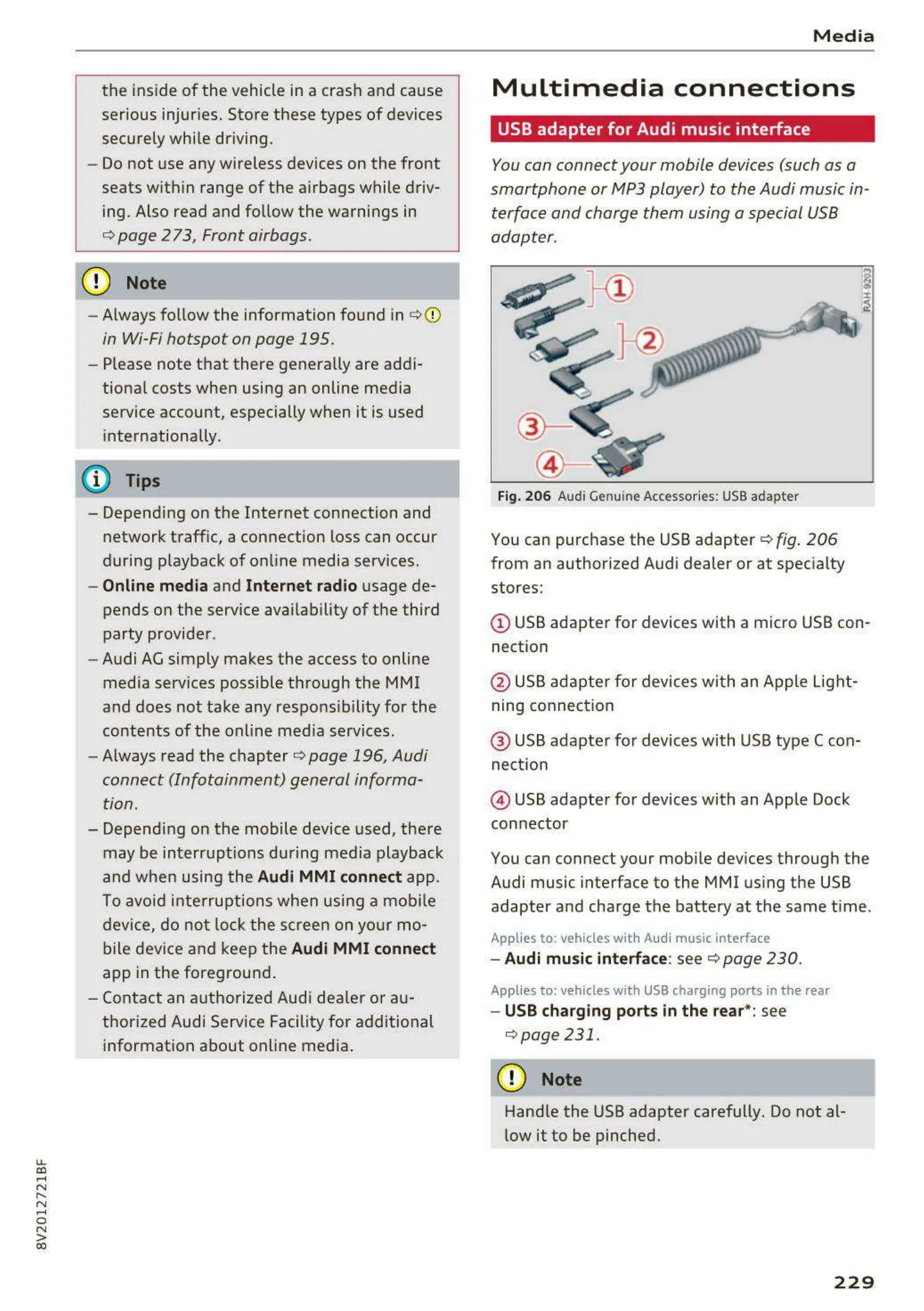
Fig. 206 Audi Genuine Acces sor ies: USB adapter
You can purchase the USB adapter ¢ fig . 206
from an author ized Audi dealer or at specialty
stores:
© USB adapter for devices with a micro USB con-
nect ion
@ USB adapte r for devices with an Apple Light-
ning connect ion
@ USB adapte r for devices wi t h USB type C con-
nect ion
@ USB adapter for devices with an Apple Dock
connector
You can connect your mob ile devices through the
Audi music interface to the MMI using the USB
adapter and charge the battery at the same t ime.
Applies to : vehicles wit h Audi music interface
- Audi music interfa ce: see c;> page 230 .
Applies to: vehicles with USB charging ports in the rear
- USB charging ports in the rear*: see
¢ page 231 .
CD Note
Handle the USB adapter carefully. Do not al-
low it to be pinched.
229



 To Next Page