Media
Audi music interface
Connect your mobile devices to the Audi music
interface in order to operate them through the
MMI and charge the battery.
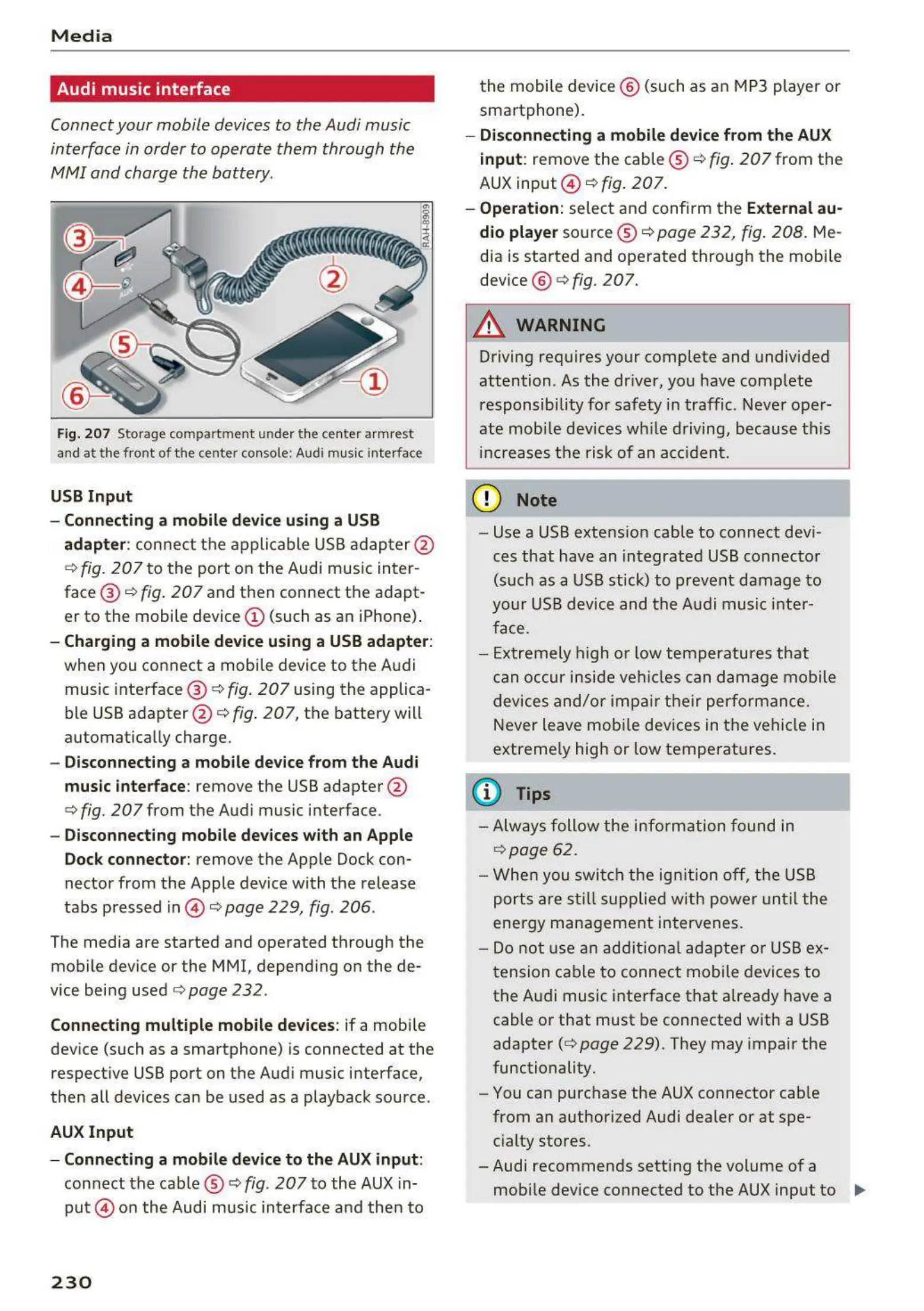
Fig. 207 Storage compartm ent under the cente r armrest
and at t he front of the center console: Audi music interface
USB Input
- Connecting a mobile device using a USB
adapter : connect the applicable USB adapter @
¢
fig. 207 to the port on the Audi music inter-
face ® ¢
fig. 207 and then connect the adapt-
er to the mobile device @ (such as an iPhone) .
- Charging a mobile device using a USB adapter :
when you connect a mobile device to the Audi
music interface @ ¢
fig . 207 using the applica-
ble USB adapter @ ¢
fig. 207, the battery will
automat ically charge.
- Disconnecting a mobile device from the Audi
music interface:
remove the USB adapter @
¢ fig. 207 from the Audi music interface .
- Disconnecting mobile devices with an Apple
Dock connector: remove the Apple Dock con-
nector from the Apple device with the release
tabs pressed in © ¢
page 229, fig. 206 .
The media are started and operated through the
mobile device or the MMI, depending on the de-
vice being used ¢
page 232 .
Connecting multiple mobile devices: if a mobile
device (such as a smartphone) is connected at the
respective USB port on the Audi music interface,
then all devices can be used as a playback source .
AUX Input
- Connecting a mobile device to the AUX input :
connect the cab le ® ¢ fig . 207 to the AUX in-
put © on the Audi music interface and then to
230
the mobile device @ (such as an MP3 player or
sma rtphone).
- Disconnecting a mobile device from the AUX
input: remove the cable ® ¢ fig . 207 from the
AUX input @ ¢ fig.
207.
- Operation: select and confi rm the External au-
dio player
source ® ¢ page 232, fig . 208. Me-
dia is started and operated through the mobile
dev ice @ ¢
fig. 207.
A WARNING
Driving requires your complete and undivided
attention . As the dr iver, you have comp lete
responsibility for safety in traffic . Never oper-
ate mobi le devices wh ile driving, because this
increases the risk of an acc ident.
(D Note
- Use a USB extens ion cable to connect devi-
ces that have an integrated USB connector
(such as a USB stick) to prevent damage to
your USB device and the Audi music inter-
face.
- Extremely high o r low temperatures that
can occur inside veh icles can damage mobile
devices and/or impair their performance.
Never leave mobile devices in the vehicle in
extremely high or low temperat ures.
(D Tips
- Always follow the information fou nd in
¢ page 62.
- When you switch the ign it ion off, the USB
ports are still s uppli ed w ith power until the
energy management intervenes.
- Do not use an additional adapter or USB ex-
tension cable to connect mobile devices to
the Audi music interface that already have a
cable or that must be connected with a USB
adapter( ¢
page 229). They may impair the
functionality.
- You can purchase the AUX connector cable
from an authorized Audi dealer or at spe-
cialty stores.
-Audi recommends setting the volume of a
mobile device connected to the AUX input to ..,



 To Next Page