u.
00
.-<
N
l'-
N
.-<
0
N
>
00
- Moving the crosshairs for sound focus: move
your finge r in the desi red direction on t he MMI
touch contro l pad.
- Storing the crosshairs location : press the con-
t rol knob twice.
Or: press the I BACK ! button 0
c>page 154, fig. 154.
Using the DVD main menu
Applies to: vehicles with MMI touch
Requirement: a DVD must be playing
c>page 232 .
- Selecting a menu item : move your finger up/
down or left/r ight on the MMI touch contro l
pad.
- Confirming a selection: press the control knob.
(D Tips
The volume of the voice guidance prom pts for
the MMI touch* can be adjusted separate ly
c> page 24 8 .
Control knob with
joystick function
Operation
Applies to: vehicles with j oystick function
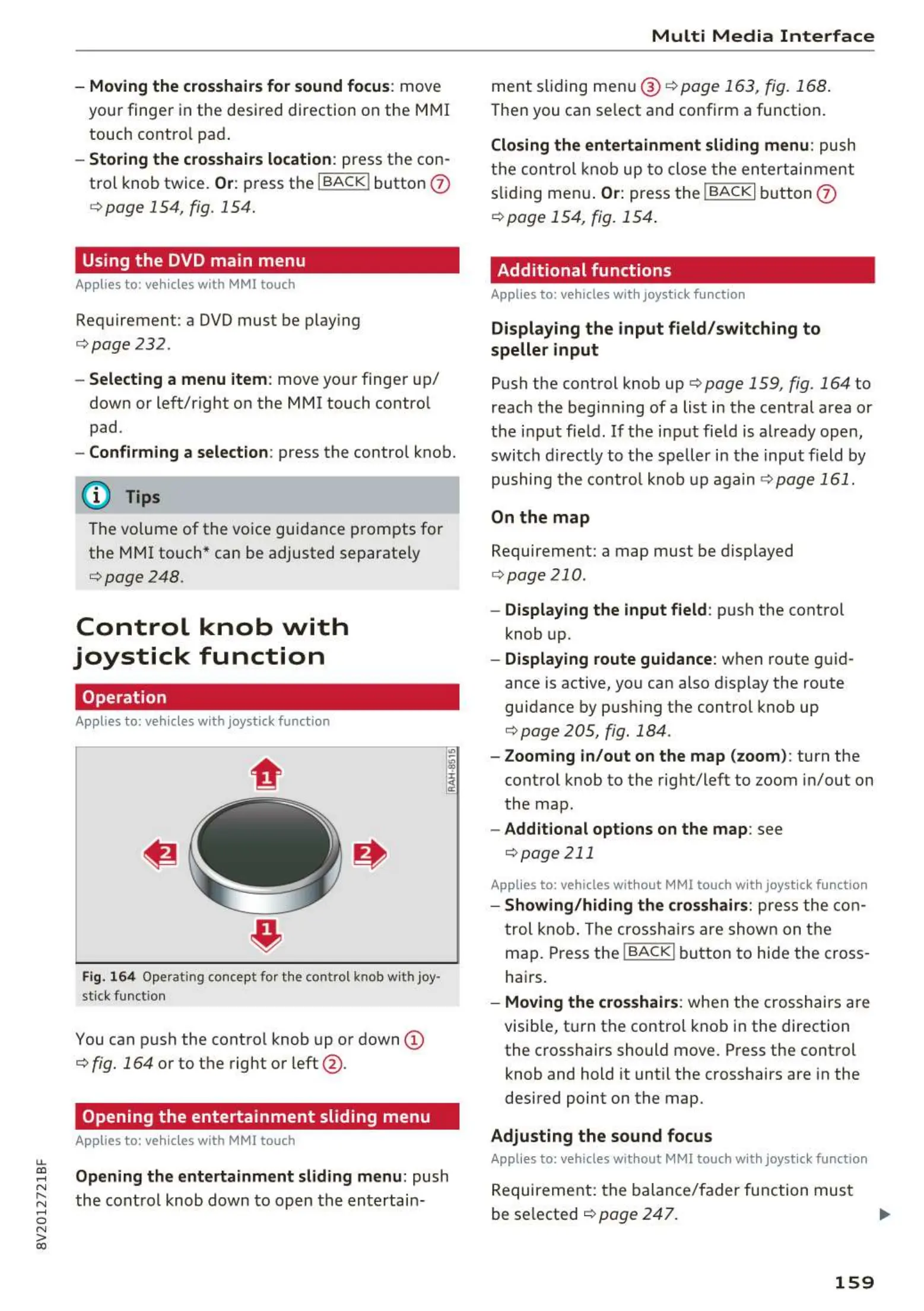
Fig. 164 Operating concept fo r t he contro l kno b wit h j oy-
sti ck funct ion
You can push the cont rol knob up or down (D
c> fig. 164 or to t he right or left @ .
Opening the entertainment sliding menu
Applies to: vehicles with MMI touch
Opening the entertainment sliding menu: push
the cont rol knob down t o open the ent ertain-
Multi Media Interface
ment sliding me nu @ c>page 163, fig. 168 .
Then you can se lect and confirm a function .
Closing the entertainment sliding menu: push
t he control knob up t o close t he ent ertai nment
sliding men u.
Or: press the !BACKI butt on (f)
c> page 154, fig. 154.
Additional functions
Applies to: vehicles with joystick funct ion
Displaying the input field/switching to
speller input
Push the cont rol knob up c> pag e 159, fig. 164 to
reach the begin ning of a list in the cent ral area or
the input field. If the input field is already open ,
switch directly to the speller in the input field by
pushing the contro l knob up again
c>page 161 .
On the map
Requirement: a map must be displayed
c>page 210 .
- Displaying the input field : push the cont rol
knob up.
- Displaying route guidance: when route guid-
ance is active, you can also disp lay the route
guidance by pushing the cont rol knob up
c> page 205 , fig. 184 .
- Zooming in/out on the map (zoom) : turn the
cont rol knob to the right/left to zoom in/out on
the map .
- Additional options on the map: see
c>page 211
Applies to: vehicles without MMI touch with joystick function
- Showing/hiding the crosshairs: press t he con-
trol knob. The crossh airs are shown on t he
map. Press the
I BACK ! button to hide the cross-
hairs.
- Moving the crosshairs: when the crosshairs are
visible, t urn the contro l knob in the direction
the crosshairs should move. Press the cont rol
knob and hold it until the crosshairs are in the
desired point on the map.
Adjusting the sound focus
Applies to: vehicles without MMI touch w ith joyst ick function
Requirement: t he balance/fader function must
be selected
c> page 247. .,.
159



 To Next Page