Navigation
CD HOV/carpool lanes 1): with the Avoid func-
tion, HOV lanes are excluded when calculating
ro utes . When
Allow is se lected, t he MMI will
route you thro ugh HOV lanes and show them on
the map.
@ Highways / @ Toll roads/ @ Ferries: if the nav-
igation system sho uld not incl ude highways, to ll
roads or ferr ies - if possib le - when calcu lating
routes, you can select the
Avoid function .
Voice guidance
Applies to: vehicles with navigation system
• Press the I N AV/MAPI button repeated ly until
the
Enter destination menu is d isplayed
¢ pag e 201, fig. 182.
• Select: right cont rol butto n > Voice guidance.
Voice guidance:
voice guidance can be Complete
or Shortened . With th e Traffic function, voice
gu idance promp t s are only given when the re are
traffic inciden t s on your route. When
Off is se-
lect ed, no voice guidance is given .
Voice guidance during phone call: voice g uid-
a nce du ring a phone call can be swit ched o n or
off.
Enterta inment fader : see ¢ page 248.
Voice guidance volume : you can adjust the vol-
ume during voice guidance using the On/Off knob
¢ page 154 You can also find additional informa-
tion
under¢page248 .
ll High occupancy vehicle
210
Map
Map operation
App li es to: vehicles with navigation system
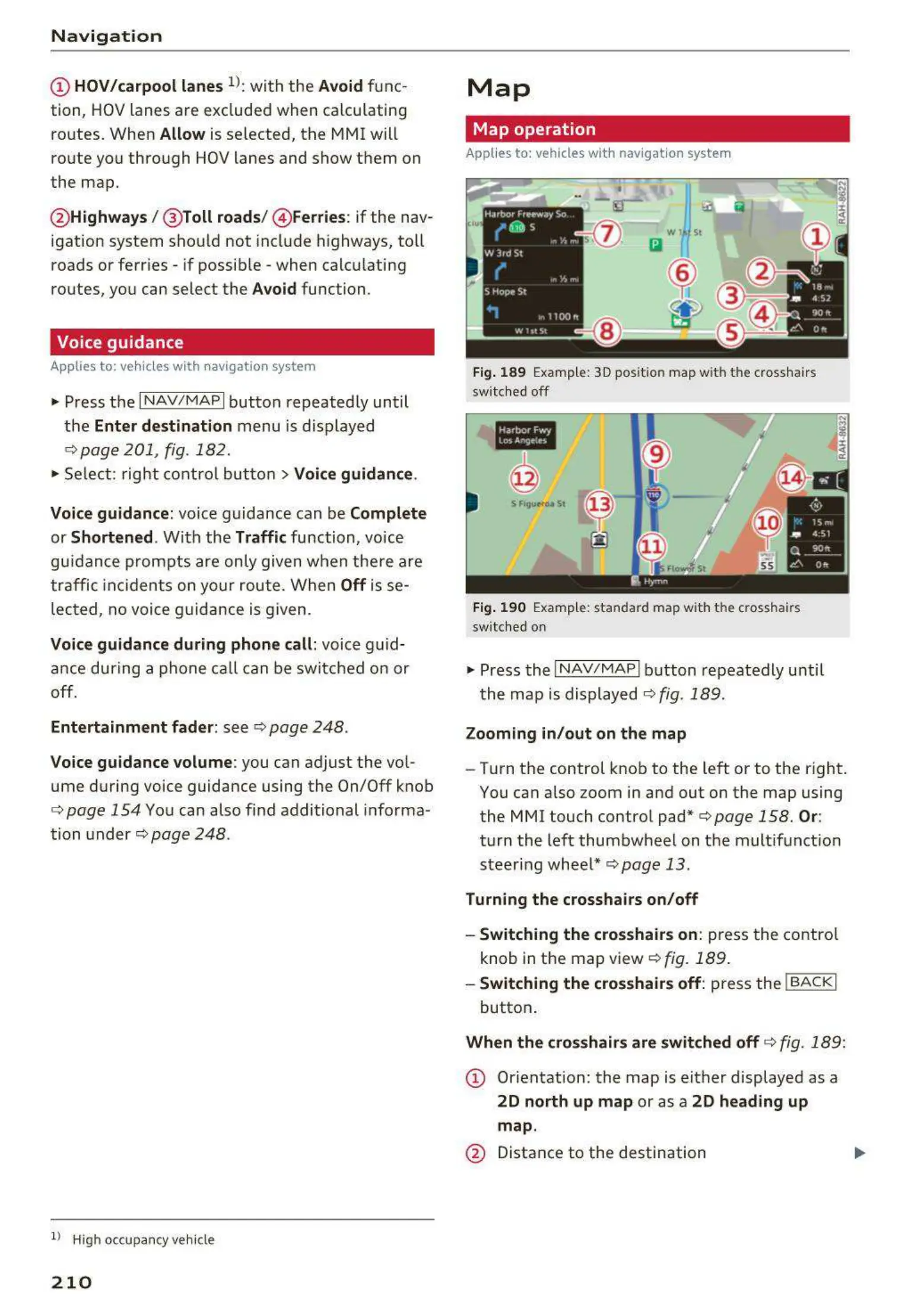
Fig. 189 Example: 3D position map with the crosshairs
switc hed off
•IN
@
Fig. 190 Example: standard map with the crosshairs
switc hed on
~
Press t he I NAV/MAPI button repeatedly until
t he map is displayed¢
fig . 189.
Zooming in/ out on the map
- Turn the control knob to the left or to the right.
You can also zoom in and out on the map using
the MMI touch contro l pad* ¢
page 158. Or:
turn the left thumbwheel on the mult ifunct ion
st eer ing whee l*
¢page 13 .
Turning the crosshairs on/off
- Switching the crosshairs on:
press t he contro l
knob in the map view
¢fig. 189 .
- Swit ching the crosshairs off: press the !BACKI
button .
When the crosshairs are switched off ¢ fig. 189:
CD Orien t ation: t he map is e it her displayed as a
2D north up map or as a 2D heading up
map .
@ Distance to the destination



 To Next Page