10 MMI control console
Symbol / marking Explanation
6
To switch from lower case to upper case letters and vice versa.
7
0-9/A-Z To switch the speller from letters to numbers and vice versa.
8
List To display a list of suggestions.
9
/Delete To delete the character to the left of the cursor.
10
No. of entries The number of list entries found is displayed.
11
List of suggestions
E.g. while entering a destination, a list of large towns first and
then other towns in alphabetical or
der is displayed.
12
Cursor The position that is currently being edited is marked.
13
Entry field The current entry is displayed.
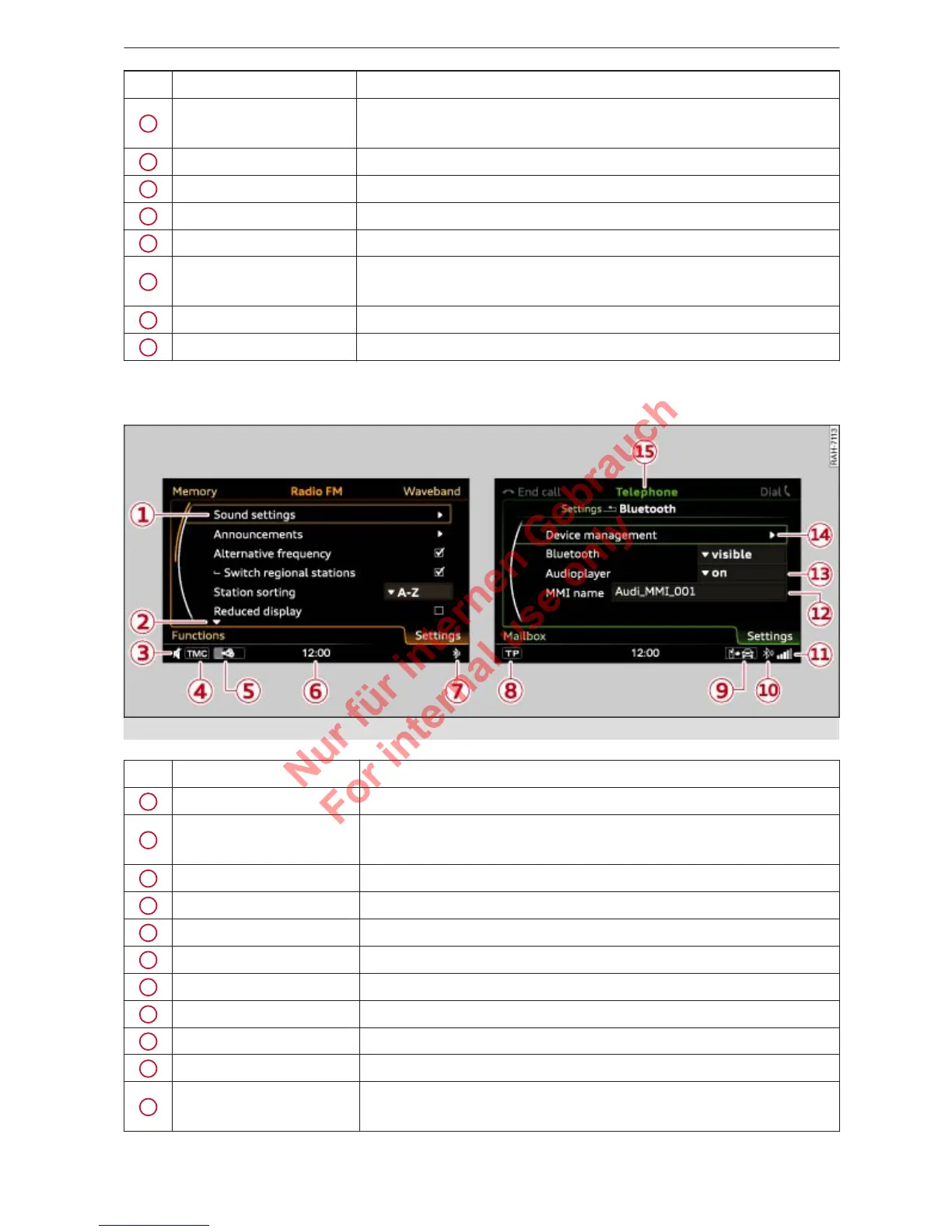
Menus and symbols
Fig. 6 Menus and symbols
Symbol / marking Explanation
1
Selected option Selected function
2
Arrow
up/
down
Further available functions
3
Mute Audio source muted ð page 7
4
TMC Reception of TMC traffic information
5
Copying procedure Copying of audio/video files to the jukebox
6
Time Time setting ð
page 29
7
Bluetooth* Bluetooth activated on the MMI ð page 38
8
TP Reception of traffic announcements ð table on page 56
9
Import process Import/update of contacts in the directory/call list
10
Bluetooth* Bluetooth device connected ð page 25 / ð page 33
11
Signal strength indica-
tor
Reception strength of mobile phone network of a connected mo-
bile phone ð page 33



 To Next Page