Owner Installation Instructions GDO-6v4 EasyRoller
®
31
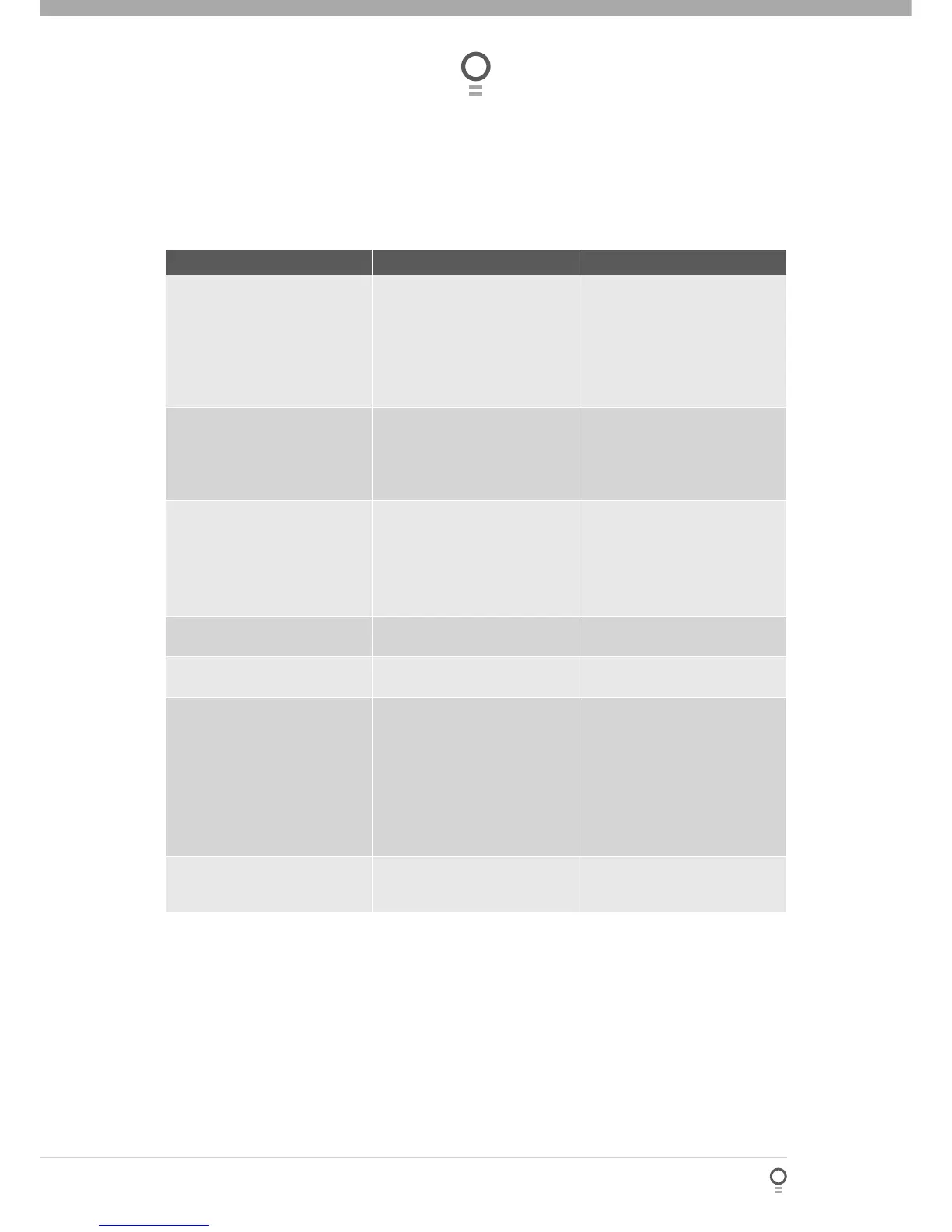
Symptom Possible cause Remedy
Door will not operate Mains power not switched on.
Door is obstructed.
Door is locked or motor jammed.
Door tracks/hardware damaged.
The opener is in “vacation mode”.
Switch on mains power.
Remove obstruction.
Unlock door or remove jam.
Door requires service/repair by
qualifi ed technician.
Turn off “vacation mode”.
Door starts to close but
automatically reverses to open
position
Adverse weather conditions (wind
or cold) causing door to stiffen and
become tight in the tracks.
Possible obstruction in the
doorway.
Increase force margin setting.
See page 18 to re-calculate force
margin.
Remove obstruction.
Door operates from drive unit
(OPERATE) button but not from
transmitter*
See note
Transmitter code not stored in
memory.
Flat battery.
Broken battery lead inside
transmitter.
Code transmitter in to openers
memory. Refer step 10.1 on page
19
Replace battery
Send transmitter to installer or
Automatic Technology for repair.
Door will not close fully. Door limits positions need to be
reset.
Reset limits positions. Step 7.3,
page 16.
Door will not open fully. Door limits positions need to be
reset.
Reset limits positions. Step 7.3,
page 16.
Auto-Close not working Safety Beam or wiring faulty. Repair Safety Beam or replace
wiring.
Safety Beam not aligned correctly. Re-align optics.
Safety Beam is obstructed. Remove obstruction from path of
Safety Beam.
Door obstructed when closing. Remove obstruction.
Auto-Close time not set. See Step 15 on page 23.
Opener beeps and fl ashes at the
end of each operation
Service is due on the door and
opener
Please refer to page 30 or sticker
on the back of the door for more
information
PLEASE NOTE:
*Some areas may be prone to excessive radio interference brought on by devices such as cordless telephones,
wireless stereo headphones and baby monitors. It is possible that these devices could cause a degree of
interference such as to greatly reduce the range of the transmitter. In such an instance, please contact your
Automatic Technology dealer for an alternative frequency replacement kit. As this is not a warrantable situation
but an environmental issue, charges may apply for the change over.
Safety Beams must be installed if the closing force at the bottom edge of the door exceeds 400N (40 kg)
force
Troubleshooting








 To Next Page