13
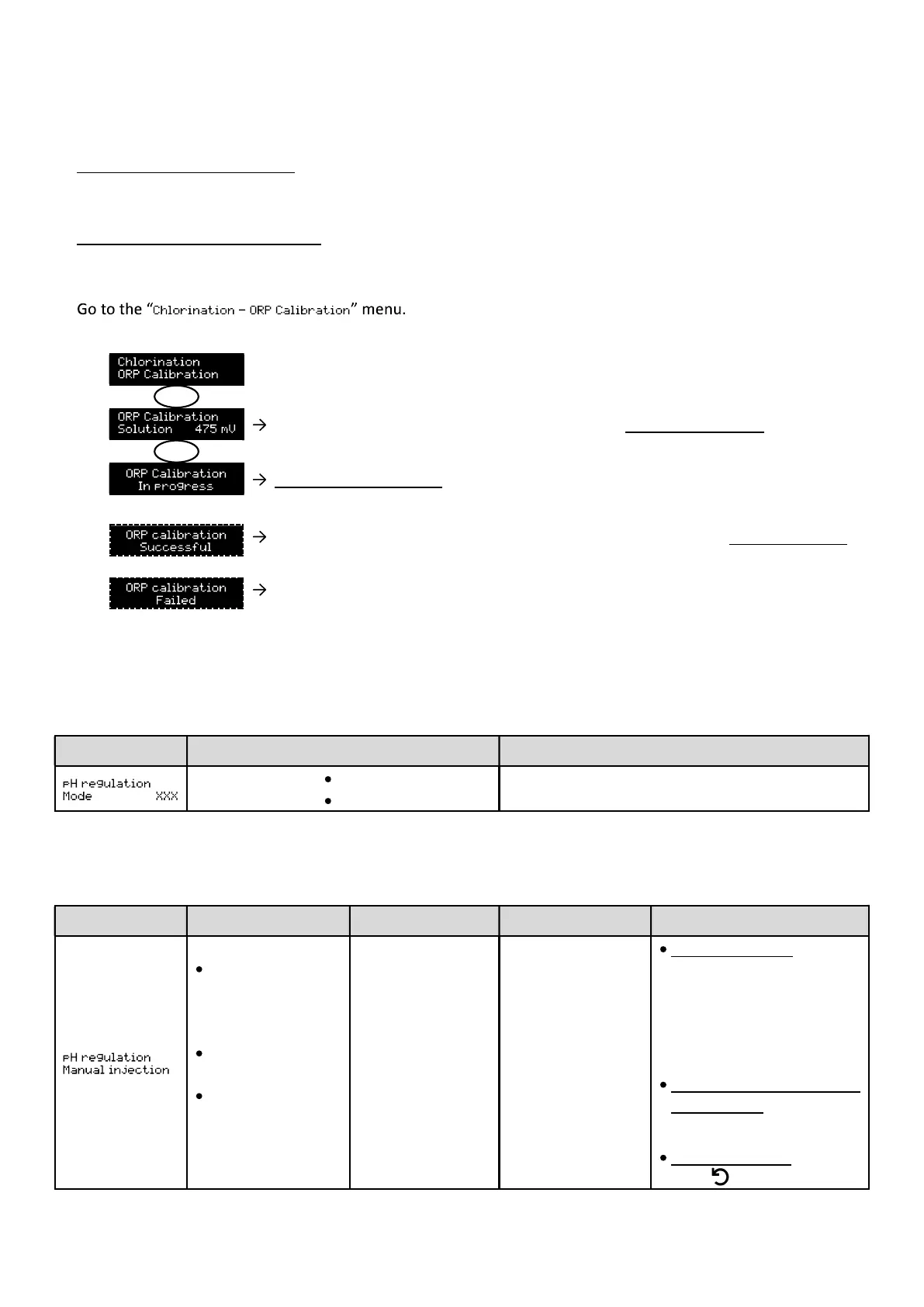
4.6.18. Calibrating the ORP probe
1) Open the 475 mV ORP standard solution.
2) Turn off the filtration (and therefore the electronics unit).
3) If the probe is already installed:
a) Remove the probe from the probe holder, without disconnecting it.
b) Insert the cap provided into the probe holder.
If the probe is not already installed:
Connect the probe to the electronics unit.
4) Turn on the electronic unit.
5)
6) Follow the instructions below:
Insert the probe into the ORP calibration solution, then wait 5 minutes.
Do not touch the probe.
(Wait a few seconds)
a) Rinse the probe under running water, then leave it to drip
b) Install the probe into the probe holder.
Perform the navigation again with the above instructions, several times if
If calibration still fails, replace the probe then perform another calibration.
4.6.19. Activation/deactivation of pH regulation
Menu Possible settings Default setting
ON
OFF
ON
4.6.20. Manual injection
Menu Functions Possible settings Default setting Instructions
and filling of semi-
rigid tubing.
injection.
peristaltic pump.
30
minutes in 30-
second
increments.
1 min.
To start injecting:
setting.
displayed in real time.)
the injection:
Press OK.
To stop injection:
Press .
OK
OK


 To Next Page
 Loading...