35146AJ
21
Title – Customizable camera name, seen on the Camera List and in the
Live Screen.
State – Set the camera to Enabled or Disabled.
• Enabled: Uses a recording channel license, can be viewed in
live and recorded.
• Disabled: Does not use a recording channel license and
cannot be viewed in live or recorded.
Associate Camera – Select another camera to transfer camera
information to in case of hardware failure or change in camera status.
IP/Port – Camera IP address and Port Number. Clicking the IP address
in a web browser allows direct access to the camera’s web setup menu.
Username and Password – Credentials to access camera. Click to
view Password.
Enable PTZ/Autofocus – Enable Pan, Tilt, Zoom (PTZ) capabilities. If a
camera does not have PTZ capabilities, this option will be unavailable.
Hidden Camera – Enable to allow only users with hidden camera
permissions to view this camera.
IP Address – Clicking the IP address in a web browser allows direct
access to the camera’s web setup menu.
Synchronize – Manual check of IP device for latest information.
Model – Model number of the camera (transmitted from the camera
itself).
Integration ID – Integration ID is the channel number used in 3
rd
party
integrations over the API.
Update Image – Update the thumbnail image for this camera to the
current live view.
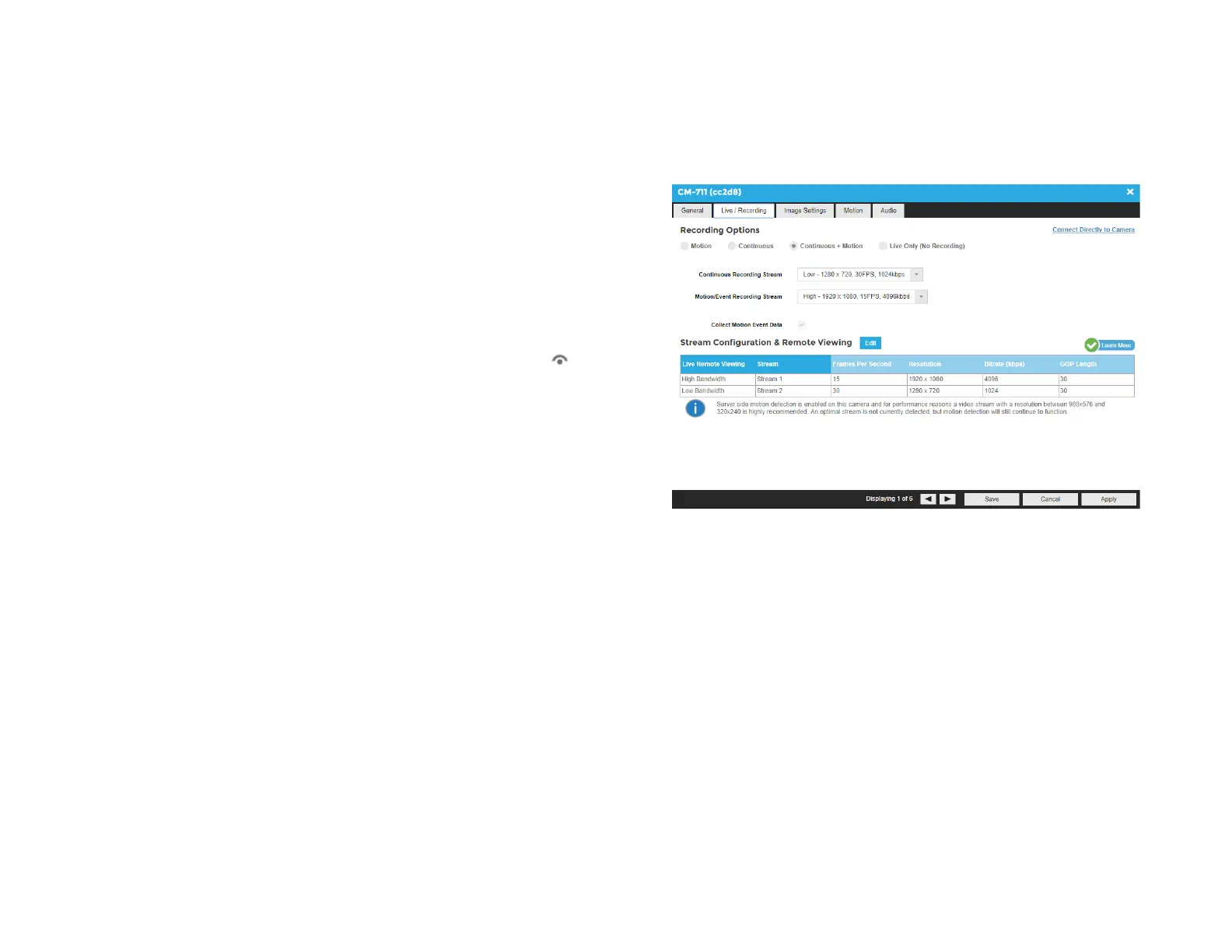
Live / Recording
The Live Recording tab displays Recording Options, which determines
when and how the camera will record.
Motion – Record only motion detected by motion thresholds.
Continuous – Records video stream continuously.
Continuous + Motion – Record one Continuous stream, and then
records a Motion stream in addition when motion is detected.
Live Only (No Recording) – Camera displays live video but does not
record unless a macro is setup to record on sensor events.
Continuous Recording Stream – Stream continuously recorded at a
lower resolution and/or frame rate when motion is not detected and
Continuous + Motion recording option is selected.
Motion/Event Recording Stream – Higher resolution and/or frame rate
camera video stream used when a motion event is detected.
Collect Motion Event Data – This function collects motion event data
when a continuous stream is recording and populates the events in
Event Search.


 To Next Page