Home
Avision
Scanner
FL-1801
Page 157 (The Rotation Tab)
Avision FL-1801 - The Rotation Tab
207 pages
Manual
Save Page as PDF
To Next Page
To Next Page
To Previous Page
To Previous Page
Loading...
149
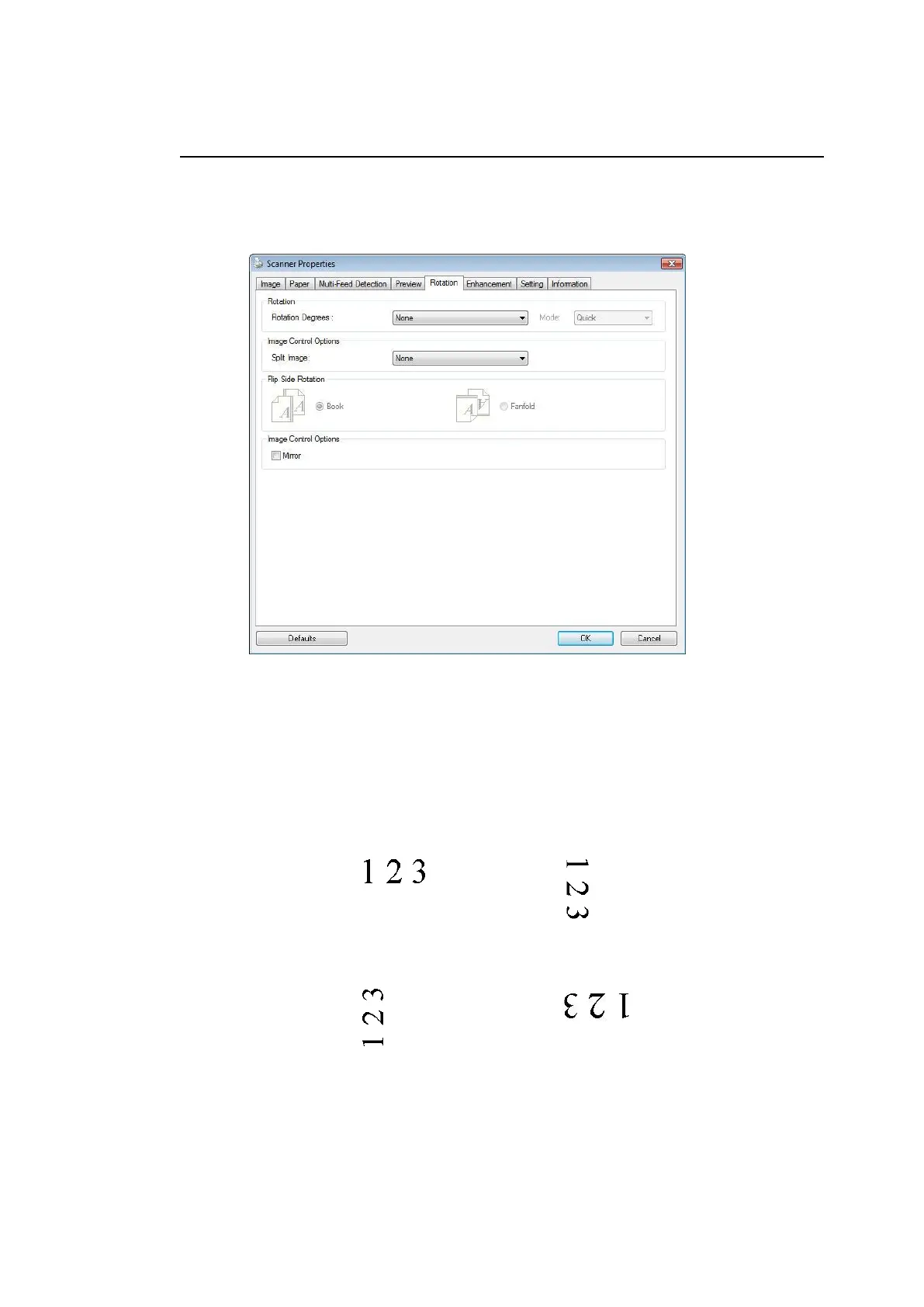
The Rotation T
ab
The Rotation
tab all
ows you to set the fol
lowing i
mage rotating opti
ons
:
Rotate Image
Choose the rotati
on angle from the drop
down list i
f
you wish to rotat
e your scanned i
mage.
Choice: None, 90°
CW
(clockwise),
90°
CCW(counter cloc
kwise), 180°
, Auto b
ased
on contents. Aut
o rot
ate every even p
age.
Original
Rotate 90°
CW
Rotate 90°
CCW
Rotate 180°
156
158
Table of Contents
Main Page
Table of Contents
6
Getting Started
9
Introduction
9
Various Scan to Destinations
9
Package Items
11
External View
12
The Front View
12
The Rear View
13
The Side View
14
Removable Parts
14
Pre-Installation Information
15
Preinstallation
15
Frequently Used Buttons on the Touch Screen
17
Installing Your Machine
18
Minimum Configuration Requirements
18
Installing the ADF Paper Tray
19
Connecting the Cables
20
Connecting the Ethernet Cable
20
Connecting the Power and Turning on the Machine
20
Turning off the Machine
21
Selecting Your Language
22
Setting Date and Time
23
Specifying the Product's TCP/IP Address
24
Specifying the Product's Mail Server
25
Creating Your Address Book
26
Creating Your Filing Profiles
27
Installing and Launching a Plug-In App (Optional)
29
Operation
35
Document Loading Tips
35
Loading Document(S) in the ADF
36
Scanning a Stack of Document with Various Sizes and Weights
38
Scanning and Sending Your Document to E-Mail Addresses
40
Basic Operation
40
Advanced Operation
42
Setttings for Various Mail Servers
49
Setttings on the Machine's Webpage
53
How to Import E-Mail Address from a LDAP Server
56
Sending Your Document to a Network Folder, a USB Flash Drive or a Public Folder
60
Basic Operation
60
Advanced Operation
62
How to Send Your Image to Sharepoint
64
Sending Your Document to Clouds
66
Basic Operation
66
Advanced Operation
68
How to Send Your Image to Sharepointonline
70
Creating a Shortcut Button
72
Using the Shortcut Buttons
74
Scanning and Broadcasting Your Images
75
Basic Operation
75
Advanced Operation
78
Setting up and Managing Destinations
81
Setting up Your E-Mail Address Book
81
Adding a New E-Mail Address
81
Editing a Current E-Mail Address
82
Deleting a Current E-Mail Address
82
Adding a New E-Mail Group
83
Editing a Current E-Mail Group
84
Deleting a Current E-Mail Group
84
Setting up Your Filing Profiles
85
Adding a New Filing Profiles
85
Editing a Current Filing Profiles
86
Deleting a Current Filing Profiles
86
Starting a Scan from Your Mobile Device
87
Making Preparation
87
Connecting to a Wireless Network
88
Connecting to a Wi-Fi Network in an AP (Access Point) Mode
88
Connecting the Scanner to a Wi-Fi Network in a Client Mode
89
Connecting to a Wireless Access Point Using the WPS Button
91
Scanning a Document from a Mobile Device
92
Customizing the Product's Configurations
94
Customizing the Product's Configurations by the Touch Screen
95
Customizing the Product's Configurations by the Product's Web Page
95
Summary of the Product's Configurations
97
Configurations Customized Only Via the LCD Touch Screen
103
Accessing the Service Mode
103
Adjusting Brightness
104
Selecting Language
104
Configurations Customized Only Via the Product's Web Page
105
Exporting and Importing System Data
105
Accessing the Public Folder
106
Using the Product as a Regular Scanner
107
Installing the Scanner Driver
107
Connecting to the Computer
108
Via a USB Cable
108
Via a Wired Network
109
Connecting to the Network Scanner
109
Verifying Your Scanner Installation
111
A Glance of the Scanner Properties Dialog Box
113
Using the Scanner Properties Dialog Box
114
Buttons on the Scanner Properties Dialog Box
115
Showing or Hiding Tabs
117
The Image Tab
118
The Image Selection Box
119
Other Image Options
122
Scanning Color Images
130
Scanning Grayscale Images
130
Scanning B&W Images
130
Editing Profiles
131
The Compression Tab
133
The Color Dropout Tab
135
Color Dropout Selection
135
The Paper Tab
139
Cropping
139
Other Paper Selection
143
The Multi-Feed Detection Tab
148
The Preview Tab
150
The Enhancement Tab
151
The Rotation Tab
157
The Separation Tab
162
The Setting Tab
166
The Imprinter Tab
168
The Information Tab
172
ISIS Interface Operation
173
Scanning and Sending the Scanned Images to Your Computer (BM2 Air)
174
Installing Button Manager V2
174
Checking the Button Configurations before Scanning
175
Scanning from One Touch of the Buttons
177
11 Troubleshooting
178
Clearing Paper Jams
178
Questions and Answers
179
Errors Indicated on the Touch Screen
180
Technical Support
193
12 Maintenance
195
Cleaning the Touch Screen
195
Cleaning the ADF
195
Cleaning the Glass
197
Replacing the ADF Reverse Roller
199
Replacing the ADF Roller
202
13 Specifications
205
Related product manuals
Avision FL-1801H
207 pages
Avision FL-1507B
151 pages
Avision FL-1315B
134 pages
Avision FL-0912S
113 pages
Avision FB15
106 pages
Avision FB1200
106 pages
Avision FB2280E
127 pages
Avision FF-2010B
183 pages
Avision FF-0609H
85 pages
Avision FF-2009B
176 pages
Avision FS-0913B
35 pages
Avision FF-1105B
132 pages



 To Next Page