2: Conguration • 9
© 2016 Axia Audio - Rev 2.0
Once the xNode has been assigned an ID value, the device has an IP address that can be used to access its HTML
conguration interface. Each input has been assigned a unique Livewire channel number. The next conguration
steps are to enter in descriptive names to the inputs and outputs and to assign Livewire sources to the destinations.
The Simple Setup page is covered later in the chapter and details of each xNode are available in following chapters.
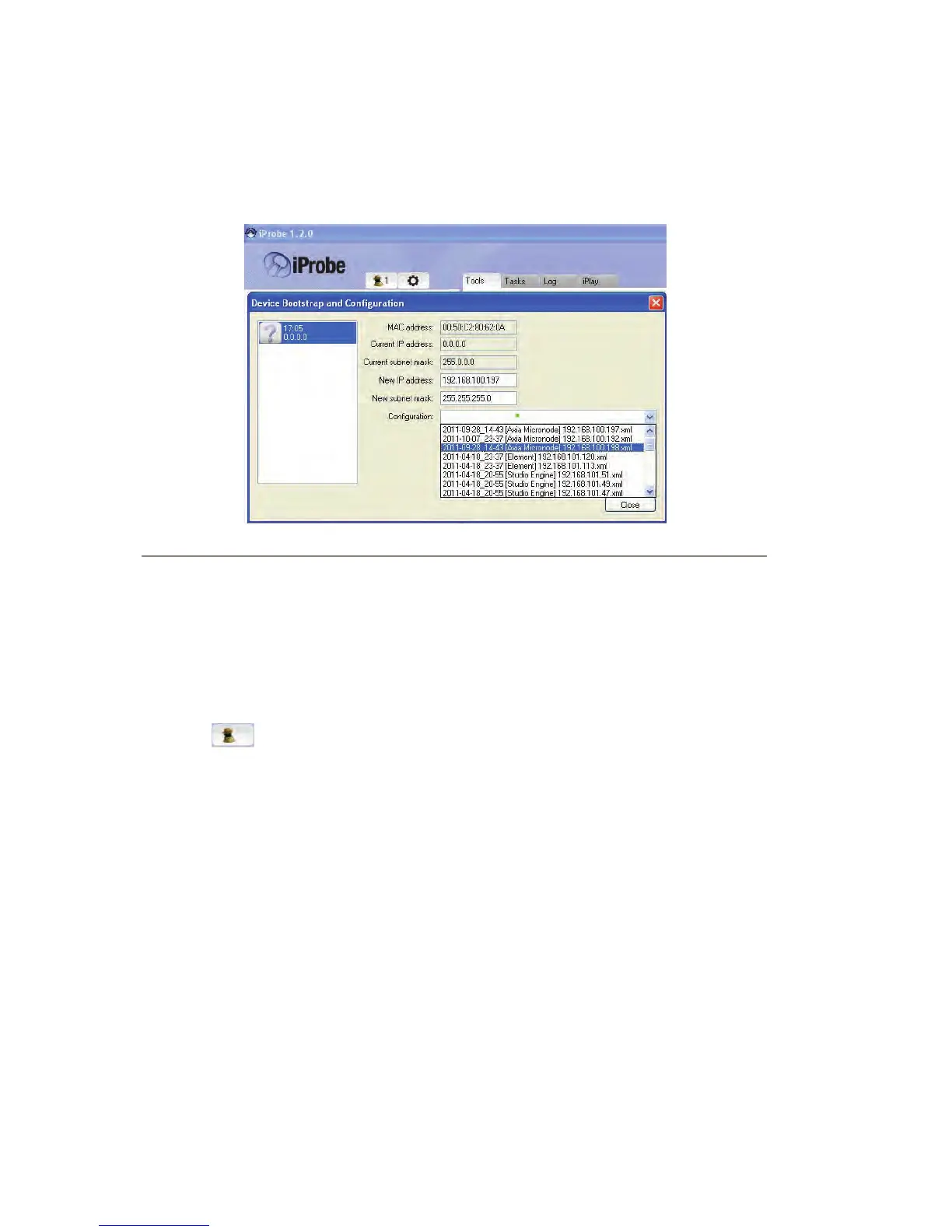
Figure 2-4
iProbe conguration
When an xNode boots and it has no conguration, it will broadcast a bootp request within 4 seconds. The broad-
casts will continue with an increasing delay between messages and randomization until a conguration is set. iProbe
includes a bootp function which will observe the request and provide an option to respond or ignore.
A counter at the bootstrap conguration button will appear when a bootp request is received by iProbe (version 1.2).
Clicking on the button will open the Device Bootstrap and Conguration window.
From the window view, select the device that has issued a bootp request. The conguration options will appear al-
lowing you to push a New IP address, New subnet mask, and a Conguration. If you have no backup conguration
to send, then apply an IP address and proceed to log into the device through the iProbe interface, and congure it per
the “web interface conguration”.
Web interface conguration (“Simple setup”)
Initially accessing the user interface of the xNode will require authentication. The default authentication is:
Username: user
Password: (none)
The initial page is the Home page. Select the “Simple setup” button.
The setup page will vary based on what xNode you are conguring. If it is an audio xNode, there will be a section
for Sources and a section for Destinations. If GPIO (General Purpose Input/Output) functionality is on the xNode,
there will be section for GPIO.


 To Next Page