9
NOTE: On some phones, it is necessary to turn on the function “Visible to all
nearby Bluetooth devices” on the mobile and then the unit will be able to
¿QGWKHPRELOH%OXHWRRWKGHYLFH
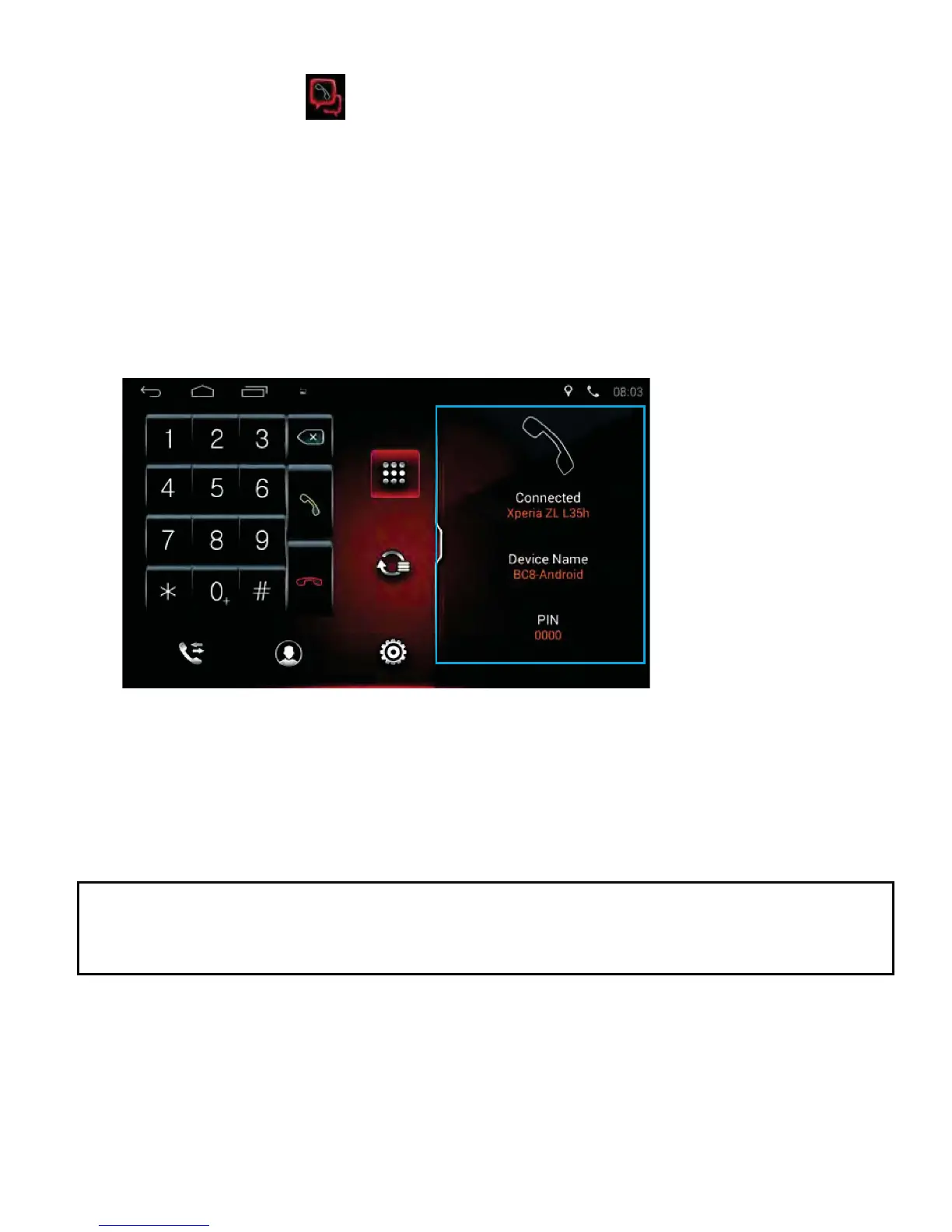
Phone Pairing and Connections
Tap the Phone icon on the Home Page to enter the phone interface.
To pair a mobile phone to the unit:
1) Turn on the Bluetooth function on your mobile phone.
2) Search for Bluetooth devices with the mobile or the unit and connect.
(The unit will show as “BC8-ANDROID”)
3) A message will show on the mobile, input the password 0000 (which is
GHIDXOWRQWKHPRELOHWRFRQ¿UP
4) If pairing successful, the system will display the interface below:
5) After paired successfully, the phone icon will show on the top right
corner of the screen and will turn White.
6) This unit can pair multiple phones. Only one phone will work at a time.
,IWKHXQLWLVSRZHUHGRႇDQGWKHQRQDJDLQWKH%OXHWRRWKIHDWXUH
will connect to the last mobile that was disconnected.



 To Next Page