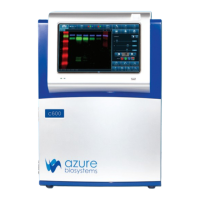
The Azure Imaging System is a high-performance device designed for a wide range of imaging applications in research. It offers intuitive user interface software, allowing for multiple applications to be programmed with a touch. The system eliminates the need for manual focus adjustment; users simply place the sample, select an exposure time, and capture the image. The family of instruments includes models 200, 280, 300, 300Q, 400, 500, 500Q, and 600, with field upgradeability to higher models for expanded applications.
Function Description:
The Azure Imaging System captures high-quality images from various sample types, including chemiluminescent blots, fluorescently labeled samples, nucleic acid gels with dyes, protein gels with dyes, and true color samples. It supports multiplex imaging in up to four channels (red, green, blue, and grayscale pseudocolor). The system is equipped with a camera, light sources, a filter wheel, and an integrated touchscreen computer for control and image acquisition.
Key Components:
- Cabinet: A light-tight imaging station housing the camera, lens, light sources, filter wheel, integrated touchscreen computer, Ethernet, and USB ports.
- Camera: High-resolution camera, preinstalled.
- UV Transilluminator: Provides 302nm and 365nm trans-illumination, mounted on a pull-out tray.
- EPI LEDs: Blue Light excitation for fluorescent images and true color imaging.
- EPI RGB LEDs: High-intensity LED illuminators (Azure 400 and 600 models).
- EPI 685 and 784 Laser Diodes: For NIR applications (Azure 500 and 500Q, 600 models).
- Filter Wheel: An automated 7-position filter wheel with a standard Orange filter for most UV fluorescent applications, and additional Red, Green, Blue, and/or IR filters for multichannel systems.
- Integrated Computer: A touch screen PC for system control and image acquisition.
- Black Tray (Blot Tray): Required for imaging all blots, and for fluorescence and chemiluminescence applications not using the UV Transilluminator. Can be placed on the UV transilluminator or the top shelf.
- Trans White Table: Provides an even light source for imaging colorimetric gels, silver stain gels, cell-culture plates, and other transparent, colorimetric samples. Plugs into the system behind the UV transilluminator.
- USB Ports: Two ports for data transfer (front panel and lower right side) and a USB A to B port for external computer connection.
- USB Memory Stick: Contains calibration files.
- AzureSpot Analysis Software: Electronic license provided for image analysis.
Important Technical Specifications:
- Image Resolution:
- 5.4M pixels (Azure 200)
- 5.9M pixels (Azure 280)
- 9.1M pixels (Azure 300, 300Q, 400, 500, 500Q, 600)
- Epi-illuminations: Blue LED; RGB LED (400, 600); 685nm Laser Diode (500, 500Q, 600); 784nm Laser Diode (500, 500Q, 600).
- Trans-Illumination: 302nm/365nm.
- Maximum Field of View: 20.5 cm x 16.5 cm.
- Image Output: 16-BIT TIFF, 8-BIT TIFF, JPEG, BMP.
- Working Environment: Ambient temperature/humidity: 0 –30°C / 85%.
- Power Requirement: 100-240 VAC, 4A.
- Dimensions (W x D x H): 41 cm x 56 cm x 33 cm.
- Weight: 20.3 kg (44.8 lbs).
- CE Conformity: Complies with Low Voltage Directive 2006/95/EC and EMC Directive 2004/108/EC, and harmonized standards EN61010-1: 2001, EN61326-1: 1997+A1:1998+A2:2001+A3:2003 Class A, and EN61000-4-2, -3, -4, -5, -6, -11.
- Protection Category: IP20 according to IEC 60529.
- FCC Standards: Complies with Part 15 of the FCC Rules for Class A digital devices.
Usage Features:
- Home Page Imaging Options:
- Chemi Blot: For luminescent and chemiluminescent signals (e.g., ECL-HRP). Supports additional channels for blue-stained ladders or total protein normalization.
- Fluorescent Labels: For multiplex imaging with fluorescent signals in up to four channels.
- Nucleic Acid Gels with Dyes: Images fluorescently stained nucleic acid gels.
- Protein Gels with Dyes: Images stained protein gels, supporting various modalities (UV-excited fluorescent dyes, EPI-light excited fluorescent dyes, colorimetric dyes).
- True Color Imaging: Captures true color of opaque or translucent colorimetric samples.
- Custom Imaging: Allows customization of each imaging specification, with protocols savable for later use.
- Exposure Modes:
- Auto Image: Automatically determines optimal exposure time.
- Manually Image: Allows manual setting of exposure parameters.
- Rapid Capture: Optimizes short exposure time for the brightest signal.
- Overexpose: Calculates exposure time to saturate brightest bands for weaker signals.
- Wide Dynamic Range: Calculates exposure time to capture the widest signal range without saturation.
- Manual: Custom exposure time (max 60 mins for chemiluminescence, 5 mins for fluorescence).
- Pixel Binning: Improves image sensitivity by combining pixels into "super-pixels." Settings include 1x1 (highest resolution), 2x2, 3x3, 4x4, 6x6, and 8x8.
- Live Mode: Illuminates the imaging area for real-time sample placement verification. Offers "Auto-exposure to region" and "Capture selected region."
- Imaging Modes (Chemi Blot): Single image capture, Cumulative image capture (multiple images cumulated over time), and Multiple image capture (1-5 independent images).
- Color Marker: Creates an overlay of visible molecular weight markers/ladders with the ECL signal.
- UV Override: Useful for band excision or pre-warming UV bulbs, with a safety interlock system that can be defeated for these specific tasks (requires caution and UV protection).
- Gallery: Stores captured images, allowing for viewing, editing, and analysis.
- Image Adjustment Functions: Adjust black, white, and gamma levels; invert colors; highlight saturation; select regions of interest (ROI) for cropping or copying; rotate/flip images; resize images.
- Protocols: Create, save, and recall custom imaging protocols.
- Auto Save Functionality: Automatically saves images taken during a session.
- Q Module (Upgrade): Available for Azure 500 and 300 to add a green fluorescence channel for total protein normalization in quantitative Western blots.
Safety Features:
- UV Safety: Built-in UV transilluminator (200-400nm) with a two-way safety interlock switch that cuts off power when the door is opened. Users are advised to wear UV-protected eyewear and cover exposed skin when operating the transilluminator outside the system.
- Laser Safety: Models 500 and 600 include a laser illumination system (685nm and 784nm). The system is fully enclosed, and laser modules are non-removable. A safety interlock switch prevents laser operation when the door is open. Overriding the interlock for band excision is possible but not recommended for laser imaging.
- Hot Surface Warning: UV transilluminator glass surface temperature is normally below 50°C, but can exceed 80°C if the system malfunctions. Caution is advised.
- Electrical Safety: Power entry module located on the back panel. Requires connection to a well-grounded power source, with surge protection recommended. Main power switch on the back panel.
Maintenance Features:
- Laser System: Models 500 and 600 do not require regular, periodic, or preventive maintenance for optimal performance. Faulty laser module replacement is a manufacturer-only repair action.
- Calibration: Darkmasters, Focus Calibration, and Flats are set at the time of manufacture. Technical support should be contacted for assistance with these settings.
- Software Updates: Contact technical support for questions about upgrading the software.
Warranty:
One-year warranty against defects in materials and workmanship, unless otherwise specified. Exclusions include defects from improper operation, unauthorized repair/modification, use of non-Azure spare parts, damage from accident/misuse/disaster, corrosion, and unauthorized movement of the system.
Research Use Only:
This instrument is suitable for research use only and should be operated by personnel aware of health risks associated with reagents.

 Need help?
 General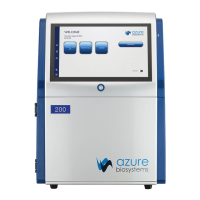

 To Next Page