Azure Imaging System User Manual Page 13
• Capture selected region – will generate an image of the selected region.
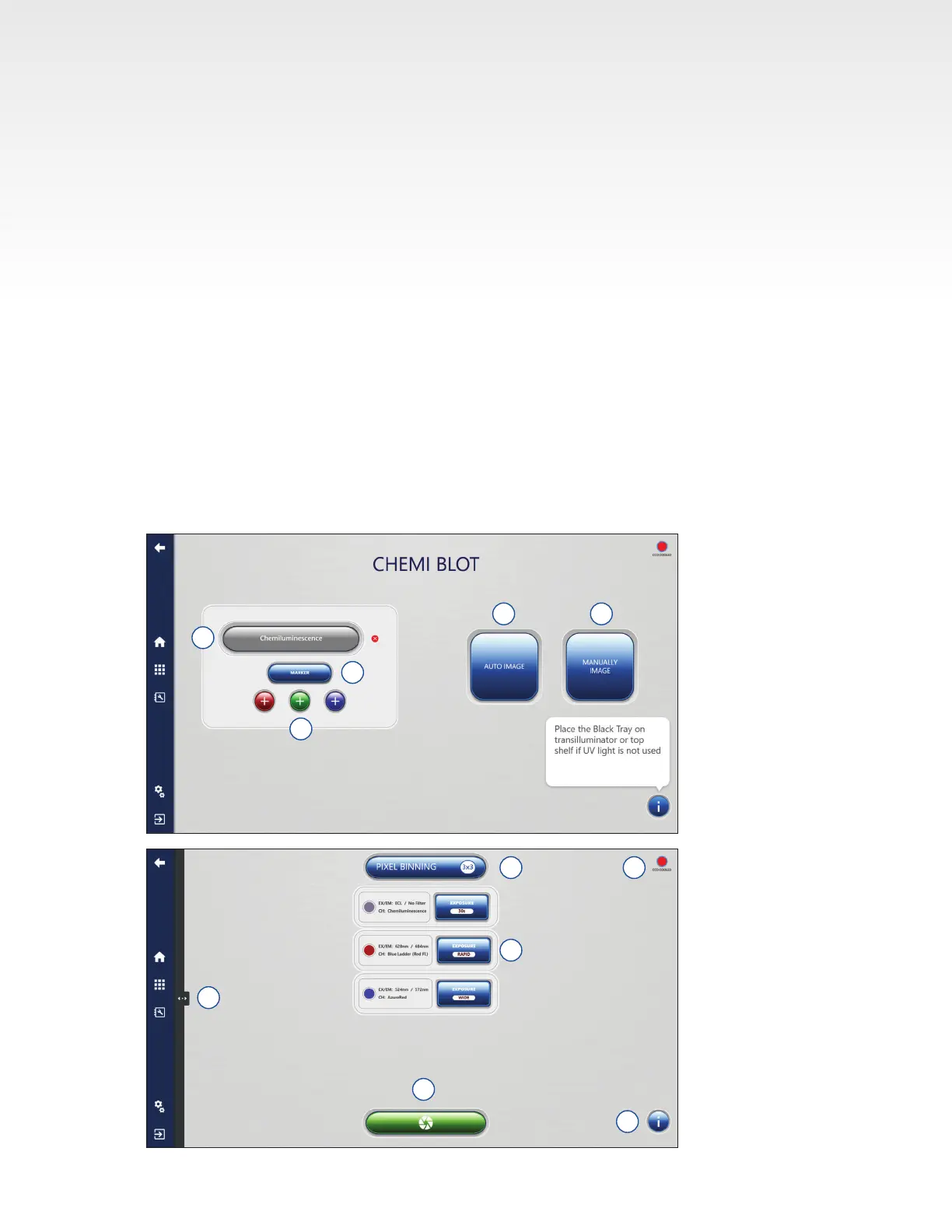
15. Select the Capture button to capture the image according to the set specications.
16. When imaging a single channel chemiluminescent image with or without color marker, the additional
option of Imaging Mode is available. Select between Single image capture, Cumulative image
capture and Multiple image capture.
• Single – captures a single image according to the exposure type selected.
• Cumulative – captures multiple images at the user set time interval and cumulates the signal of
each subsequent image. For example: if you set an exposure time of 1 minute, the system will
capture and display one image every minute cumulating each exposure, up to ten exposures
(default. Number of exposures adjustable in Settings/General). The rst image displayed will be
a one minute exposure. The second image displayed, at the two minute interval, will be a two
minute exposure. The nal, tenth image, will be the sum of ten, 1-minute images. Images appear
and can be viewed in the Gallery tab as they are acquired.
• Multiple – select between 1 and 5 images. The exposure time for each individual image can be set
independently. The images are not stacked. Use the arrow buttons to move between the frames
when setting the exposure times
17. After capture, images will appear in the Gallery automatically. The Gallery can be reached at any
time by pressing the Gallery icon.
18. Go back one screen at any time by pressing the back icon.
6
7
8 9
5
10
11
12
13
14
15


 To Next Page