If you are using a Bad Elf Flex Extreme, tokens are not
required and this screen is not shown.
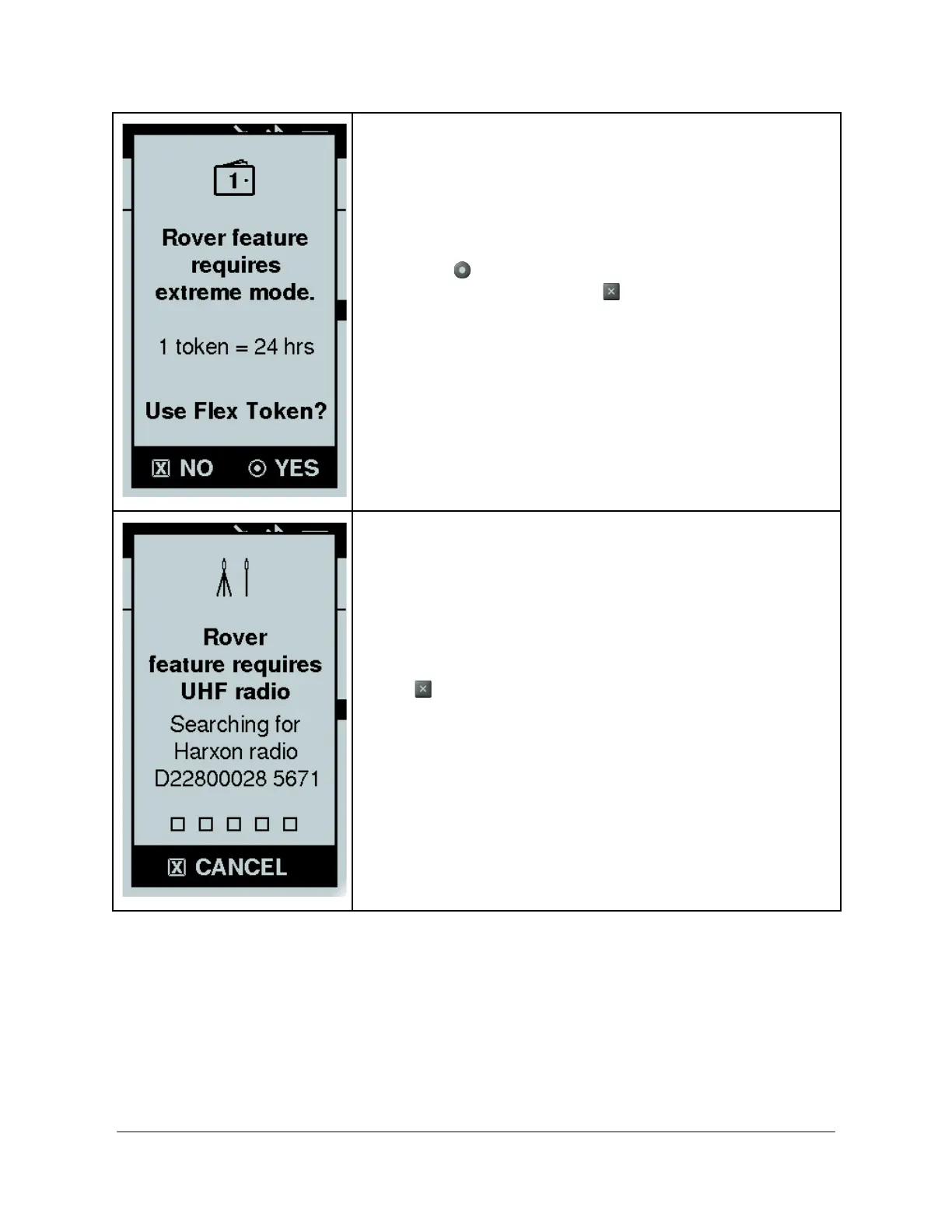
The Bad Elf Flex standard requires extreme mode through the
use of a Flex Token. If a Flex Token isn’t active, the Bad Elf
Flex prompts you to use a token to enable extreme mode. To
enable extreme mode select the option Yes by pressing the
enter button . If you want to cancel starting rover mode,
press No using the back button .
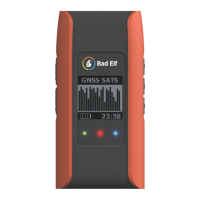
In a radio is not connected, the Bad Elf Flex automatically
attempts to restore the Bluetooth connection with the last
radio it used. The display shows the radio it is searching for
and the serial number for reference. This process takes 5-10
seconds and requires the radio to be on.
If you want to pair with a different radio or are having any
issues pairing with your radio, Cancel by pressing the back
button and use the Bluetooth feature from the main menu
of your Flex to establish a new pairing.
Copyright © 2022. Bad Elf, LLC. 13
All Rights Reserved.


 To Next Page