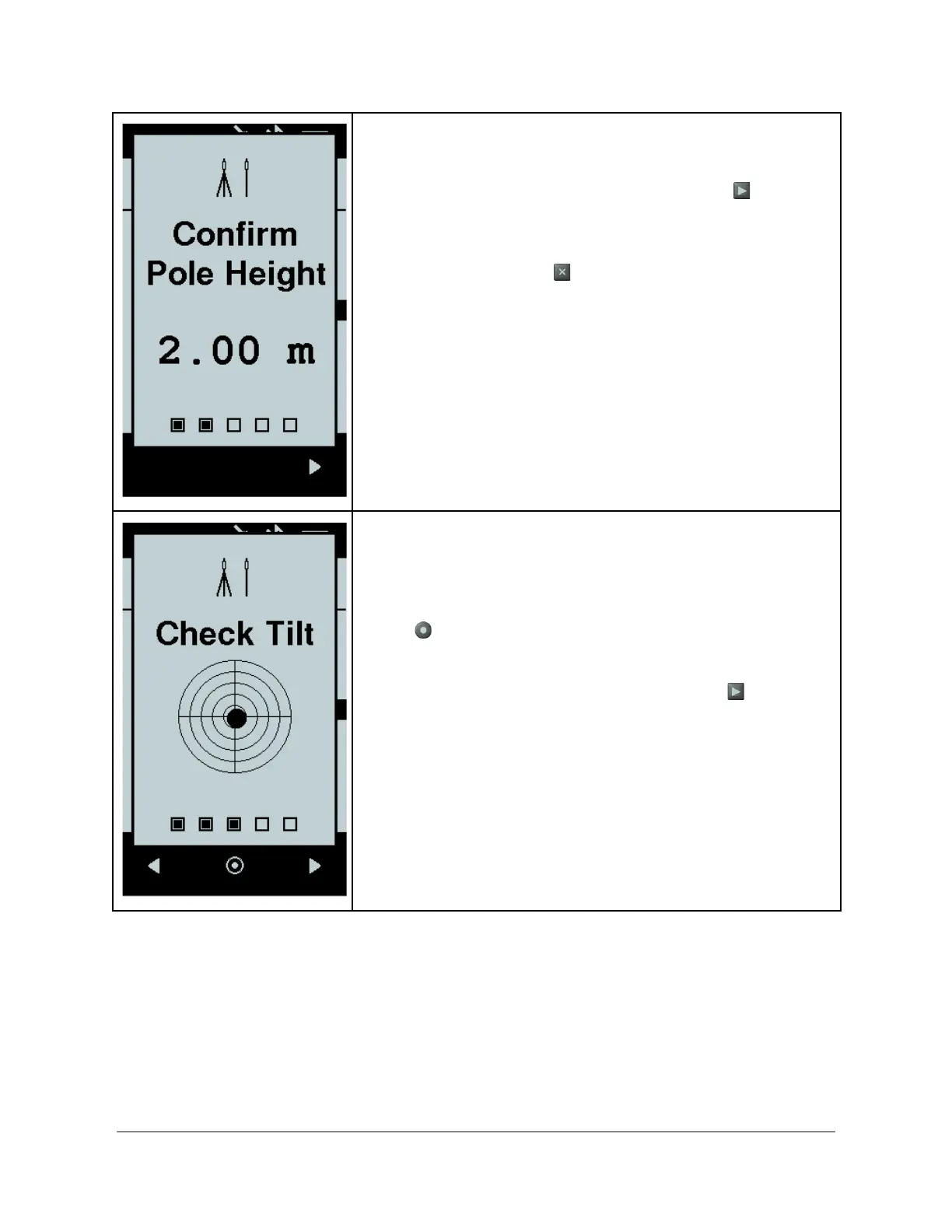
Once the Bad Elf Flex confirms Bluetooth pairing with a radio,
the checklist displays a confirmation of pole height.
If your pole height is correct, use the right button to
proceed to the next item in the checklist.
If your pole height is incorrect, cancel the checklist by
pressing the back button and use the Bad Elf Flex app on
your phone or tablet to change the default pole height.
Once you have confirmed the pole height, the Bad Elf Flex
confirms unit tilt. Ensure your Bad Elf Flex is mounted tightly
on the pole and that the pole is level and completely vertical.
If you need to adjust the tilt calibration, pressing the enter
button provides a feature to adjust and calibrate the
internal bubble level.
If your calibration is correct, use the right button to
proceed to the next item in the checklist.
Copyright © 2022. Bad Elf, LLC. 14
All Rights Reserved.


 To Next Page