12
If the log or boat speed is in error by a known percentage
then this method allows the calibration figure or LOG CAL to
be adjusted by that amount. The calibration figure is
measured in Hertz per knot (Hz/kt), the factory set value is
6.25.
NOTE: The accuracy of this method is dependant upon the
accuracy of the calculated percentage error.
Using the factory set LOG CAL of 6.25 Hz/kt:
If the display is under reading by 10% subtract 0.62,
If the display is over reading by 10% add 0.62.
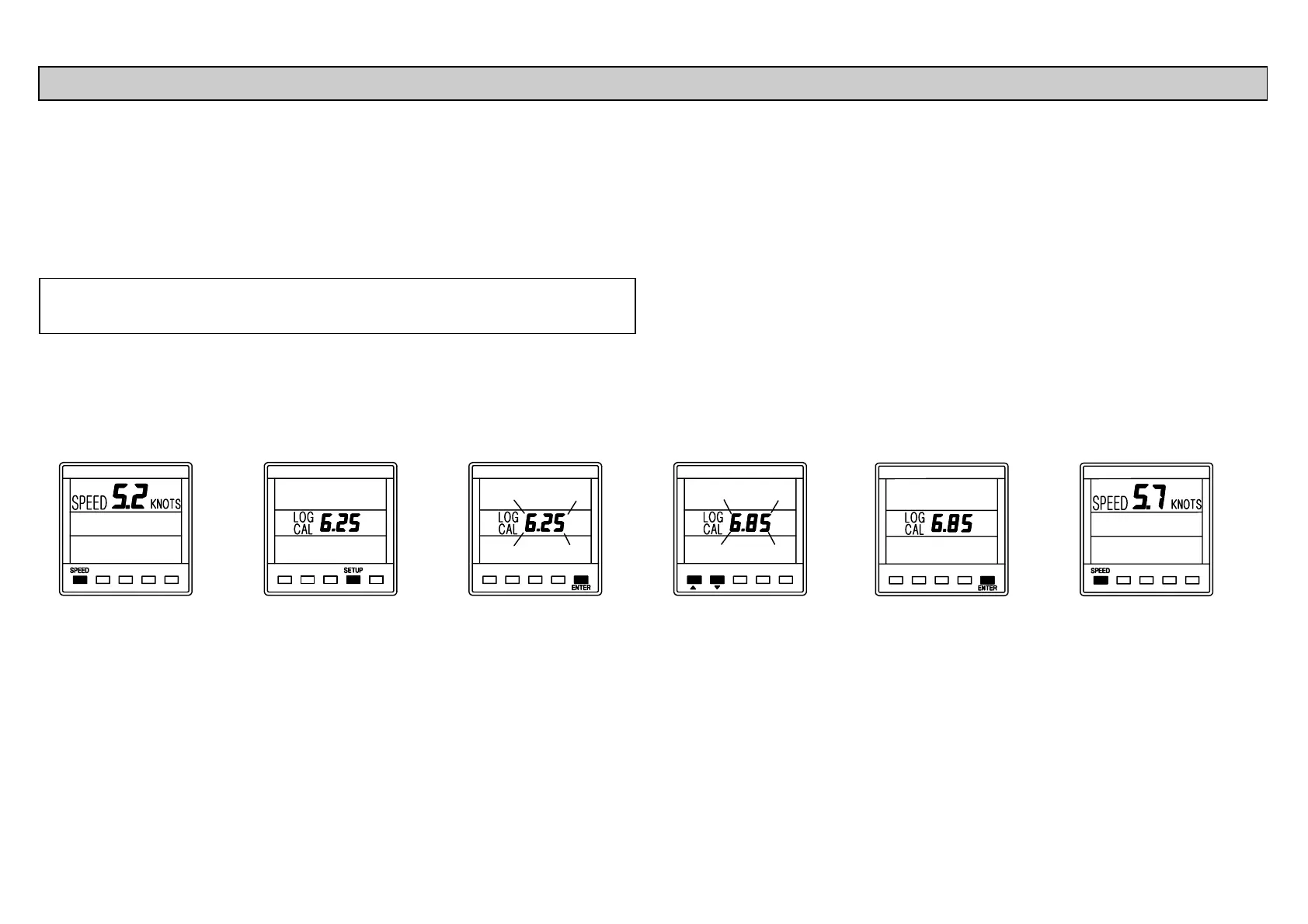
Press SPEED
key to display
current boat
speed.
Press SETUP key
four times to
display LOG
CAL.
Press ENTER
key to adjust the
displayed value.
Use ! or " to
change the value.
Press ENTER to
store the new
value in memory.
Press SPEED
key to complete
change.
METHOD 2. - MANUAL CALIBRATION - LOG CAL



 To Next Page