5
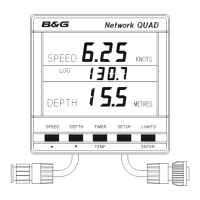
The Network QUAD unit has two operating modes. The
correct mode must be selected for your Network system to
operate properly.
tYPEt Transducer mode, the unit uses and displays
speed and depth data from sensors
connected directly into the display unit.
tYPEr Repeater mode, the unit operates as a
repeater using data from the system network.
Press TIMER key
to display stored
log.
Press SETUP key
to display the
current mode.
Press ENTER
key if the mode
needs to be
changed.
Use ! or " to
change mode.
Press ENTER to
store the new
mode in memory.
Press TIMER to
complete the
change.
SELECTING THE DISPLAY MODE



 To Next Page