K5905271 /16 Display Controller
20
3.4 Installation options
Configure installation options
You can modify the setup. ini file at the Barco root folder to change the default setting of MXRT driver after
either installation or silent installation.
Install driver in 24-bit
• Locate the [MXRT_WDDM] section of setup.ini
• Remove -30bit command line parameter from both Install and SilentInstall lines
• Modify the default.ini file, found in:
Barco_MXRT_Driver_SoftwarePackage_xxxx\Setup_Barco_Productivity_Tools.x.x.x\
Change Color%20Depth\30BitDesktop to false.
Install driver with Coronis Fusion displays in SingleView mode
• Locate the [MXRT_WDDM] section of setup.ini
• Add -singleview command line parameter to the end of both Install and SilentInstall lines
• Modify the default.ini file, found in:
Barco_MXRT_Driver_SoftwarePackage_xxxx\Setup_Barco_Productivity_Tools.x.x.x\
Change SingleView\singleviewEnabled to true.
Install driver with VirtualView enabled
• Locate the [MXRT_WDDM] section of setup.ini
• Add -virtualview parameter to both Install and SilentInstall lines
• Modify the default.ini file, found in:
Barco_MXRT_Driver_SoftwarePackage_xxxx\Setup_Barco_Productivity_Tools.x.x.x\
Change VirtualView\FeatureEnabled to true.
3.5 After installation
Installation verification
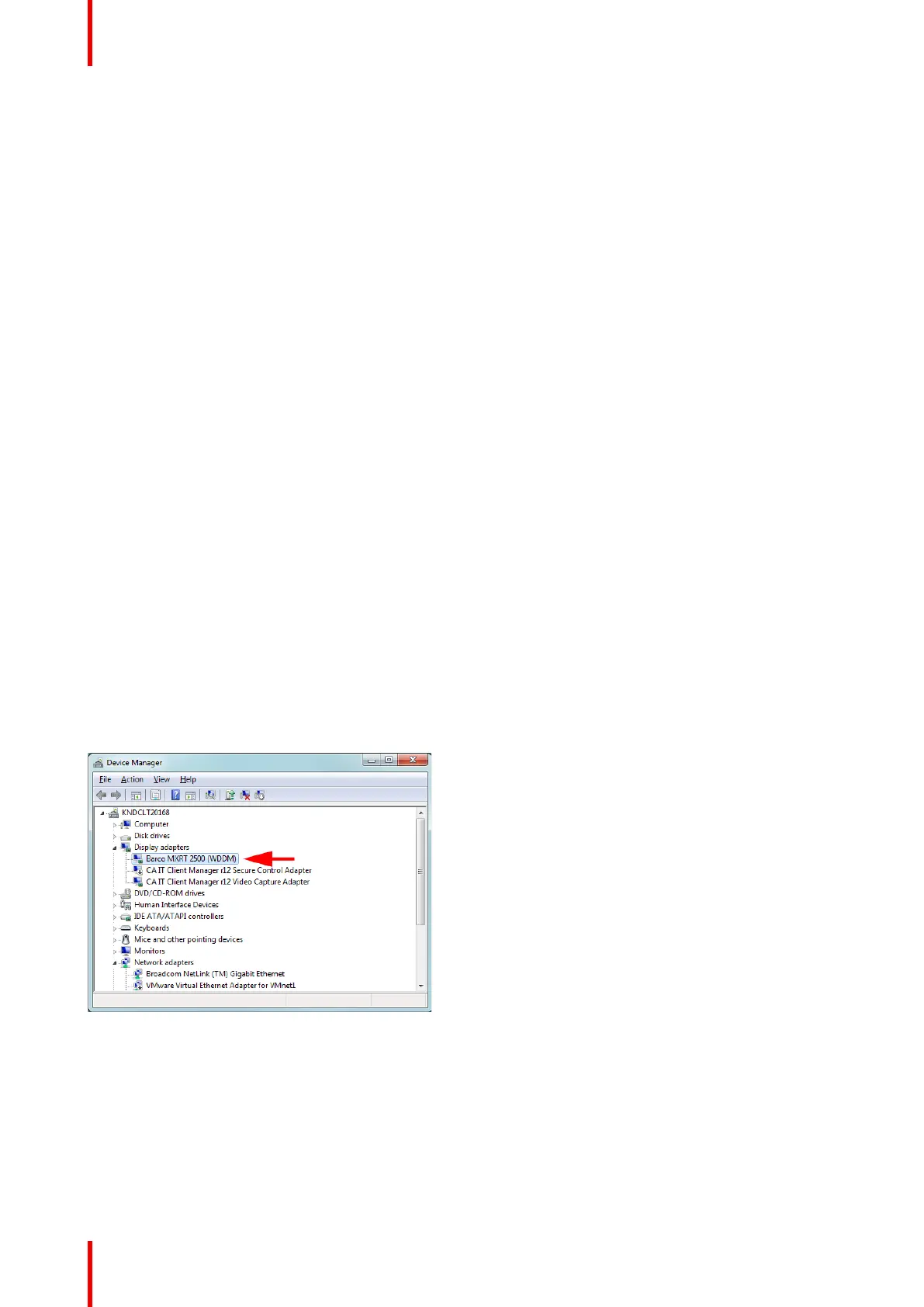
To verify that the driver was installed, go to the Windows Control Panel, select System, select Device
Manager, then select Display Adapters. Verify that Barco Display Controllers are properly identified, as
shown below:
Image 3-2: Verifying driver installation
Automatic display configuration
Once the drivers, software and documentation have been installed and the system has been rebooted, the
computer should automatically detect your Barco displays and attach them to the desktop with the correct
resolution. If the computer fails to detect your Barco displays or fails to attach them to the desktop correctly,
please use the Windows Screen Resolution to set the correct resolution.
Driver and software installation



 To Next Page