21
Instructions For Use
3 Site~Rite
*
5 System Information
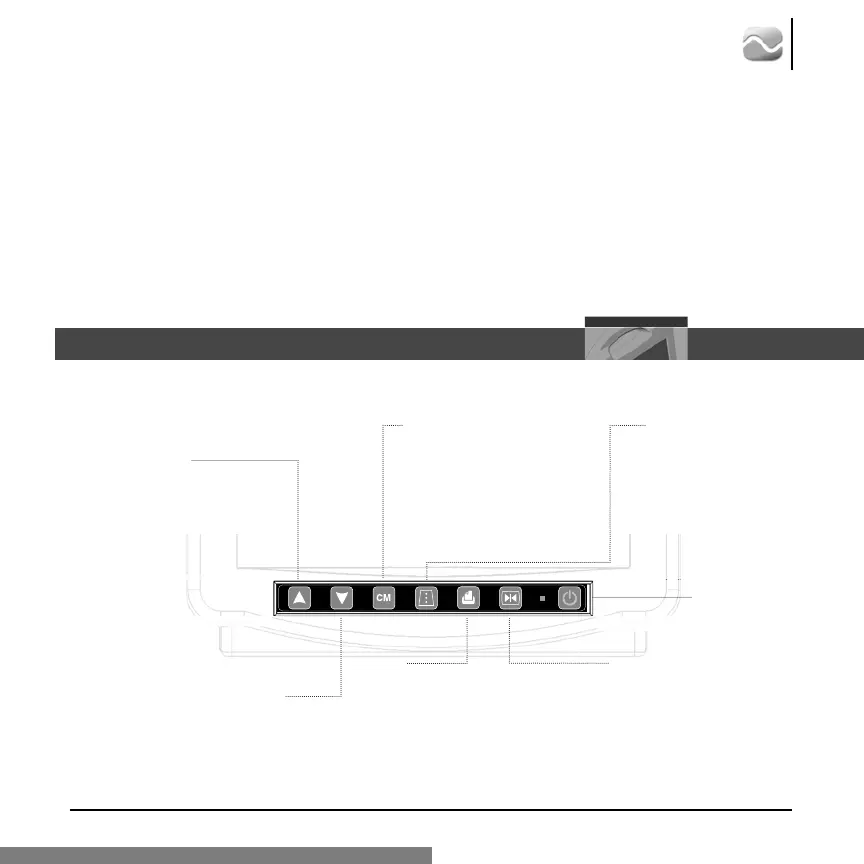
3.1 Front Panel Controls
Freeze
(In Time Set mode, this button
sets the internal clock to the
displayed values and returns
the system to Run Mode.)
Increase Gain
(In Time Set mode,
this button increases or
toggles the selected field.)
Decrease Gain
(In Time Set
mode, this button
decreases or toggles
the selected field.)
Depth
(In Freeze mode, if this but-
ton is held for more than 5
seconds, the system enters
the Time Set mode. In
Time Set mode, this button
selects the next field.)
Depth Markers
Toggles depth
markers on/off.
Print
Sends the current image to the
printer if connected. If a USB
storage device is connected to
the system, this button will also
save the current screen image to
the storage device.
2.8 Resetting the Site~Rite
*
5 Ultrasound System
Should the scanner display ever appear blank or show an exclamation mark (!), the system may
need to be reset.
To reset the system:
1. Depress and release the power button located on the front of the Site~Rite 5 scanner.
2. Wait approximately 60 seconds for the unit to reset itself.
3. Power the unit back on per instructions in section 2.7.
On/Off/Reset








 To Next Page