23
Instructions For Use
Display Screen Information
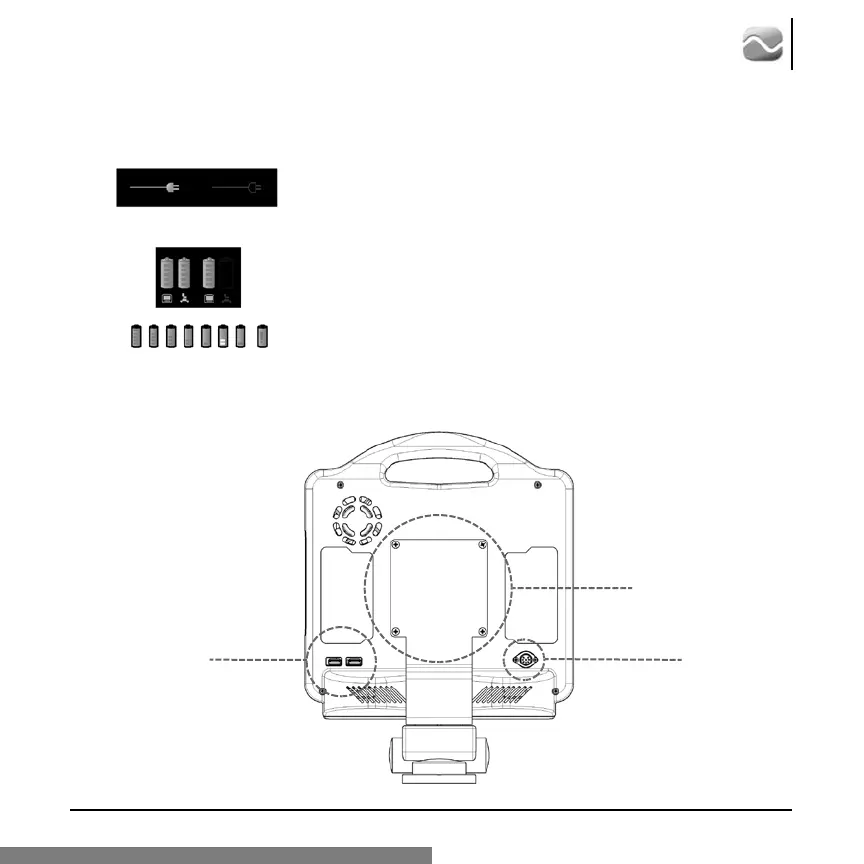
3.3 Back Panel
VESA Mount
Power Outlet
Printer/ Image Storage
Connectors
AC Power Indicator
The indicator is shown in solid grayscale when connected to AC wall power and
is shown as a dark gray outline when disconnected.
Battery Indicator
The 5 charge levels for the batteries are displayed as shown. When the unit is
recharging, the indicator is green for all 5 levels. When the unit is under battery
power, the console battery indicator changes to yellow at 40% and red/blinking
at 20% of remaining life. If a battery malfunction is detected, the system will
show the battery with a red “!” overlay.








 To Next Page