51
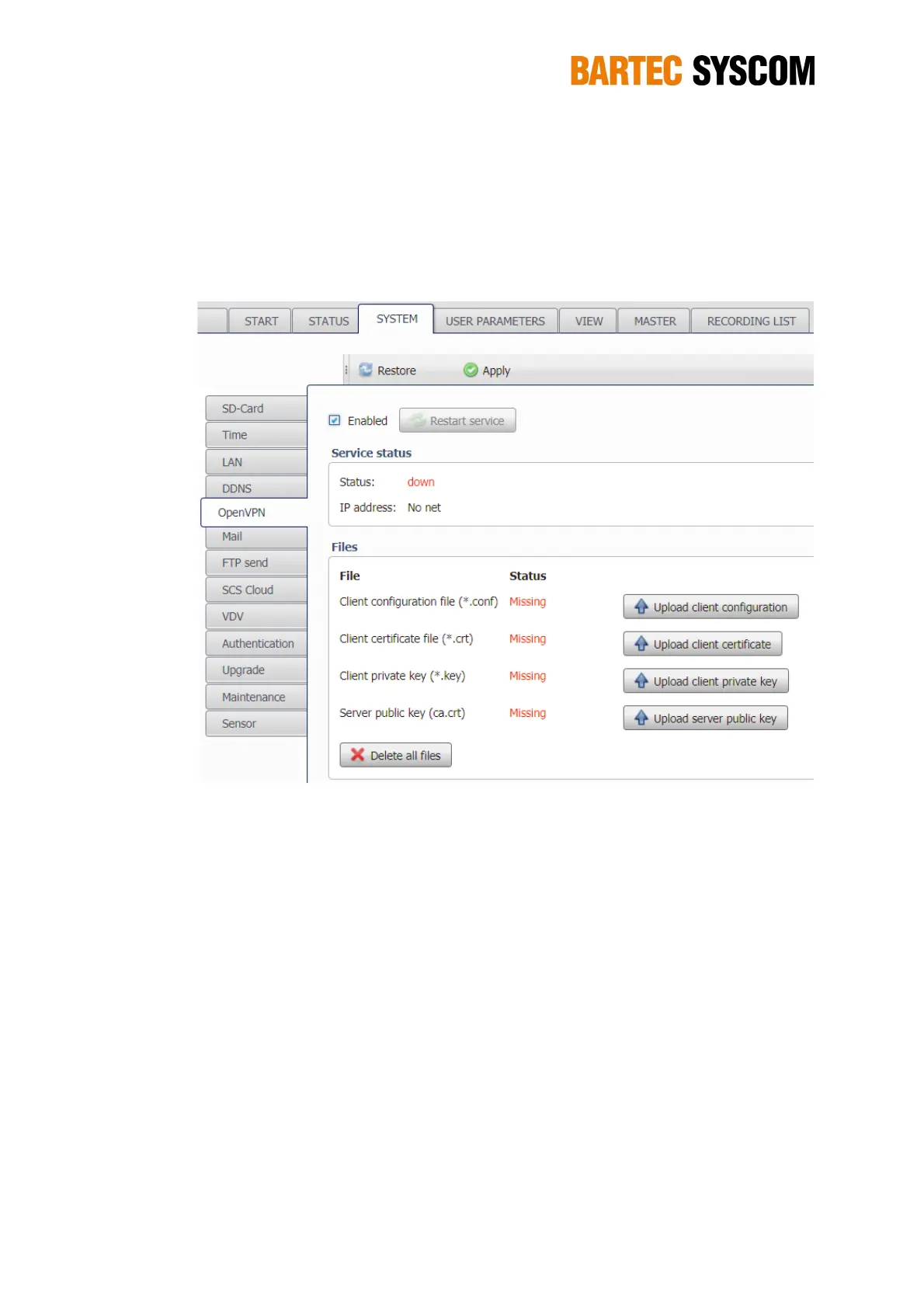
are routed via the OpenVPN server. The communication between your PC and the DMS is
encrypted.
The other data (FTP push, NTP time synchronization, E-Mail, Firmware-upgrade) are not routed
through the VPN tunnel, but use the normal Internet access.
Figure 5.3.5. Subsection dedicated to the OpenVPN.
5.3.6. Mail
In this section, you can configure the e-mail settings, in order to receive automatically mails from
MR3000DMS. For this purpose you need an e-mail account and Internet access for the DMS-–
check with the PING function as described in Section 5.3.10
You have to enter the access data of your e-mail account, i.e User address (e-mail address of your
e-mail account) and the Password in the section User identity. In the section SMTP server you
have to enter the URL (name or IP address of the SMTP server) and the Port.
You don’t need a unique e-mail account for every DMS - you can have one e-mail account with a
single e-mail address for all of your DMS as this address is only used to send e-mails, not to
receive.
If you use a different e-mail service you will have to check the documentation of your service
provider to figure out the URL and the port of the SMTP server.
Create an address, e.g. mr3k.syscom@yourprovider.com
Enter this address as User address together with Password in the section User identity
The settings for the SMTP server can be found on the provider site.



 To Next Page