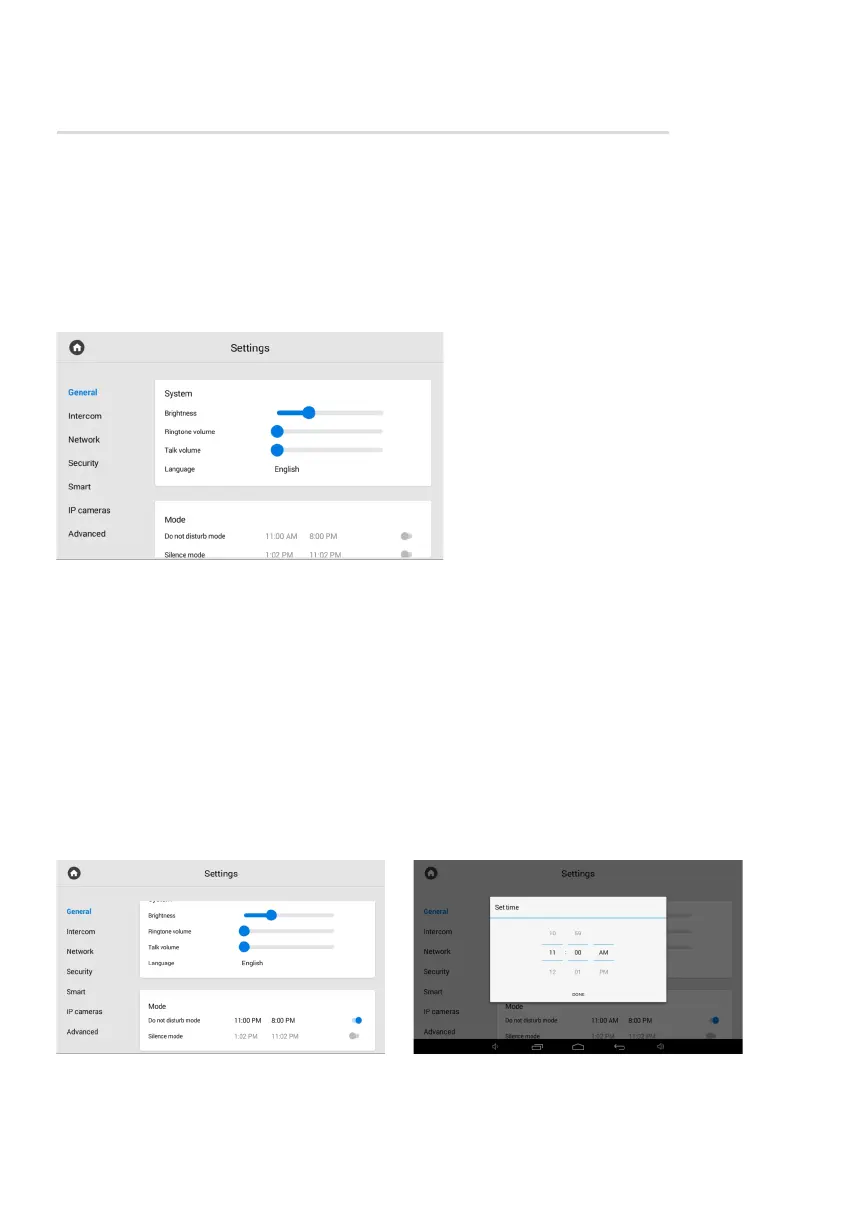
Monitor settings menu
You can configure the monitor using the corresponding menu, which can be accessed
by swiping down or tapping a place at the top of the main screen.
After opening the navigation bar, go to the Settings menu. There is access to general
and advanced settings of the network, security, automation, IP cameras, etc. Each setting
menu is described in more detail below.
In this tab, you have access to the
configuration of the following parameters:
screen brightness adjustment;•
ringtone volume adjustment;•
speaker volume adjustment during•
a call (talk volume);
selection of the system language: •
English; Russian; Ukrainian; • • •
Spanish; Polish; Hebrew; • • •
Dutch; Turkish. • •
Do not disturb mode configuration; •
Silence mode configuration. •
General settings
How to configure the Do not disturb mode
Do not disturb mode allows you to turn off all sounds (except the alarm), and incoming calls
from other devices will not be displayed on the screen. All received in this mode calls will be
shown as missed calls on the main screen.
In this tab or in the web interface, you can enable the feature in advance for a specified
period of time. To do it, you must:
In the General monitor settings, find
the Mode section and enable the mode.
Set the start and end of the mode
functioning.



 To Next Page