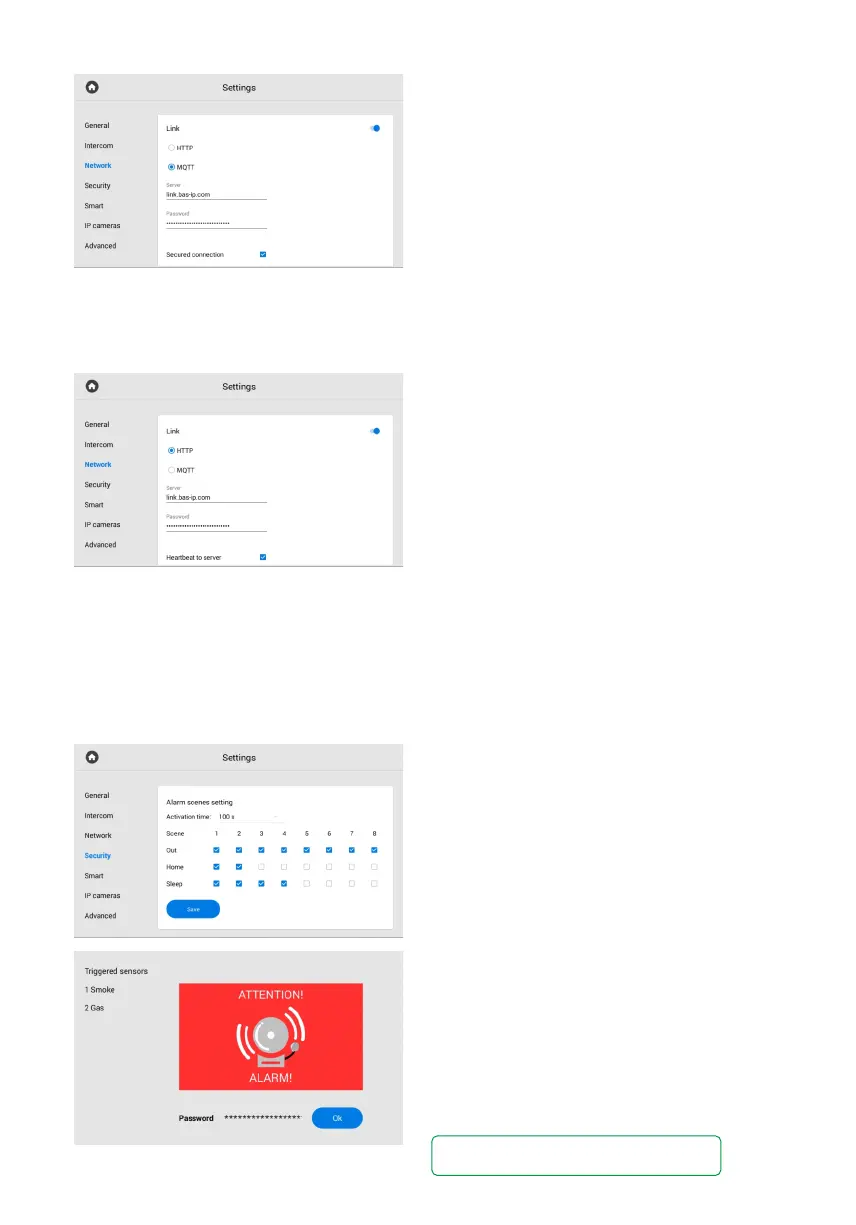
MQTT protocol configuration
If you select MQTT, you must enter:
Management system broker address and port•
for server field.
Password for interaction with the management•
system.
Also, you can enable / disable a secured
connection. Sending of heartbeat (current
status: online/offline) is done by default here
without the ability to enable/disable it.
HTTP protocol configuration
If you select HTTP, you must enter:
An IP address or domain name of the server•
where the Link software is installed.
Device password to the server.•
If necessary, you can activate the heartbeat
(current status: online/offline) from the panel
to the server.
In this tab, you have access to configure the operation of security scenes, sensors, and user
and administrator passwords.
Security settings
Alarm scenes setting
With this section, you can set sensors that will
be triggered in a corresponding scene.
There are 3 available scenes (Out, Home, Sleep)
for various occasions. To configure their operation,
select which sensors should be enabled / disabled
for each scene.
Activation time (from 0 to 300 sec) is the time
after which the monitor will switch to securit
mode and activate the necessary scene.
When a sensor is triggered, an alarm signal will be
sent to the main and all synchronized monitors.
Also, in the corresponding section, you can set
additional notifications in the form of a message
or a call to a SIP device.
To disable the alarm, enter the user password.
The default password is 1234.



 To Next Page