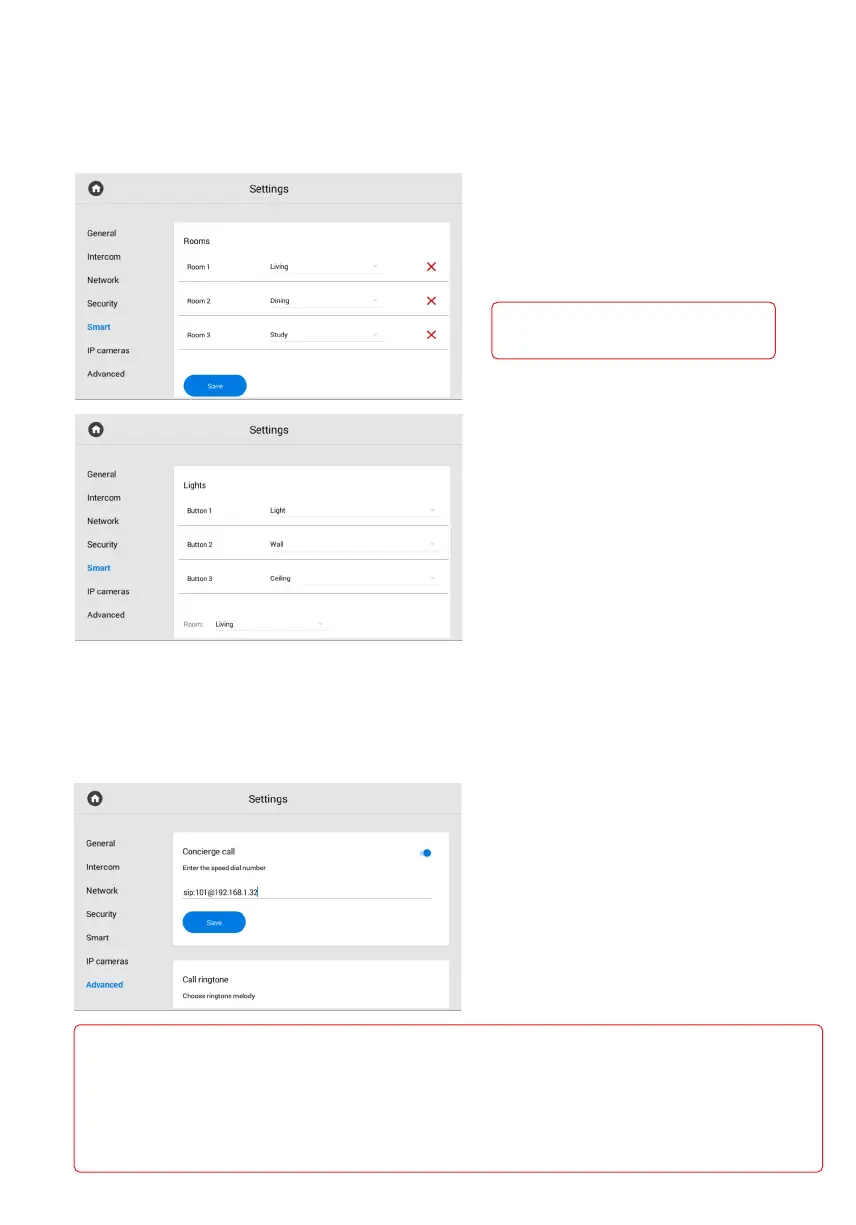
In the menu, you can configure home automation services for Rooms and Lights.
Smart settings
Rooms
In this section, you can configure
the rooms for displaying in the home
automation control menu.
Warning!
The adding rooms feature is only available
on the main monitor (with 0 device number).
Lights
In the menu, you can set the name
for each room or button.
In the menu, you can configure the concierge call number, a ringtone, and standby mode,
set the screensaver, theme, etc.
Advanced settings
Concierge call
Here you can set the number of concierge,
or any other device for its quick call
via SIP or P2P.
The button for the call is in the navigation
bar of the monitor main screen.
You can also enter the number in the
device web interface.
Format for calls via P2P:
sip:1@192.168.1.65, where 1 is the desired number to be displayed for the callee, 192.168.1.65 is the IP address of the callee•
SIP client (if you use a softphone, the IP address of a device where the softphone is installed).
Format for calls via SIP:
sip:5588@us.sip.bas-ip.com, where 5588 is the callee SIP number, us.sip.bas-ip.com is the address of the SIP server,•
which can be either the IP address or domain name.
For correct functioning, the SIP numbers must be registered with the same SIP server.



 To Next Page