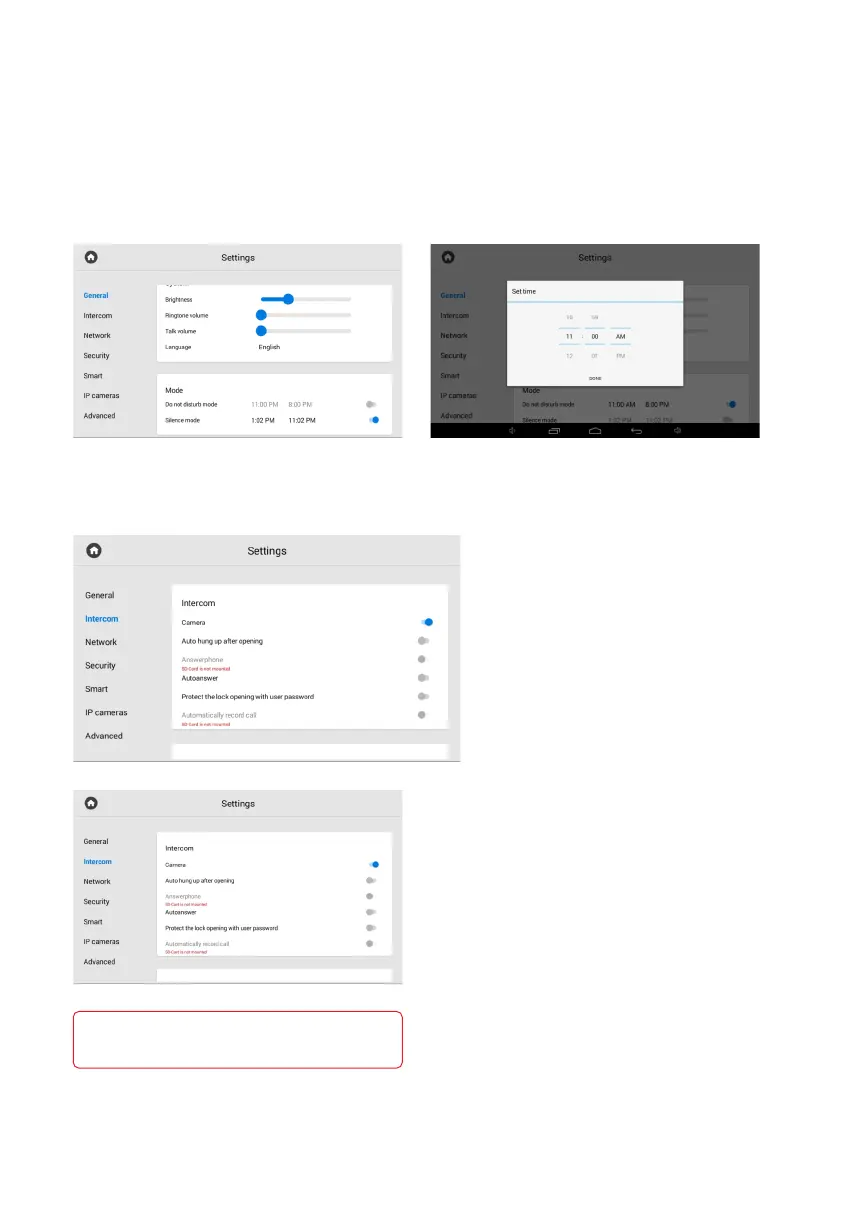
How to configure the Silence mode
Silence mode turns off all sounds (except the alarm), but incoming calls will be displayed
on the screen.
In this tab or in the web interface, you can enable the feature in advance for a specified
period of time. To do it, you must:
In the General monitor settings, find
the Mode section and enable the mode.
Set the start and end of the mode
functioning.
In the menu, you have access
to communication, logical address, SIP,
and DTMF settings.
These settings can be set both in this
menu and via the web interface.
Intercom settings
Intercom
In the Intercom section, you can enable/disable
the following features:
enabling / disabling auto hung up in 3 seconds•
after pressing the Open button during a call;
enabling / disabling the feature of automatic•
call acceptance by the monitor in the absence
of the answer. If there is no response within
30 seconds, the monitor will start recording
a message from the visitor (answerphone feature);
enabling / disabling all incoming calls•
autoanswer;
enabling / disabling the lock protection from•
accidental opening. A user password will be
required to open the lock during a call;
enabling / disabling automatic conversation•
recording during a call.
Answerphone and Automatic call recording features
are not available if an SD card is not installed,
or if it is not the main monitor.



 To Next Page