Address
If you have only one number enter «0» for the device number.
If you have more then the numbering must start with «0»
and end with «8».
For correct device functioning, you must enter
information about its logical address. The logical
address is used to automatically synchronize
and search for other devices in the network
and is also necessary to provide a connection
between them (more information about logical
address formation find here).
You must enter the following data about the device location:
• Building No: from 0001 to 9999.
Unit No: from 00 to 99.•
Floor No: from 00 to 98.•
Apartment No: from 01 to 99.•
Device No: from 0 to 8.•
Sync code: between monitors.•
SIP
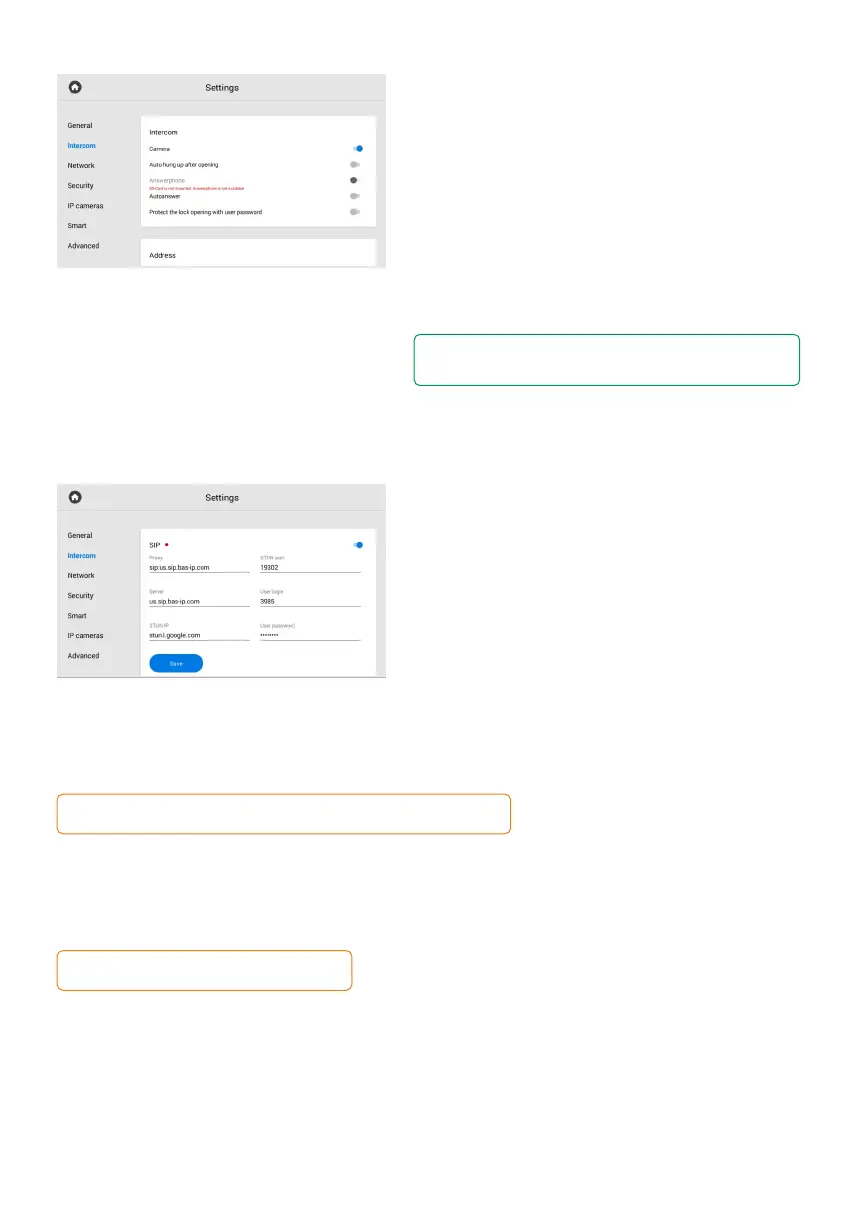
The SIP settings are required for the monitor
to work via the SIP protocol.
To configure SIP calls for the panel, you must enable device SIP registration and enter
the following parameters:
SIP server proxy that can be represented by both an IP address and a domain name.•
Data format:
Before the proxy address, you must enter «sip:», e.g. sip:us.sip.bas-ip.com.
SIP server address that can be represented by both an IP address and a domain name,•
e.g. us.sip.bas-ip.com.
Server STUN IP address. For example, stun.l.google.com.•
Port of the STUN server.•
Note:
19302 port is used for the Google STUN server.
user SIP number. •
Password for SIP number.•



 To Next Page