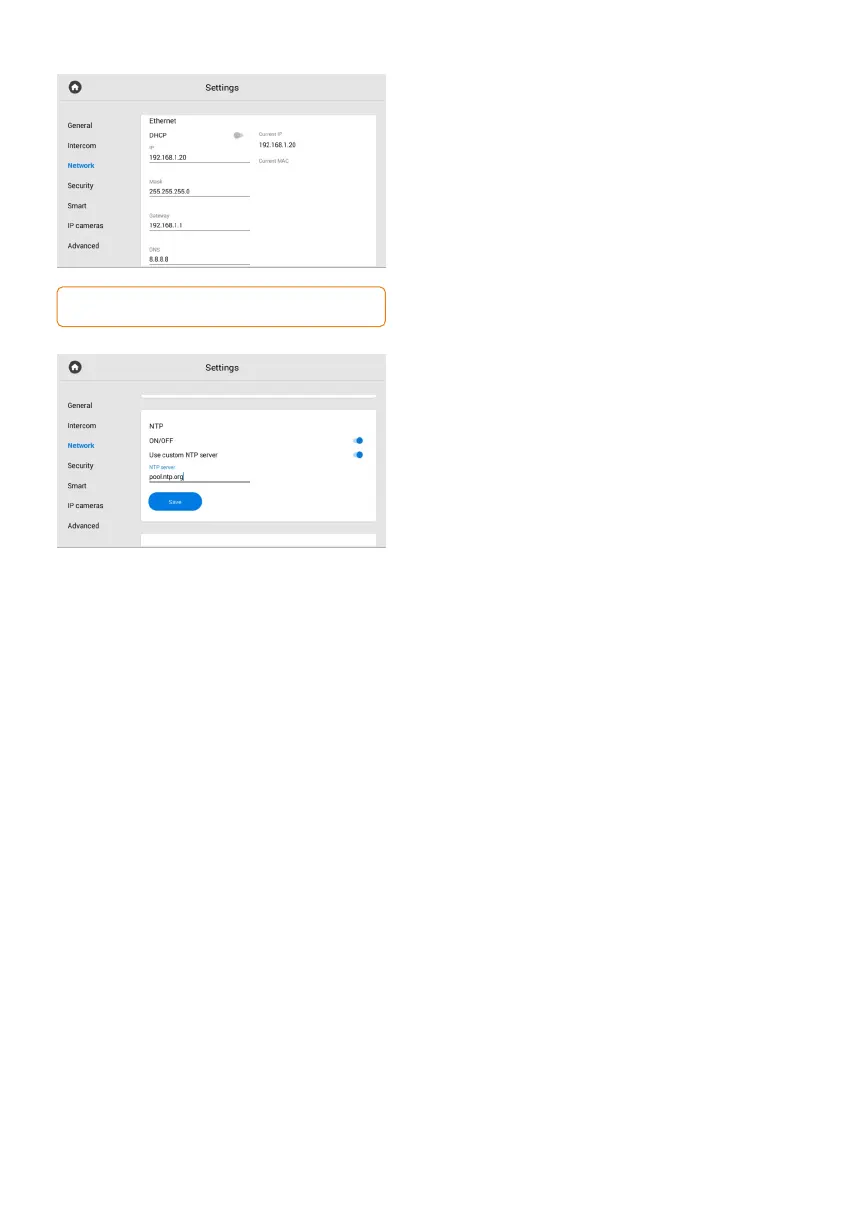
Ethernet
In this section, you can enable/disable DHCP
connection and get network settings
automatically or enter it manually.
For correct monitor work you must enter:
panel IP address; subnet mask;• •
the main gateway; DNS server address;• •
Here you also can check the current IP
and MAC address.
By default, a device can have a static IP address
of 192.168.1.90 or 192.168.1.91.
NTP
NTP server data is used for time and date
automatic synchronization between a panel
and a server.
Turning on the server time, data will be
automatically synchronized with a server via
the Internet. Therefore, this option requires
an Internet connection. In the section, you can
also turn off the NTP server functioning.
Also, you can use custom NTP for automatic
synchronization with the necessary server via
a local network. To do this, you must:
Turn on the NTP server functioning.•
Enable the use of a custom NTP server.•
Enter the server URL or IP address.•
Save data. •
Link
In this section, you can enable / disable and configure the BAS-IP Link server for access
control, management and monitoring of devices.
To do it, you must:
Enable the Link server.•
Select the necessary protocol:•
HTTP or MQTT (is recommended to use).
Enter all required data. •
Save settings.•
MQTT allows organizing the interaction of BAS-IP Link with devices, which are located
in different networks/subnets/behind NAT without additional settings from the network
infrastructure (port forwarding, etc.) as HTTP requires.
We recommend using the MQTT protocol as it is less complex, more effective, provides data
security, fast and efficient message delivery.



 To Next Page