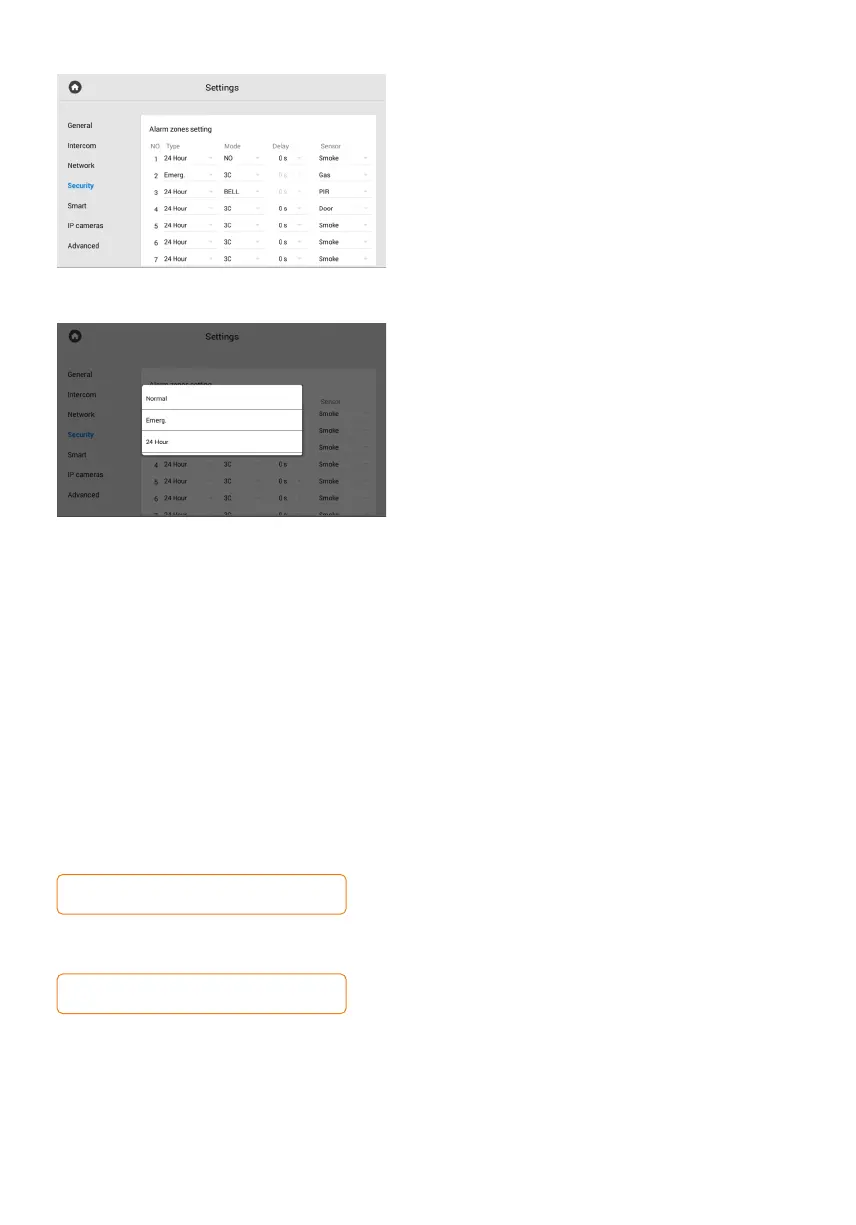
Alarm zones setting
You can connect 8 alarm sensors to the monitor.
The number of sensors can be increased up to 16
using the SH-16 module. This menu allows you
to specify pecularities and configure the operation
of each sensor separately.
The table with sensor settings consists
of the following parameters:
Sensor No.•
• Sensor type:
normal: the sensor is activated only when •
the scene (for which it is enabled) is turned on.
Typically this type is used for door and window
sensors;
emergency: the sensor is active all the time, •
and a trigger notification is sent to the
Management Software (no longer supported);
24 hour: the sensor is active all the time, •
regardless of the selected scene. This type can
be selected for flood, gas, volume, smoke
and heating sensors.
Sensor operation mode (cases for triggering•
a sensor):
NO is for the normally open sensor, activated •
when the contacts are closed;
NC is for the normally closed sensor, activated •
when the contacts are opened;
3C is activated by any change in the position •
of the contacts;
Bell is for functioning in doorbell mode. •
When the contacts are closed, the monitor will
start playing the incoming call ringtone.
Activation delay time (from 0 to 60 sec) before•
the sensor is triggered (available when selecting
a normal sensor type).
Sensor name (type) selection for additional•
information when triggered. There are such
available options as smoke, gas, PIR, door,
window, panic, flood, pull cord, bed mat.
The delay time is not summed with the alarm
scene activation time.
To disable the alarm, enter the user password.
The default password is 1234.



 To Next Page