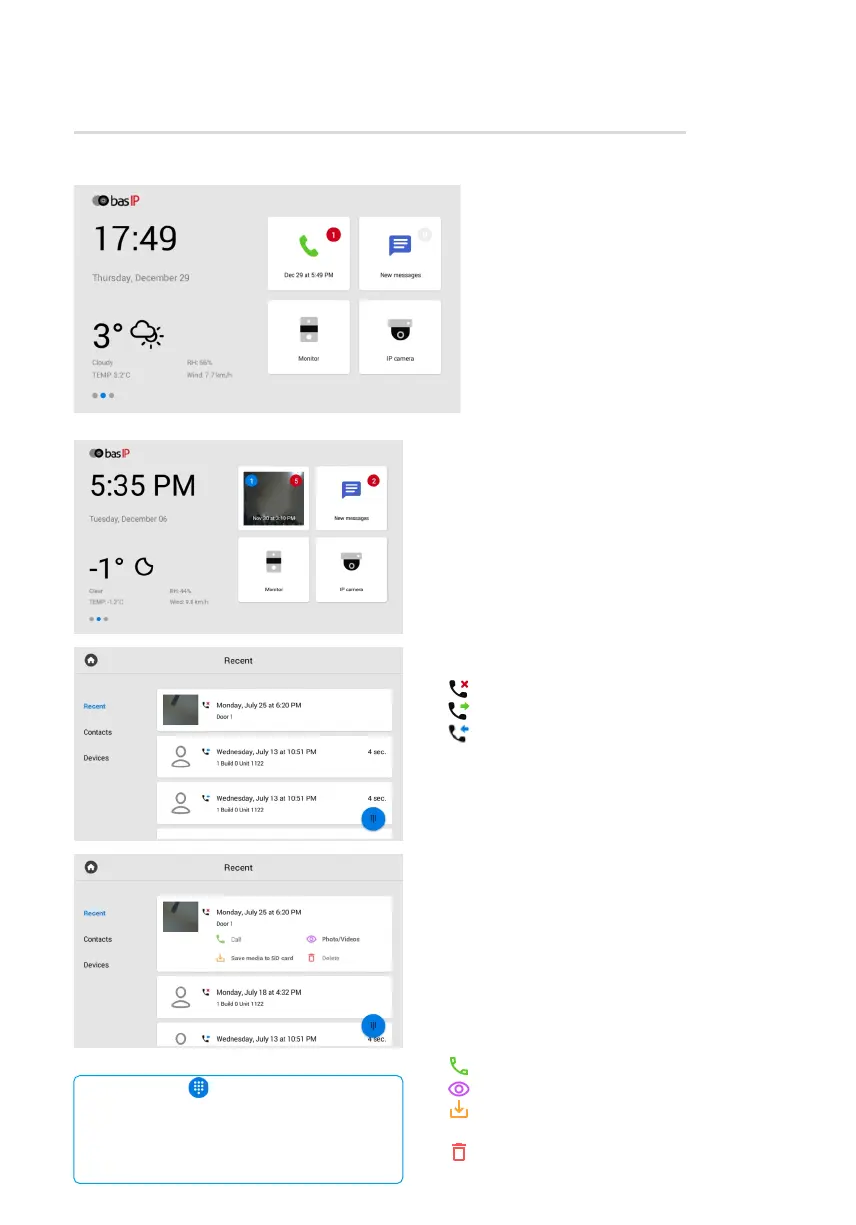
Call menu
When the Motion detection feature is enabled,
missed calls are displayed in the right corner
of the call icon, and notifications of videos
recorded when motion sensors are triggered
are displayed in the left corner.
By pressing the icon, the call history is displayed:
- missed call;•
- оutgoing call;•
- incoming call. •
An entry about a call contains the following info:
date and time when a call was made;•
subscriber number;•
сonversation duration.•
To open additional options, tap the entry.
Icons meaning:
- to call the selected number;•
- to view photos/videos taken during the call;•
- to save photos/videos taken during the call•
to SD card;
- to delete the entry.•
With the button in the lower right corner
of the screen, you can open the keypad for dialing
the number.
By pressing this button for a few seconds, you can
clear the call history.
On the main desktop, next to the call
icon, you can check the number
of missed calls.
Call menu



 To Next Page