18-8 9492600990
BESTCOMSPlus
®
Software DECS-150
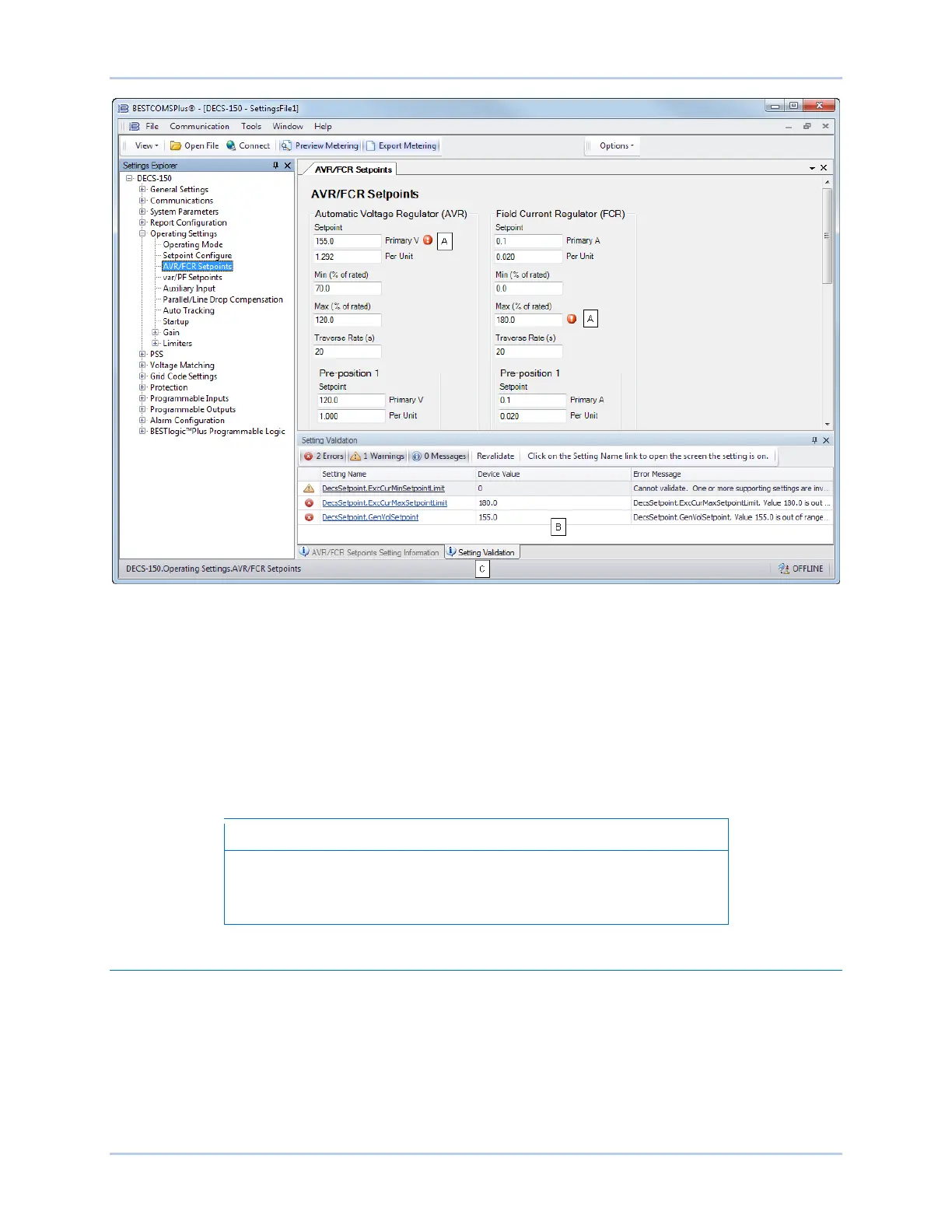
Figure 18-6. Flagged, Noncompliant Settings and the Seting Validation Window
The Setting Validation window, viewed by selecting the Setting Validation tab (locator C), displays three
types of annunciations: errors, warnings, and messages. An error describes a problem such as a setting
that is out of range. A warning describes a condition where supporting settings are invalid, causing other
settings to be noncompliant with the prescribed limits. A message describes a minor setting issue that
was automatically resolved by BESTCOMSPlus. An example of a condition triggering a message is entry
of a settings value with a resolution that exceeds the limit imposed by BESTCOMSPlus. In this situation,
the value is automatically rounded and a message is triggered. Each annunciation lists a hyperlinked
name for the noncompliant setting and an error message describing the issue. Clicking the hyperlinked
setting name takes you to the setting screen with the offending setting. Right-clicking the hyperlinked
setting name will restore the setting to its default value.
It is possible to save a DECS-150 settings file in BESTCOMS
Plus
noncompliant settings. However, it is not possible to upload
noncompliant settings to the DECS-150.
Metering Explorer
The Metering Explorer is used to view real-time system data including machine voltages and currents,
input/output status, alarms, reports, and other parameters. Refer to the Metering section for full details
about the Metering Explorer.



 To Next Page