TX1500 Manual V3.5 Dec 07 Page 11 of 40 TX1500 MATRIX
MONITOR OUTPUT CARD
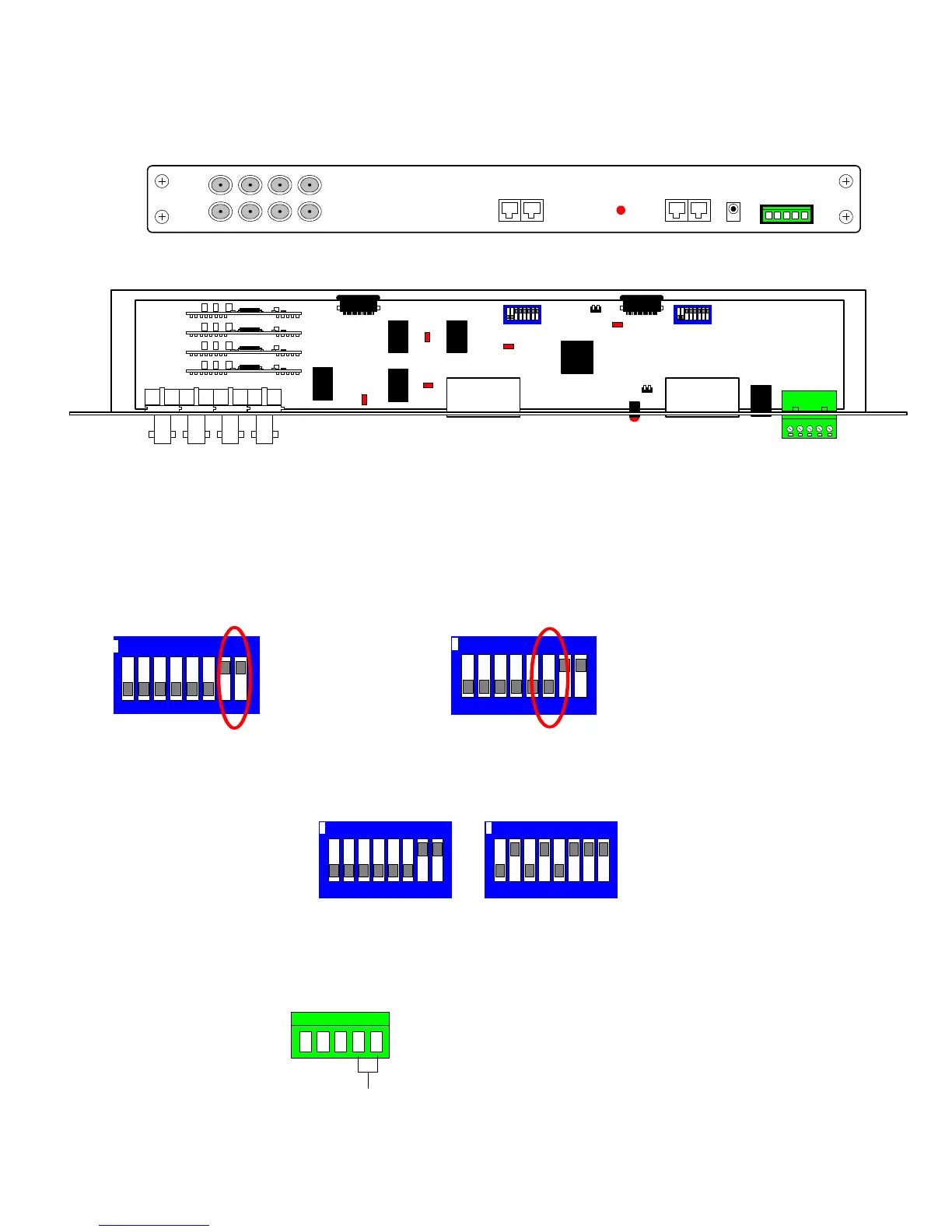
This card provides the 8 monitor outputs, BBUS, RS485 telemetry and a relay output.
Internal switches are used during specific BBV tests that should not require on site adjustment.
Monitor Output card Front Panel View
Monitor Output card internal view
LD1 STATUS – Front Panel indication of system and BBUS operation. Refer to page 16.
Internal LEDs,
LD2 – BBV debug use.
LD3, 4, 5, 6 – ON whilst coaxial telemetry is transmitted to the camera
For normal operation the internal switches must be as shown below:
To reset system to factory defaults:- Power off the TX1500, set the switches as below and power up
the TX1500. On screen instructions are displayed on monitor 1 output.
NOTE: The Power Up Factory Reset option will delete all TX1500 parameter programming.
Contact BBV technical support for guidance. +44(0)1323 444600.
NO
NC
COM
ALARM 00
1 2 3 4 5
Alarm 00 input can
trigger one of several
actions, refer to page 19
Input from volts free,
normally closed contacts
CHANGEOVER RELAY
operated by the triangle
key
Volts free contacts for low
voltage switching only
B-BUSTELEMETRY
MONITORS
12 34
56 78
12Vdc
ALARM
12 3456 78
ON
Power Up Factory Reset
12 3456 78
ON
SW1 SW2
12 3456 78
ON
12 3456 78
ON
SW1 SW2
B-BUS RS485
ON = Terminated
OFF = Un-terminated
RS485 Telemetry
ON = Terminated
OFF = Un-terminated
PL2PL1
SW2
LD2
01002
SW1
PROG
LINK
L9
LD1
LD3
LD5
LD4
LD6
B-BUS
RS485
OUT



 To Next Page