TX1500 Manual V3.5 Dec 07 Page 32 of 40 TX1500/BBUS-I/F INTERFACE
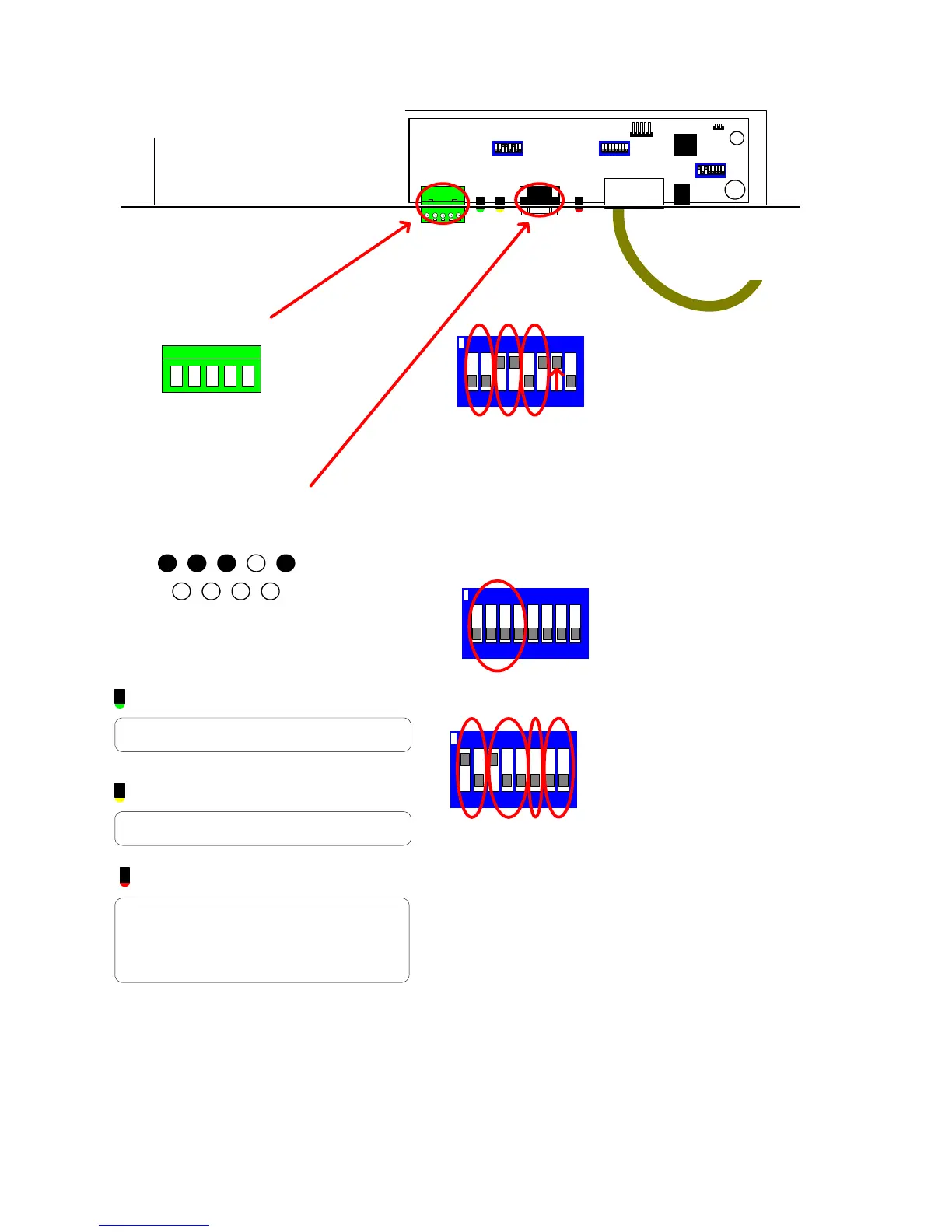
TX1500/BBUS-IF Interface switch settings
02005 Iss 2
LD1
B-BUS
SW4
SW1
SW3
LD2
LD3
POWER
1/2 = BBUS Address
SW4/1 SW4/2 Addr Keyboard No
OFF OFF 0 1
ON OFF 1 2 (Default)
OFF ON 2 3
ON ON 3 4
3/4/5 = Default Monitor Selection
SW4/3 SW4/4 SW4/5 Monitor
OFFOFFOFF1
ON OFF OFF 2 (Default)
OFF ON OFF 3
ON ON OFF 4
OFF OFF ON 5
ON OFF ON 6
OFFONON7
ON ON ON 8
6 = Control Protocol Selection
SW4/5 Protocol
OFF TX1000 (Default)
ON TX1500
7/8 Remote Tx1500 keyboard modes
SW4/7 SW4/8 Mode
OFF OFF Normal mode (SW3/1 OFF)
ON ON Matrix End (SW3/1 ON)
OFF ON Keyboard End (SW3/1 ON)
7/8 Variable/Fixed speed when in normal mode
OFF OFF Variable speed
ON OFF Fixed speed - High Speed (8)
ON ON Fixed speed - Low speed (2)
ON
SW4 Settings
712 3 5468
Chassis Mount DB9 Male
1 2 3 4 5
7 8 96
+V OUT
RS232 IN
RS232 OUT
GND
RS232
RJ45 to TX1500 BBUS
5 RB/-(IN)
RS485/422
4 RA/+(IN)
3 TA/+(OUT)
2 TB/-(OUT)
1 GND
TX1500 BBUS Interface
LED guide
GREEN LD1
Flashes when the interface sends an LED
status to the RS232 port.
YELLOW LD2
Flashes when interface receives a command
from the RS232 port.
RED LD3
BBUS comms status.
OFF = Unit de-powered
ON = Unit Powered but not communicating
with the Tx1500.
Pulsing Very Fast = Comnunicating correctly.
1/2 = BBUS termination
Must be ON only when the interface is at the
end of line.
Default = OFF
3/4 = RS485 termination
Must be ON only when the interface is at the
end of line. Default = ON.
5/6 = RS232 or RS485 selection.
SW1/5 SW1/6 Input
OFF OFF None
ON OFF RS485
OFF ON RS232 (Default)
ON ON DO NOT USE
7 = MUST BE ON
8 = NOT USED
7812 3 546
ON
SW1 Settings
7812 3 546
ON
SW3/1 Select mode
OFF BBUS Mode - RS232 control
ON Remote keyboard mode
Running Tx1500 keyboard over a RF link,
fibre or other network.
SW3 - Mode



 To Next Page