27
1.8 Power Supply
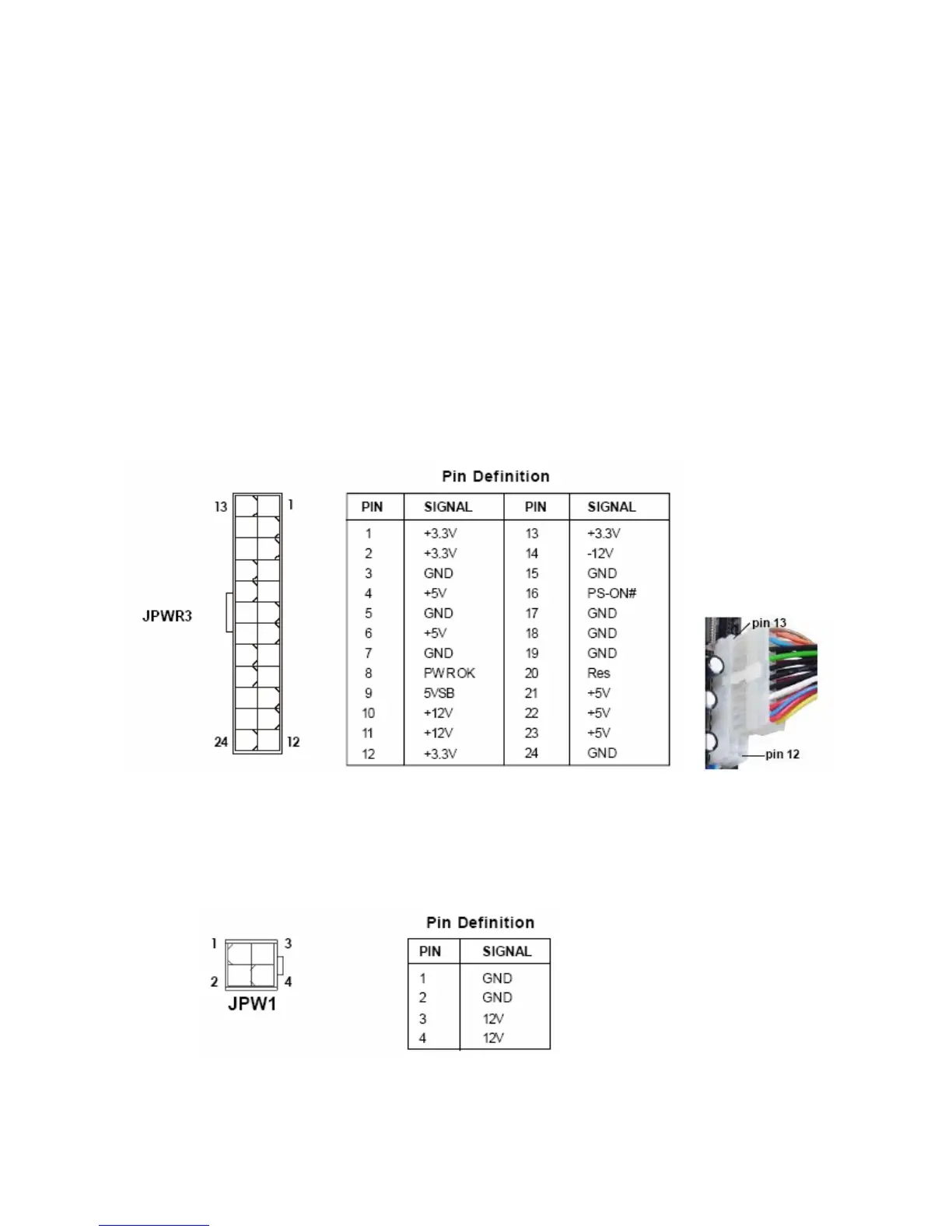
1.8.1 ATX 24-pin Power Connector: JPWR3
This connector connects to an ATX 24-pin connector from power supply unit (PSU). To connect the
ATX 24-pin power connector, make sure the 24-pin power connector from PSU is inserted in the
proper orientation and the pins are aligned. Then push down the 24-pin power connector firmly into
the connector JPWR3.
You may use the 20-pin ATX power supply as you like. If you’d like to use the 20-pin ATX power
supply, please align the 20-pin power connector from PSU to pin 1 & pin 13 (refer to the color picture
below) of JPWR3. There is also a foolproof design on pin 11, 12, 23, & 24 to avoid wrong installation.
1.8.2 ATX 12V Power Connector: JPW1
This 12V power connector JPW1 is used to provide power to the CPU.



 To Next Page