75.0034.03 ULTIMO 20220120 Page 15 of 20
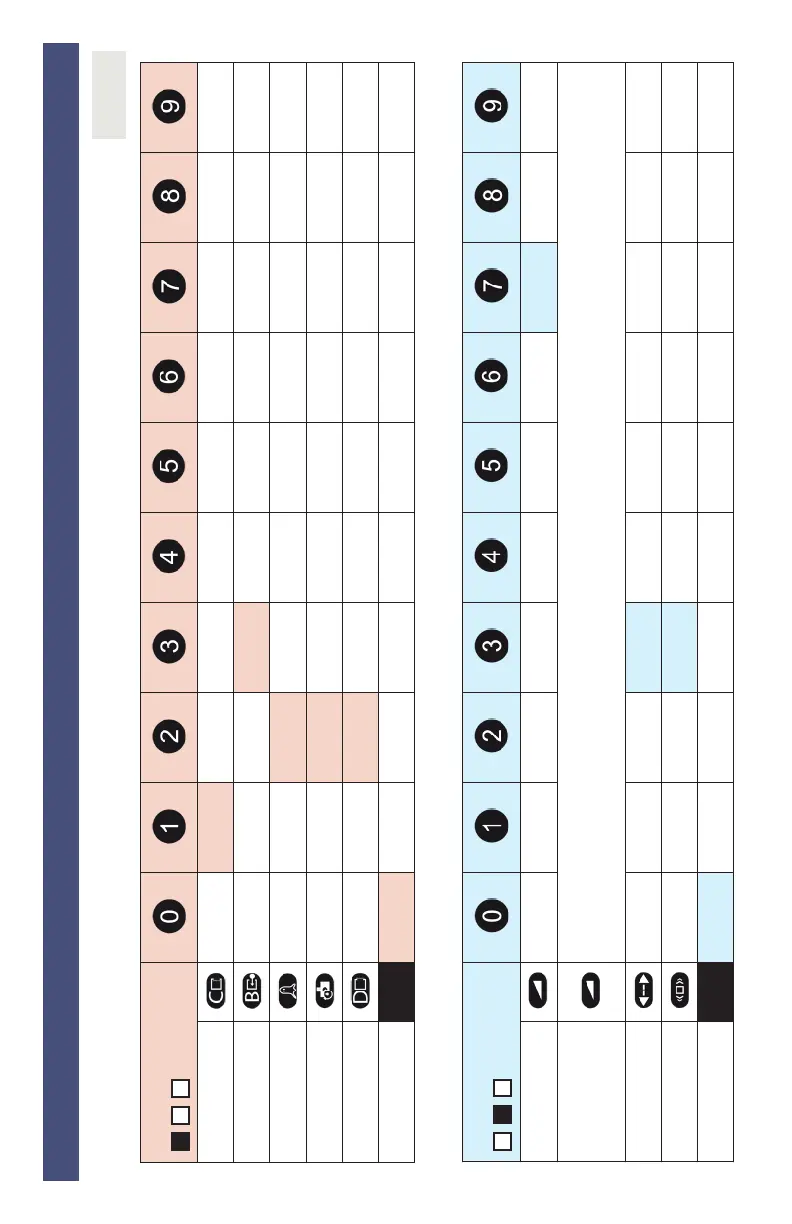
Use the following tables to aid in understanding settings set by either LCD menu or remote control.
1 > V5.0 auto-synch
2 for use with IXIO if synchronization issues occur
default =
INFRARED SETTINGS
IR:Width wide standard narrow
left, angled right, angled
IR:Curtains 0 1 2 3 4 5 6 7
IR:Immunity normal outdoor enhanced
IR:PresTime 30 sec 1 min 2 min 5 min 10 min 20 min 60 min infinite
IR:Freq auto-synch IXIO
1
freq A
2
freq B
2
IR:Startup yes no
RADAR SETTINGS
Rad:Fieldsize small > > > > > > > > large
Rad:Shape
LCD: "narrow" and "wide" setting options
Remote Control: After pressing the Rad:Fieldsize button, use the plus sign button to select the Wide shape or the minus sign button to
select the Narrow shape. Numeric remote control buttons are only applicable to the Rad:Fieldsize function.
Rad:Direction OFF BI <>| UNI >|
MTF <|
Rad:Immunity low > > > > > > > high
Rad:Reentry small > > > > > > > > large
SETTINGS
shaded


 To Next Page