22
Transducer Line Test
When using BearingChecker for measurement with external
transducers, a transducer line test (TLT) automatically checks
the quality of the signal transmission between transducer and
instrument. The TLT value and transducer/probe type for the
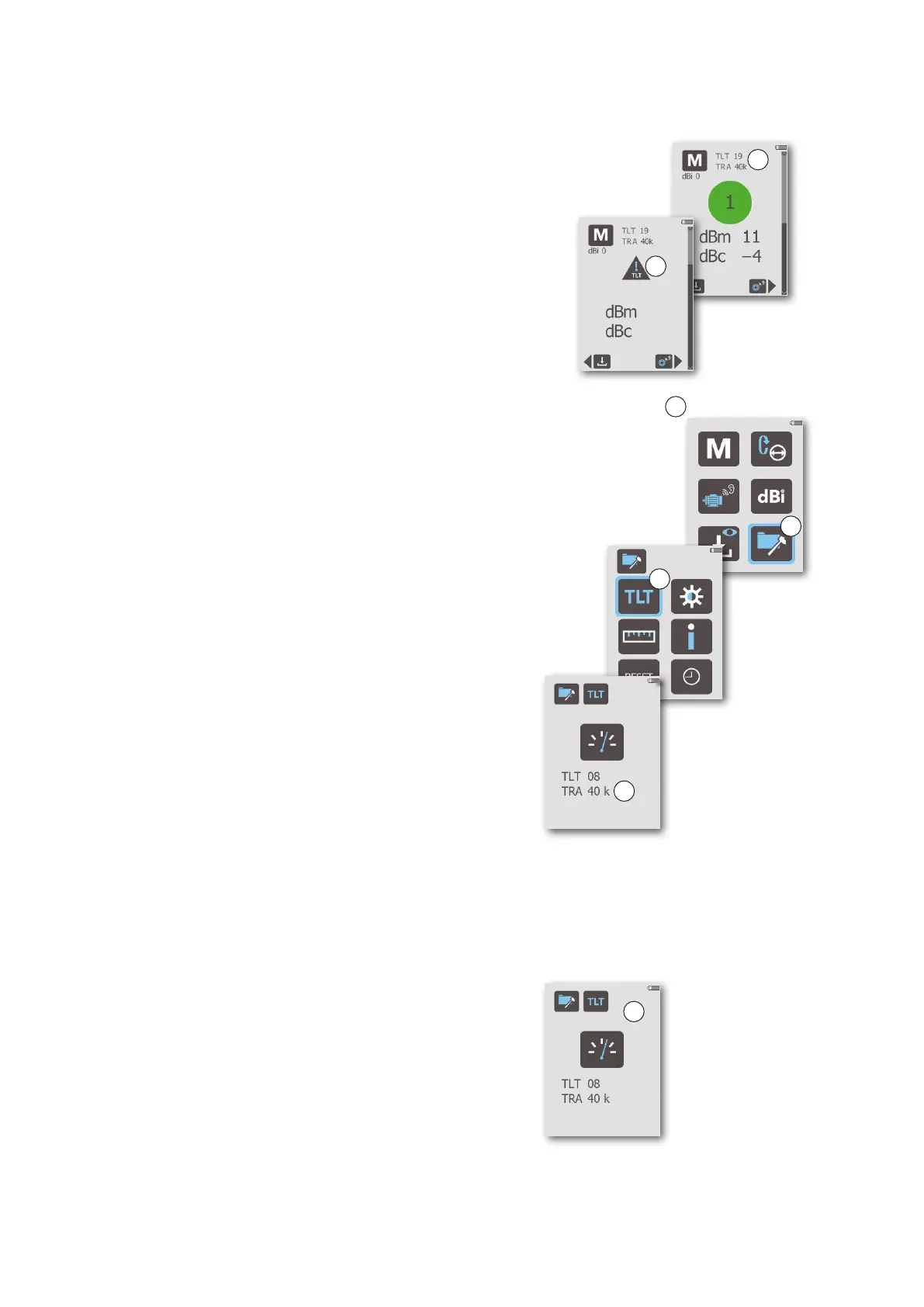
latest reading is saved and shown in the Measure (A) and TLT
(F) displays, respectively. Part of the signal will be lost in a poor
transducer line, so the measurement results will be lower than
they should be. If a shock pulse measurement is made with a
poor transducer line, the instrument will display a TLT warning
sign (B).
Manual transducer line test
To perform a manual transducer line test, follow these steps:
1. Connect the external transducer to the instrument.
2. From the Main display (C), navigate to the General settings
menu (D) and press ENTER to open it.
3. In the General settings display, press ENTER to open the
TLT display (E).
4. Press the MEASURE key briefly. The resulting TLT reading
and transducer/probe type is shown in the display (F):
TRA INT PROBE = internal probe
TRA EXT PROBE = external probe
TRA 40K = 40000 type transducer
TRA 42K = 42000 type transducer
‘40K’ is also displayed in case of a cable breakdown. In case
of a short circuit, ‘42K’ and the value 0 (normally) is displayed.
5. To return to the Main display from the TLT display, press the
BACK key twice.
At TLT values from 15 upward, there is normally no signal loss
due to poor transmission between transducer and instrument.
If the value is below 15, or if it is deteriorating from a previously
higher value, check the cables, connectors, and transducers for
poor connections and moisture.
From the TLT display, a manual transducer line test can also be
done for the built-in probe, if malfunction is suspected.
Turning the transducer line test off temporarily
By default, a TLT test is automatically performed for every bear-
ing measurement with an external transducer. It can, however,
be temporarily turned off to force measurement results on
transducers with TLT below 15, e.g. when measuring via coupling
transformers:
1. In the TLT settings display (G), press ENTER to turn the TLT
test off (pressing ENTER again turns it back on).
2. Press the BACK key twice to return the Main display.
3. Press ENTER to open the Measurement display, then perform
the forced bearing measurement.
4. Go back to the TLT display and press ENTER to turn the au-
tomatic TLT test back on.
C
Main display
D
General settings
E
TLT setting
F
TLT setting
G
Measurement
Measurement
A
B


 To Next Page
 Loading...