Maintenance
CP27xx 45Version: 2.0
7.2.3 Exchange gasket
If you have chosen to order your device with the option of a stainless steel front instead of an aluminum
front, there is a silicone seal on the back of the unit to protect the connection section from moisture.
The silicone seal may become porous after a long operating time. In that case, you should replace the seal
to continue protecting the connection section. You can order the following replacement seals from your
Beckhoff sales department:
Table14: Ordering options seal
Ordering option Description
C9900-Z520 Replacement seals for stainless steel built-in Panel CP2x07-00x0 (C9900-F941)
C9900-Z521 Replacement seals for stainless steel built-in Panel CP2x13-00x0 (C9900-F942)
C9900-Z522 Replacement seals for stainless steel built-in Panel CP2x16-00x0 (C9900-F945)
C9900-Z523 Replacement seals for stainless steel built-in Panel CP2x18-00x0 (C9900-F946)
C9900-Z524 Replacement seals for stainless steel built-in Panel CP2x21-00x0 (C9900-F948)
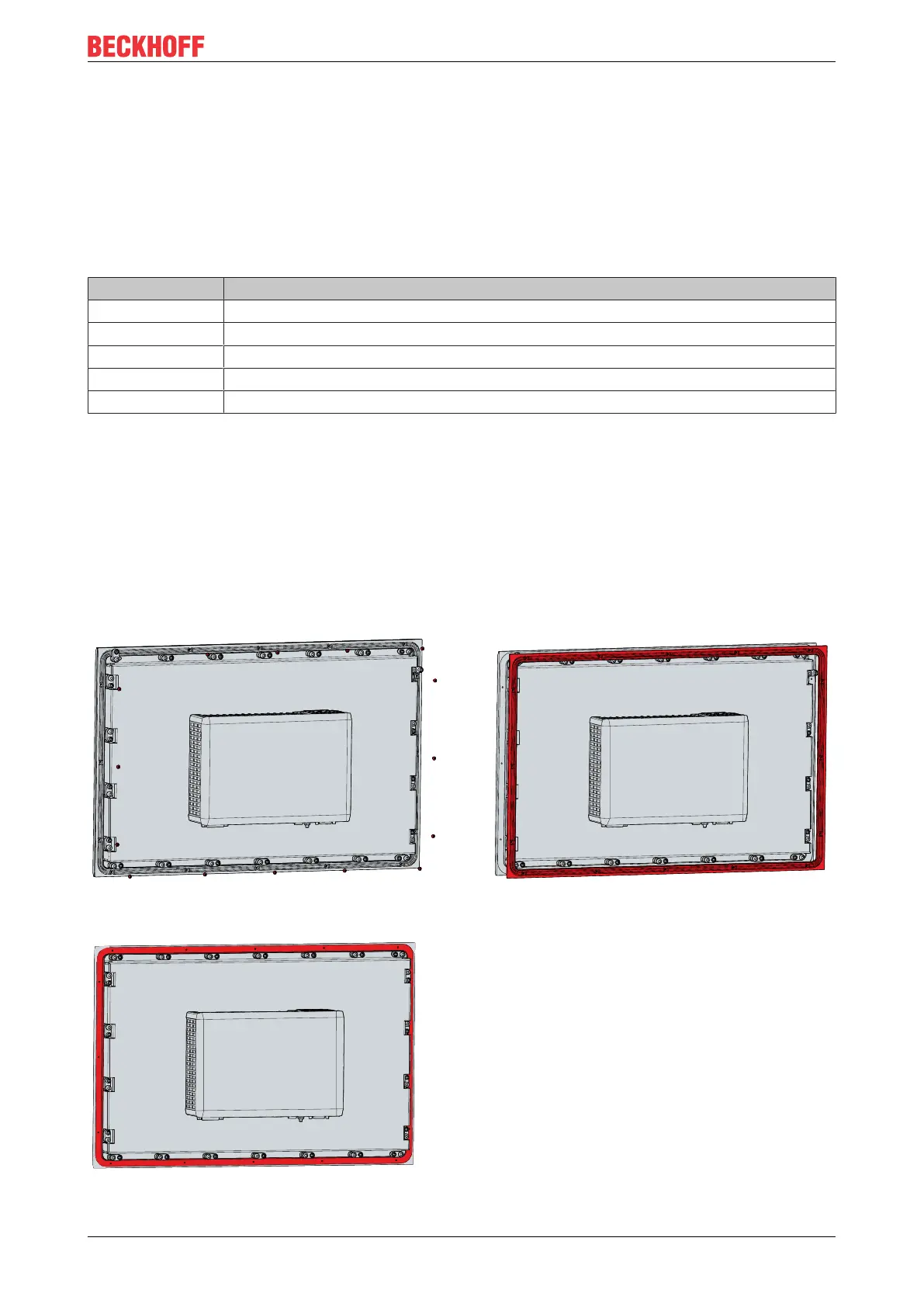
To replace the seal, follow the steps shown below in figure 29:
1. Loosen and remove the M2.5x4 screws (section A).
2. Remove the seal (section B).
3. Place the new seal in the circumferential sealing groove on the back of the device (section C).
4. Press along the seal with your fingers until it is neatly in the sealing groove. Make sure that the seal does
not make any waves.
5. Screw the seal back in place with the M2.5x4 screws.
ð You have replaced the seal.
Fig.29: CP27xx Stainless steel front_replacement silicone deal


 To Next Page