EasyManua.ls Logo

Bedford B550-2002 - Digital Keypad Operation Guide

Default Icon
116 pages
Print Icon
To Next Page IconTo Next Page
To Previous Page IconTo Previous Page
Loading...
4-4
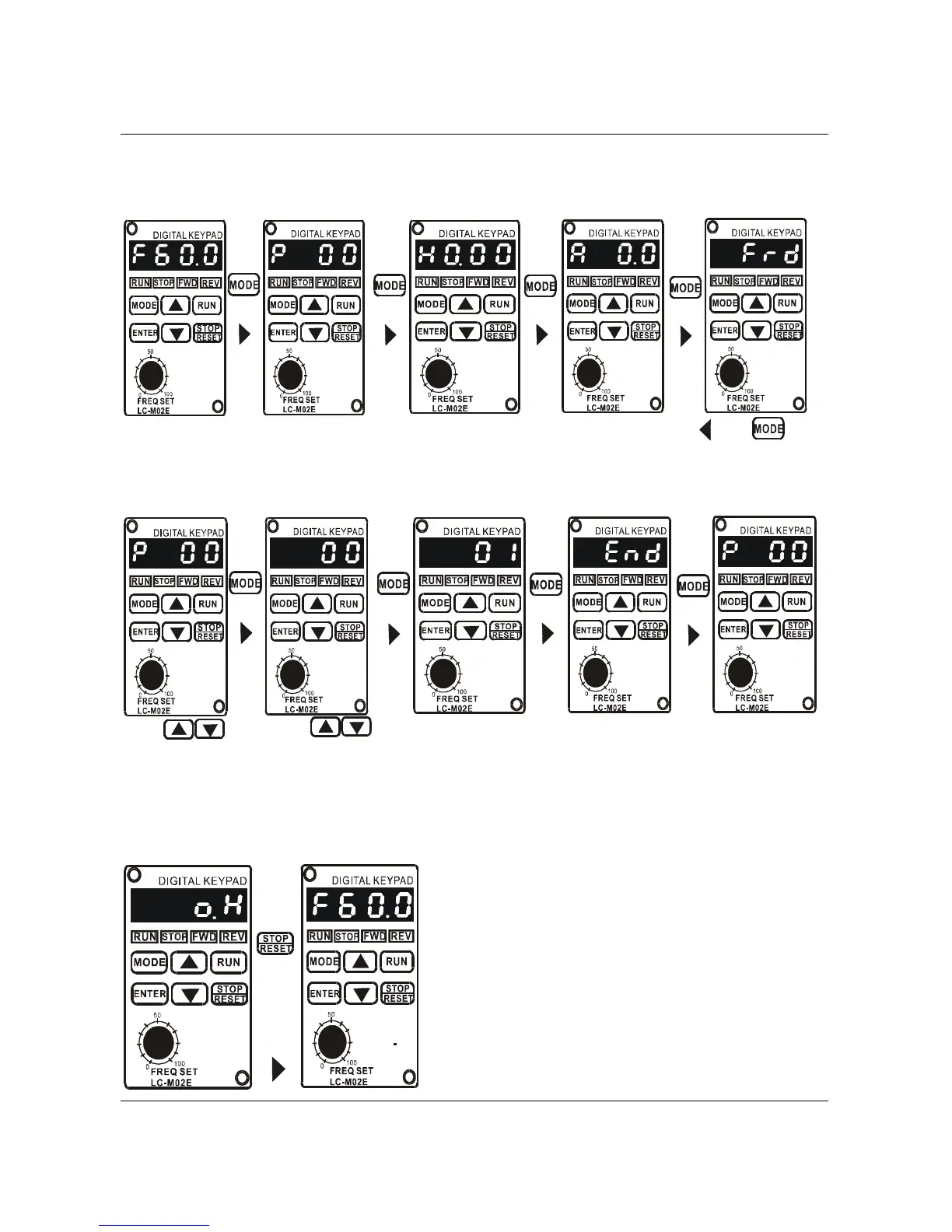
4.4 Explanation of Digital Keypad LC-M02E Operation
To view parameters:
Press
Key
Press
Key
Press
Key
Indication after
power on
Parameter values
setting monitor
Output frequency
Output current
FWD/REV monitor
Press
Key
Press key
Display the freq.
setting monitor.
Parameter value setting:
Press
Key
Press
Key
Press
Key
Indication after
power on
Parameter values
setting monitor
Parameter value
is 01
Parameter setting
monitor
Press
Key
The setting is
completed
Press
key to select the
parameter number
Press
key to select the
parameter number
Press
key to select the
parameter number
Press
key to select the
parameter number
"End":The new has
been automatically
stored in the internal
memory.
"Err": Enter value is
illegal.
Display the
parameter number
automatically.
To correct the fault messages:
Press
Key
Display fault
message o.H..
Display frequency
setting after fault
is corrected.
B550 Series sensorless vector frequency drive

Table of Contents

Related product manuals