5-6
Pr.10. This parameter is used to determine the time required for the AC drive to ramp
from 0 Hz to its Maximum Output Frequency (Pr.03). The rate is linear unless the
S-Curve (Pr.14) is “Enabled”.
Pr.11. This parameter is used to determine the time required for the AC drive to
decelerate from the Maximum Output Frequency (Pr.03) down to 0 Hz. The rate is linear
unless the S-Curve (Pr.14) is “Enabled”.
Pr.12 and Pr.13: Provide an additional Accel/Decel time although Time 1 is the default. A
Multi-Function input terminal must be programmed to select Accel/ or Decel/ Time 2 and
the terminal must be closed to select Accel/Decel Time 2 (See Pr.38 to Pr.42).
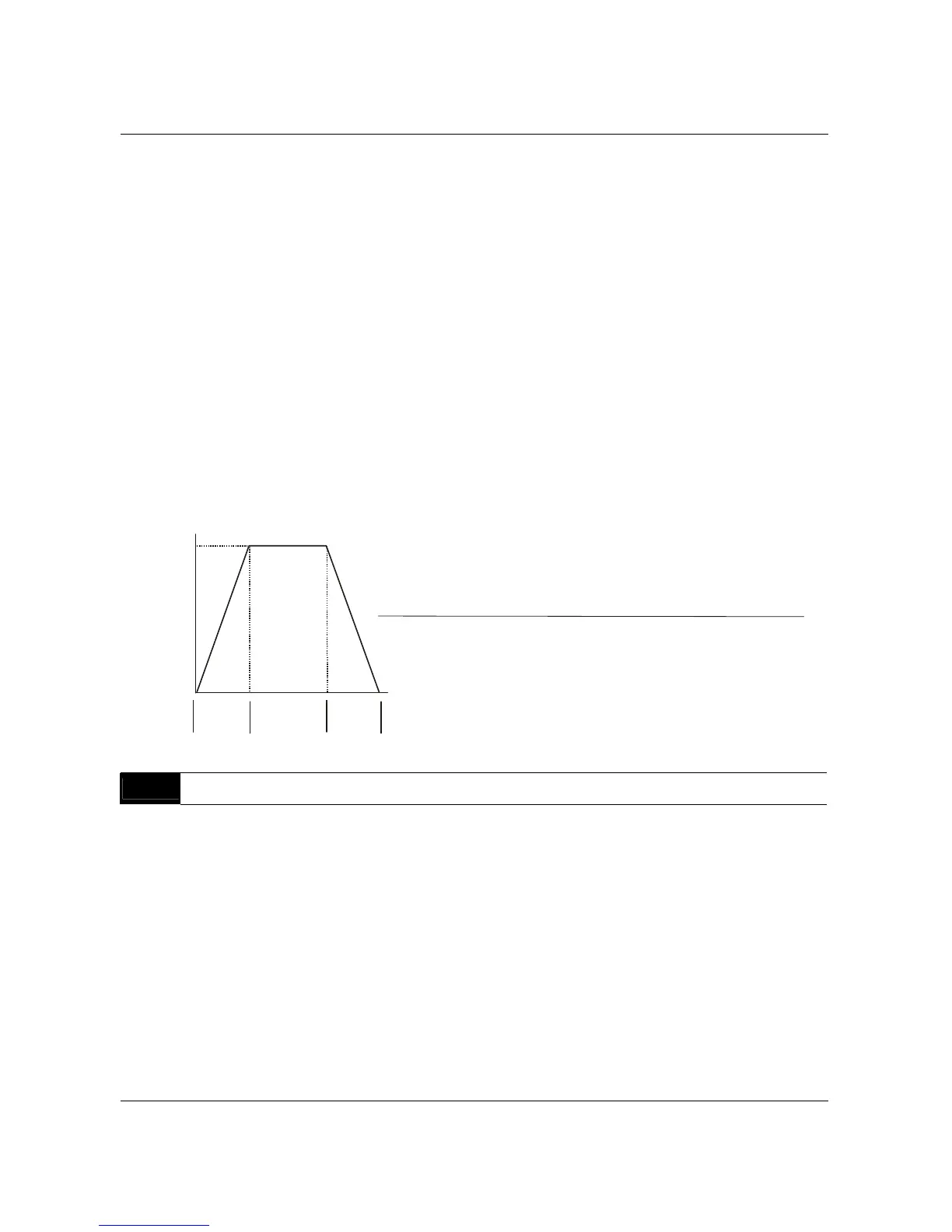
In the below diagram, suppose the Maximum Output Frequency is 60 Hz (Master Freq),
Minimum Output Frequency (start-up) is 1.0 Hz, and accel/decel time 1 is 10 seconds.
The actual time for the AC drive to accelerate from start-up to 60 Hz is 9.83 seconds
(deceleration time is also 9.83 seconds), can be determined by the formula.
Actual Acceleration/Deceleration Time=
Acceleration/Deceleration Time x(Master Freq.-Min.Output Freq.)
Max. Output Freq.
Frequency
Max.
Output
Freq.
Pr.10
or
Pr. 12
Pr.11
or
Pr. 13
Time
Deceleration Time
Acceleration Time
Pr.14
Acceleration S-Curve Factory Setting: 00
Settings 00 to 07
This parameter is used whenever the motor load needs to be accelerated or decelerated
smoothly. The desired accel/decel effect is selectable from 0 to 7, in which the larger the
number, the greater the effect achieved. If the default value of Pr.111 Deceleration S
Curve is unchanged (“0”), then Pr.14 sets both acceleration and deceleration S-Curves. If
Pr.111 is set to any value other than “0”, then Pr.14 will set the acceleration S-Curve and
Pr.111 will set the deceleration S-Curve.
B550 Series sensorless vector frequency drive



 To Next Page