5-30
This parameter can be used to compensate motor slip. Although no linear, it typically
adds 6 Hz for a setting of 10 if Pr.03=60 Hz. When the output current of the AC drive is
greater than the motor no-load current (Pr.53), the AC drive will adjust its output
frequency according to this parameter.
Pr.56
Reserved
Pr.57
Rated Current Display of the AC motor drive Factory Setting: ##.#
Settings Read Only
Pr.57 displays the rated current of the AC motor drive. By reading this parameter the user
can check if the AC motor drive is correct. See Pr.80 for details.
Pr.58
Electronic Thermal Overload Relay Selection Factory Setting: 02
Settings 00 Standard Motor (self cool motor)
01 Inverter Motor (auxiliary cool fan on motor)
02 Inactive
This function is used to limit the output power of the AC drive when powering a
“self-cooled motor” at low speed.
Pr.59
Electronic Thermal Motor Overload
Factory Setting: 60
Settings 30 to 300sec Unit: 1 second
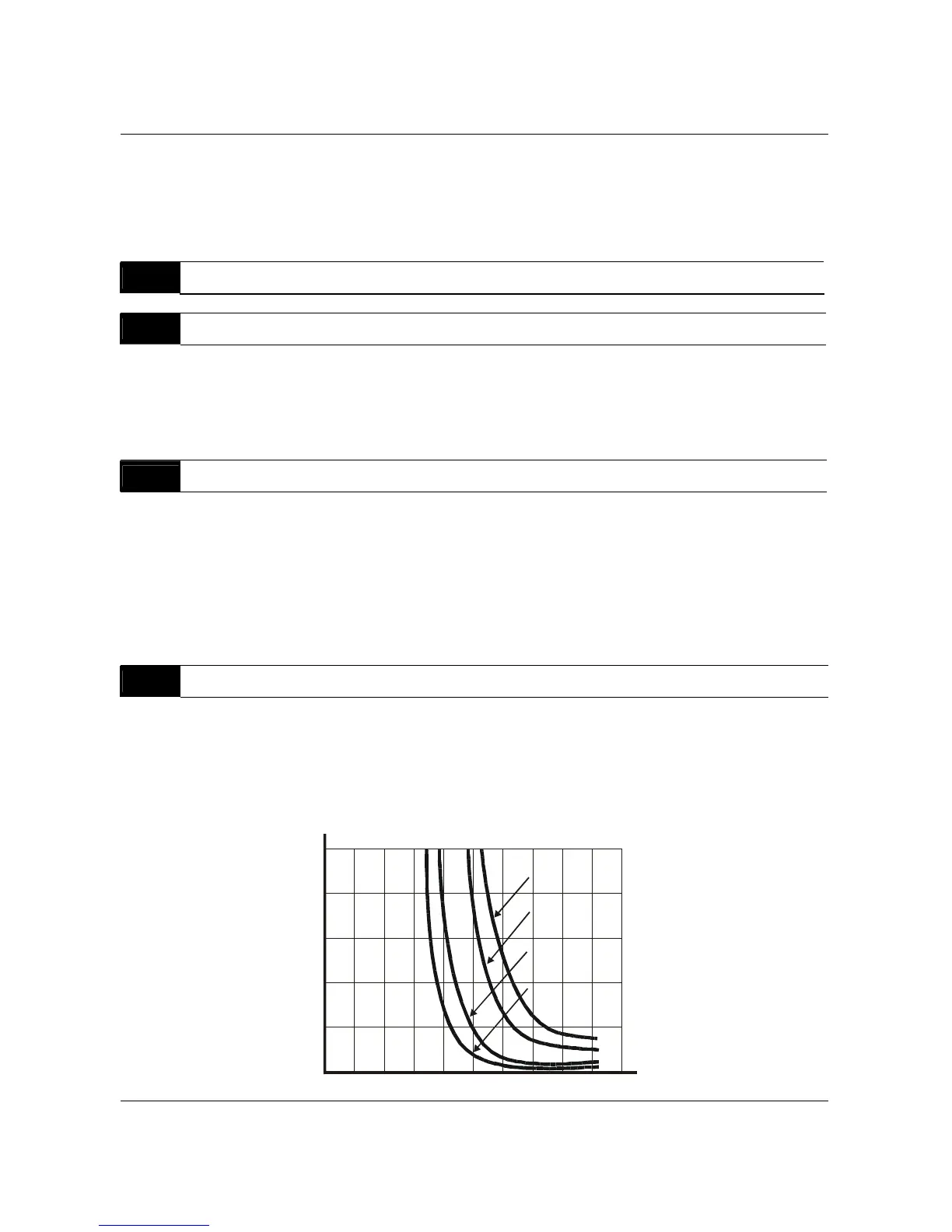
The parameter determines the time required to activate the I
2
t electronic thermal motor
overload protection. The graph below shows I
2
t curves at 150% output power for 1
minute.
1
2
3
4
5
60Hz or more
50Hz
10Hz
5Hz
0
20
40
60
80
100
120
140
160
180 200
Operation
time(min)
Load
factor
(%)
B550 Series sensorless vector frequency drive



 To Next Page