GB Sound speed controller SFR-1
06.02.2019 BEIER-Electronic 83
Configuration - Function sequences
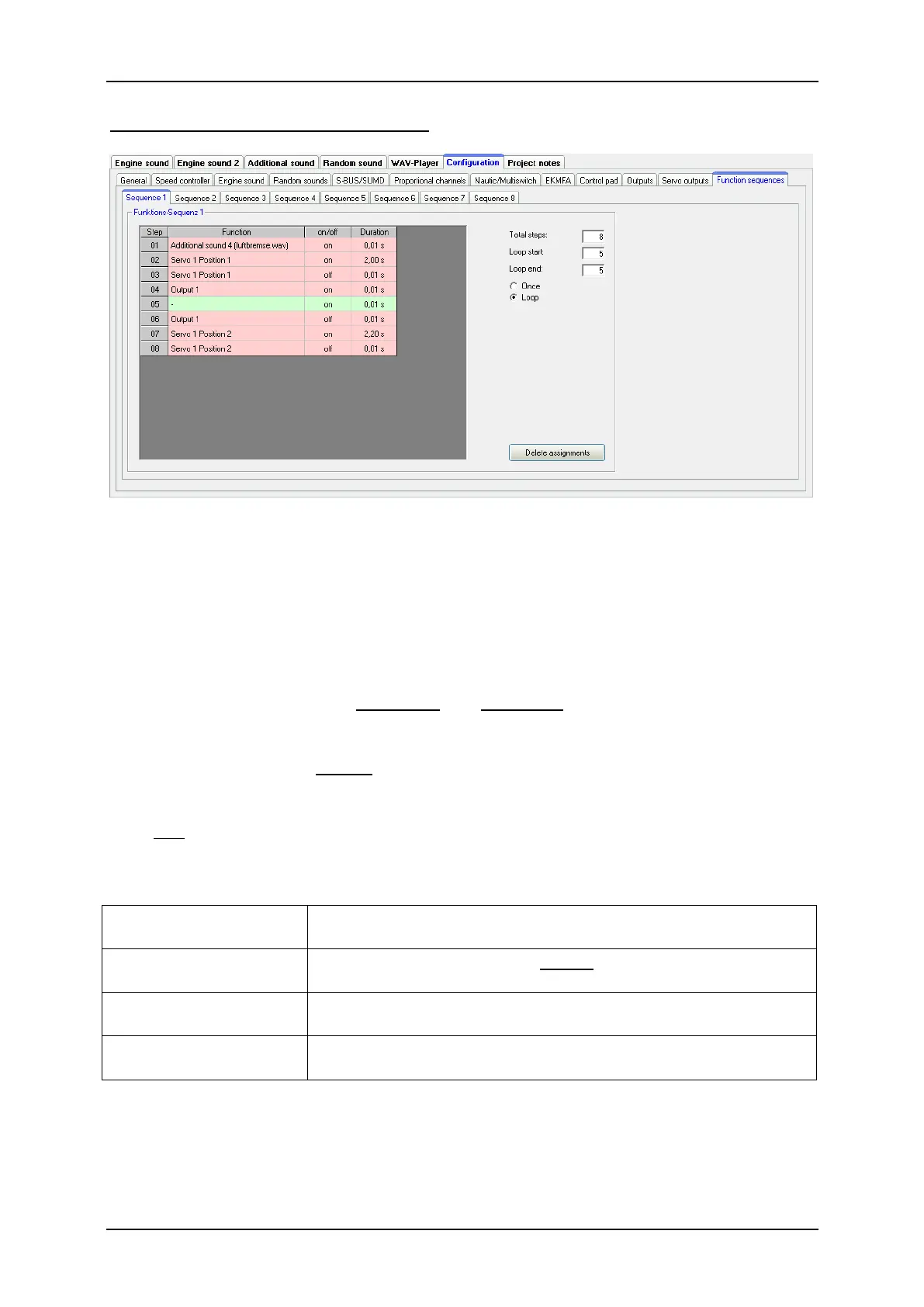
All functions of the SFR-1(see page 24) can be compiled to a timed sequence of up
to 36 functions/steps.
For each step a function can be selected and switched on or off. In Duration the time
can be defined until the next step is activated. The duration of one step can range
from 0.01 to 600 seconds.
It is possible to run the complete sequence or only certain steps as a loop. If the
option "Loop" is activated the Loop start and Loop stop can be defined. The loop is
played as long a the signal for the complete function sequence is activated.
A function sequence will always run completely to the end. All functions that are not
deactivated during the sequence remain switched on.
Only one function sequence can be played at the same time! While one function
sequence is active, no other can be started!
With the right mouse key following commands are available:
Deletes the step. All other steps are shifted one row up.
The total step quantity is reduced by this step.
Inserts one additional step before the step clicked on. All
other steps are shifted one row down.
The complete sequence can be saved in a file (*.s_seq) on
your hard disk.
Sequence files (*.s_seq) from your hard disk can be
imported.



 To Next Page