GB Sound speed controller SFR-1
32 BEIER-Electronic 06.02.2019
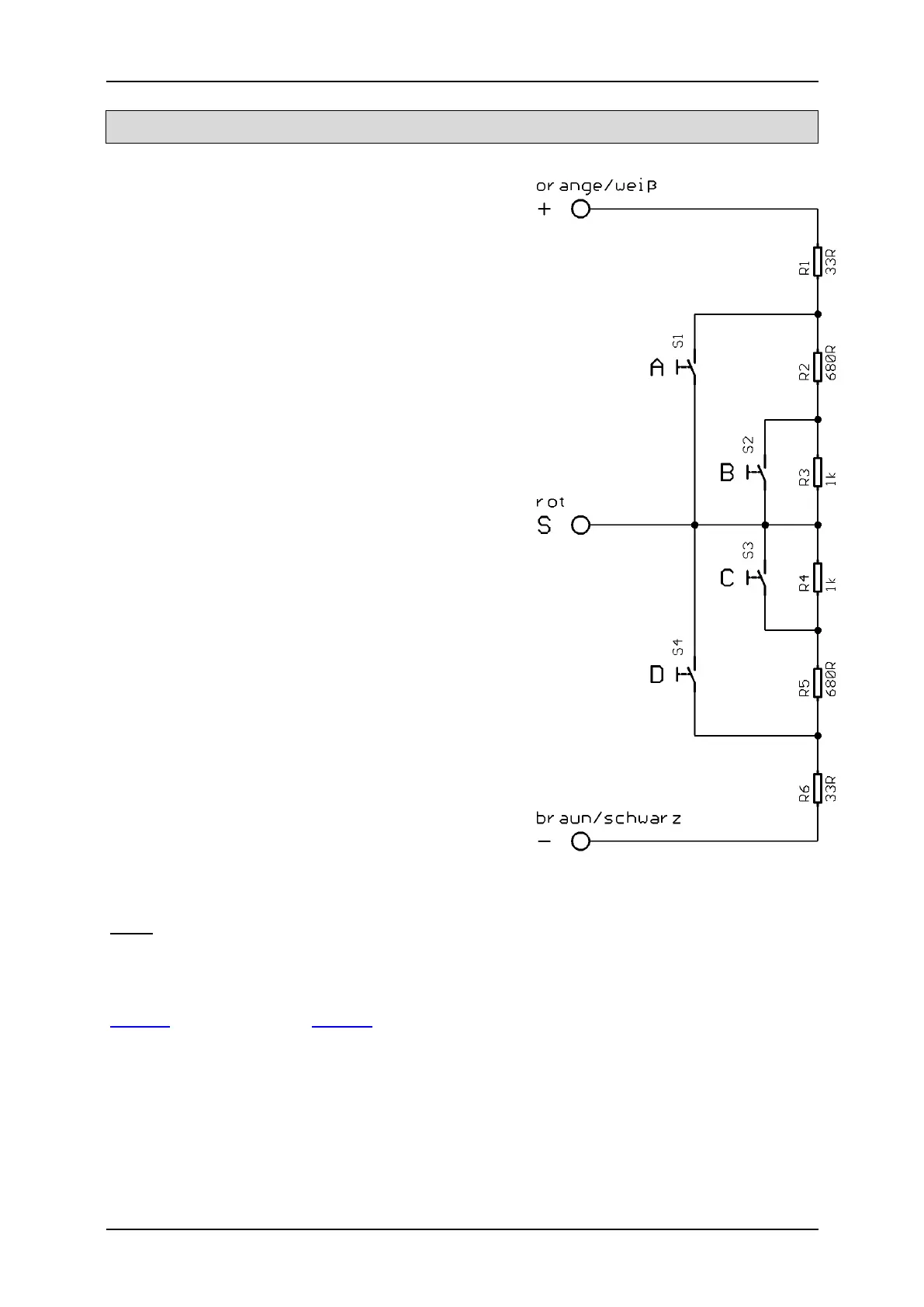
Stick simulation via keys or switches
To use the functions of the proportional
channels #2 - #6 conveniently, you can simulate
the different potentiometer positions of a stick,
through a simple keystroke. If you press the key
S1, a joy-stick position is simulated for position
A.
Often the available joy-sticks are already taken
by other functions, but mostly the remote
control has still other free channels. This
schematic can be used for the channels to
activate additional functions.
You need only six resistors and four switches
for each channel (or two reversing switches with
middle position). The small circuit can be easily
built on a strip board.
With the indicated resistors values, this
schematic works with all standard remote
controls. If needed, you can also configure the
thresholds of the five areas in the Sound-
Teacher.
How and where this schematic is connected in
the remote control, is unfortunately differs
according to the radio type.
In some (Robbe/Futaba) remote controls an
additional 68k ohm resistor is neccessary,
which has to be placed in the “S“- wire.
Hint:
Here again, we recommend using the diagnosis to check the constuction.
You can buy this circuit as fully constructed module from us:
SMS-R (for Robbe) and SMS-G (for Graupner and all other manufacturers).



 To Next Page