3-14
2.5 Adjust piping width
<power off> <release pressure>
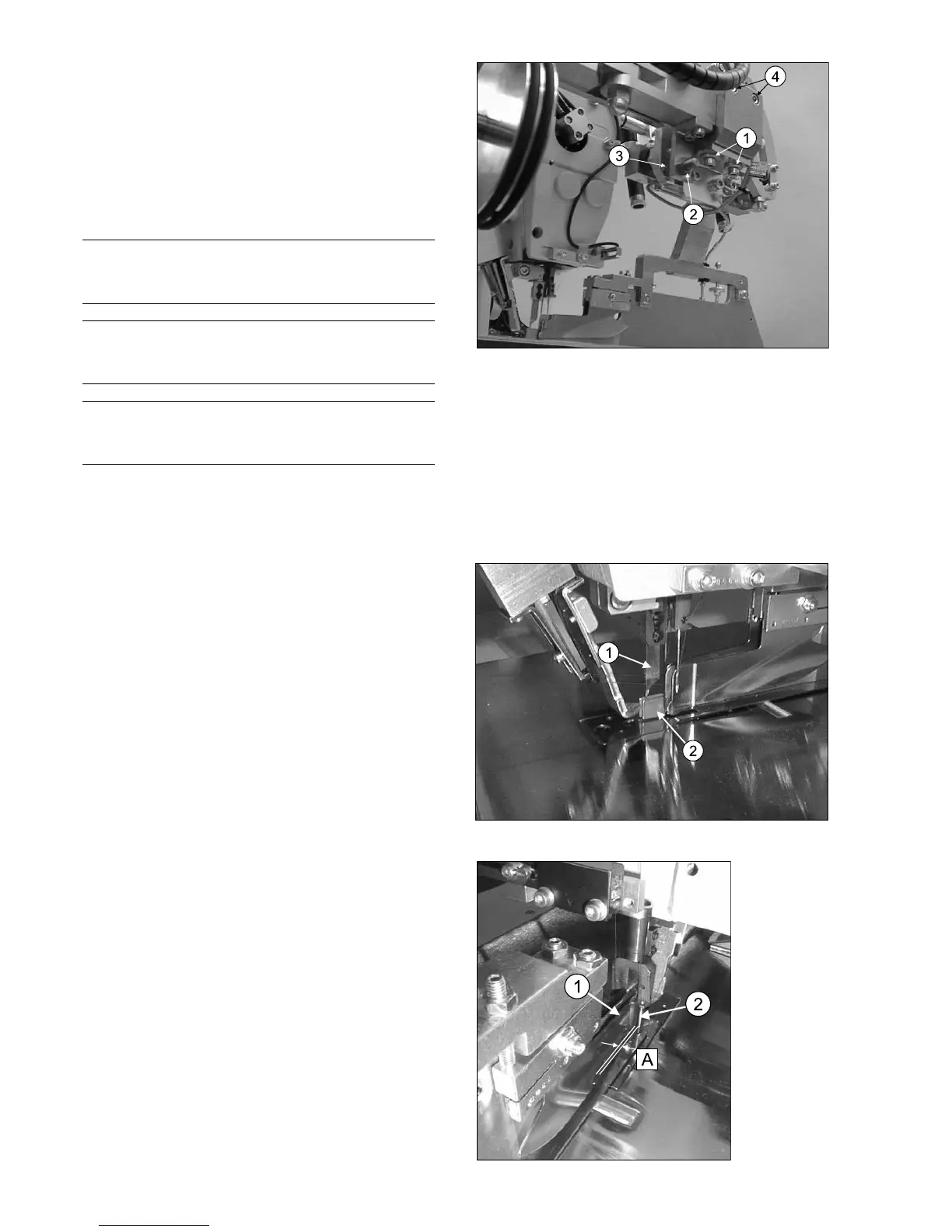
To adjust the piping width, loosen both fixing screws (4)
at the clamp block. Tilt the clamp block with the help of
the setting screw (3) a very little to the left or right.
Tighten the fixing screws again.
Then you should check and possibly adjust the distance
to both clamps.
Hint
Double and signle piping width are adjusted in the
same procedure automatically.
Hint
After adjusting the folder, the positions of the marking
lamps must be checked and possibly adjusted.
Hint
The folder sole width is decisive for the piping width. It
can be changed if desired by the customer.
2.7 Lateral distance of the guiding plate
to the needle
<power off> <release pressure>
Distance (A) to the needle should be minimized. The
guiding plate (1) may not get contact to the needle (2) or
needle head, since otherwise there would be loud noise
and the possibility of a threat break.
Adjust the distance using the corresponding bending tool.
2.6 Center knife protection
<power off> <release pressure>
The center knife protection (2) is mounted at the folder.
It should surround the center knife (1) without touching
it.
Adjust the center knife protection (2) carefully if requi-
red.



 To Next Page