25 / EN
Local air-conditioner / User Manual
Before startng operatons n ths secton:
1) Fnd a place where there s power supply
nearby.
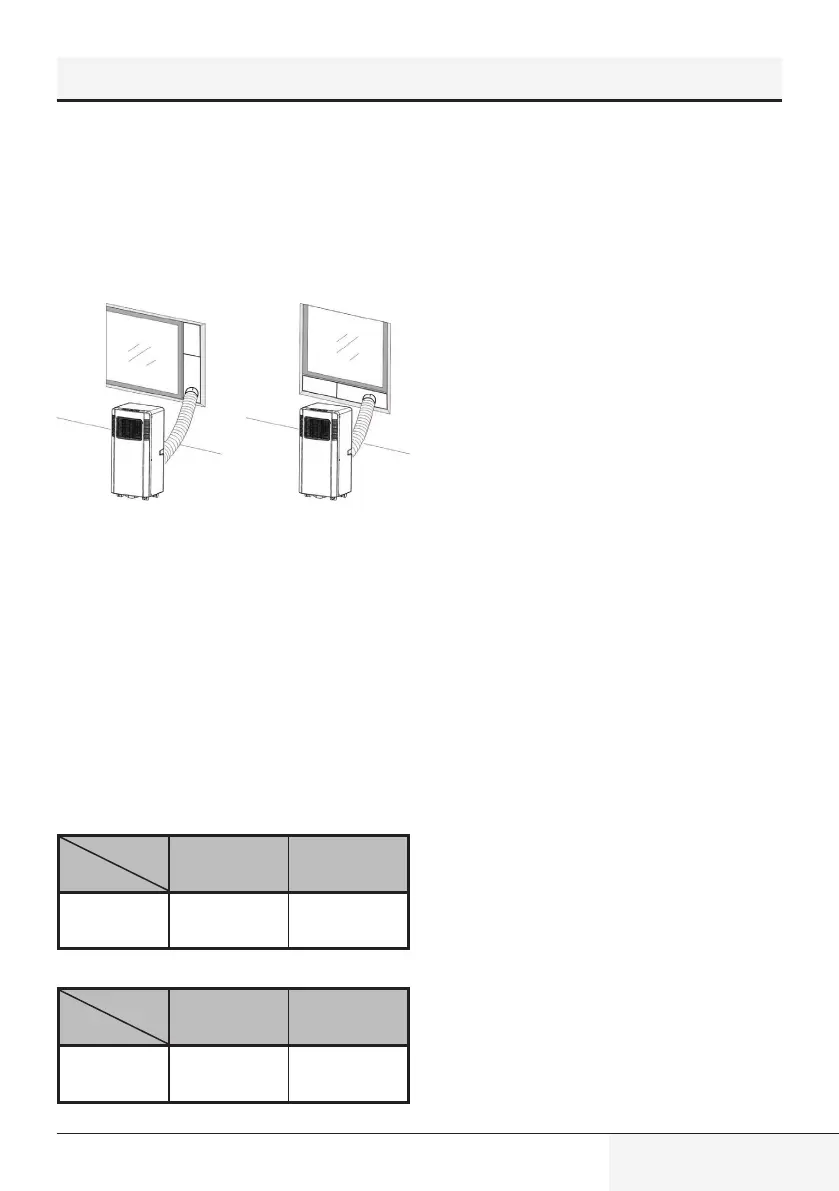
2) As shown n Fg. 2 and Fg. 2a, nstall the
exhaust hose, and adjust the wndow
poston well.
Fg. 2 Fg. 2a
3) As shown n Fg. 6, connect dran hose well
(only for usng heatng model)
;
4) Insert the power cord nto an grounded
AC220~240V/50Hz
socket;
5) Press the POWER button to turn on the ar-
condtoner.
7.1 Before usng
Notce:
– Operaton temperature range:
Maxmum
coolng
Mnmum
coolng
DB/WB (°C) 35/24 18/12
Maxmum
heatng
Mnmum
heatng
DB/WB (°C) 27/--- 7/---
Check up whether the exhaust hose has been
mounted properly.
Cautons for coolng and dehumdfyng
operatons:
– When usng functons on coolng and
dehumdfyng, keep an nterval of at least
3mnutes between each POWER.
– Power supply meets the requrements.
– The socket s for AC use.
– Do not share one socket wth other
applances.
– Power supply s
AC220-240V, 50Hz
7.2 Coolng operaton
– Press the “Mode” button tll the “Cool” con
appears.
– Press the “
∧
”or“
∨
”button to select a
desred room temperature. (16°C-31°C)
– Press the “Fan Speed” button to select
wnd speed.
7.3 Dehumdfyng operaton
Press the “Mode” button tll the
“Dehumdfy” con appears .
– Automatcally set the selected temperature
to current room temperature mnus 2°C.
– Automatcally set the fan motor to LOW
wnd speed.
7.4 Fan operaton
– Press the “Mode” button tll the “Fan” con
appears.
– Press the “Fan Speed” button to select
wnd speed.
7. Operaton ntroducton


 To Next Page