HD-973P Series Multi-Level Parking Lift 51 P/N 5900076 — Rev. B3 — January 2024
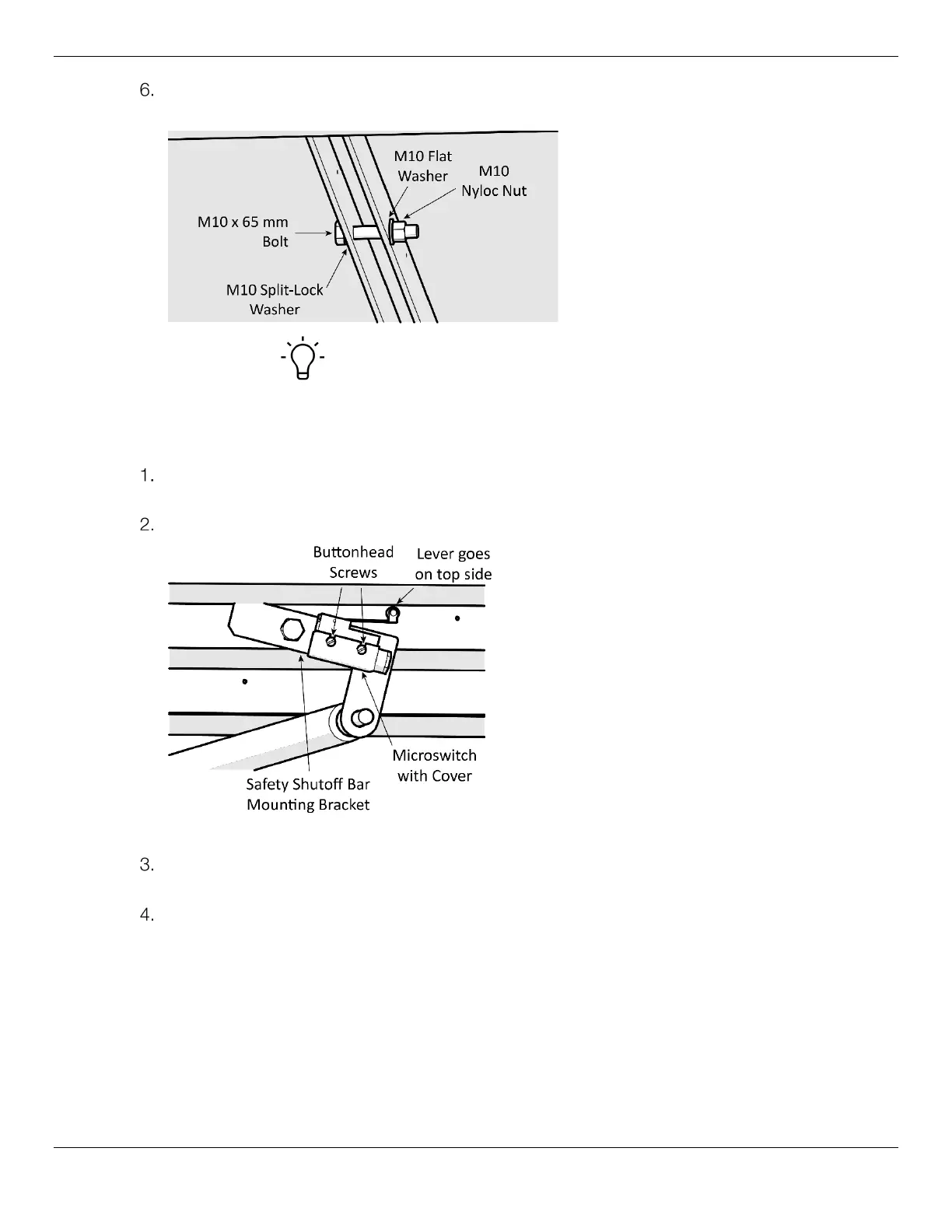
To lock the two Decks together, use a double-threaded Rod and secure it in place with a Washer
and Nut on each end.
Tip There is no Safety Shutoff Bar to install under the Lower Platform, so
you can hold off installing the Aluminum Decks (two shorter Decks) if you want,
whatever works best for your installation process.
To attach the Microswitch:
Locate the Microswitch device, add the Microswitch Cover, then go to the Safety Mounting
Bracket closest to the Power Unit.
Orient the Microswitch with the Lever on the top side, facing the right, as shown below.
View underneath Rear of the Lift, looking towards the Front. Not all components shown.
Align the marked holes on the Mounting Bracket with the guides marked on the Microswitch, then
tighten it to the Mounting Bracket using two button head screws.
Make sure the Microswitch is snug against the Mounting Plate.
The Microswitch will be connected to a cable that is routed to the Power Unit later in the
installation.
Installing the Power Unit
This section describes how to install, but not make the connections to, the Power Unit for your Lift.
An Electrician is not needed to install the Power Unit; one is required to connect the Power Unit to its
power source.


 To Next Page