HD-973P Series Multi-Level Parking Lift 58 P/N 5900076 — Rev. B3 — January 2024
Installing the Platform Selector Valve
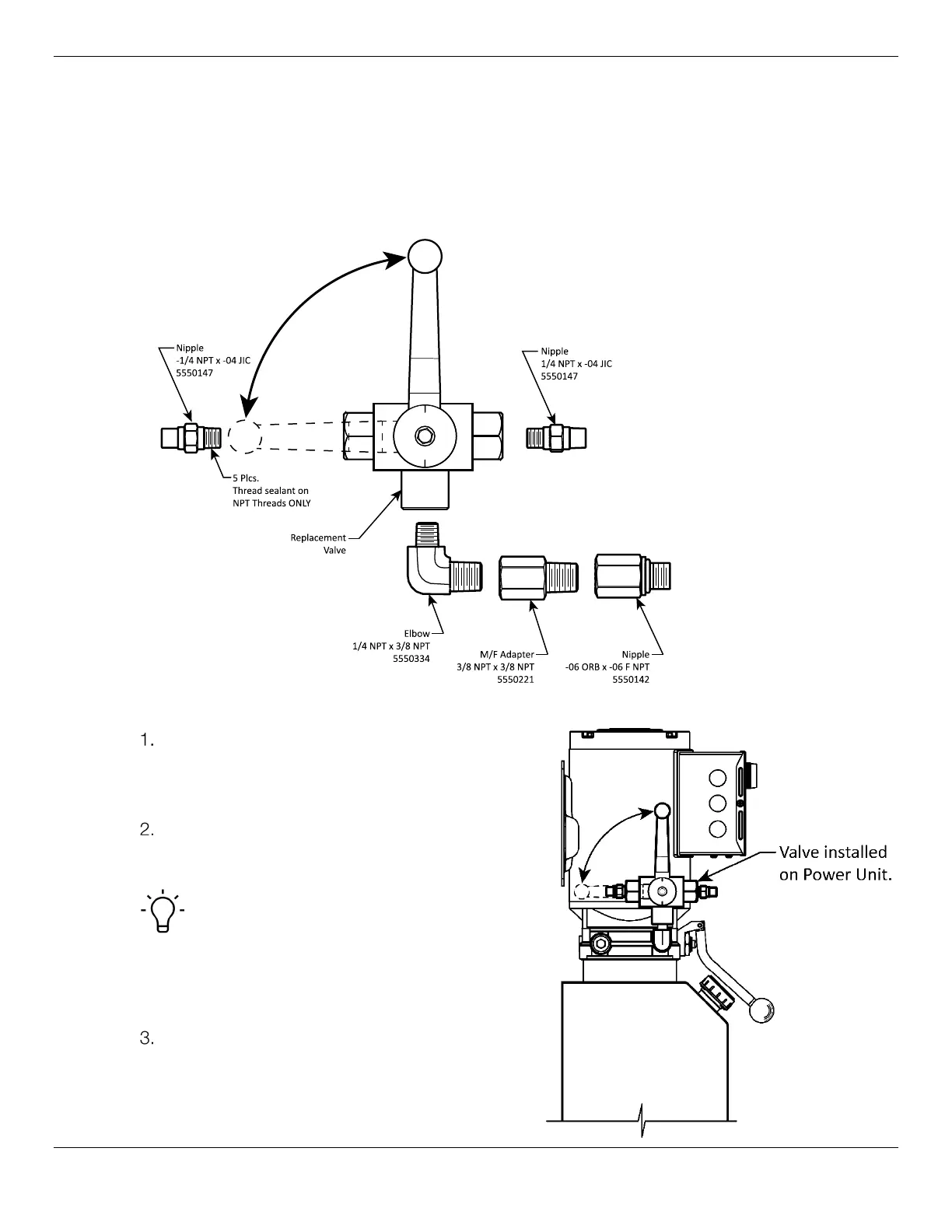
The Platform Selector Valve controls which Platform raises or lowers. The Curved end of each
Hydraulic Hose connects to the Platform Selector Valve; that procedure is described here.
The Hydraulic Hose for the Upper Platform connects to the Right side of the Platform Selector Valve;
the Hydraulic Hose for the Lower Platform connects to the Left side of the Valve.
The figure below details the connections to make to the Platform Selector Valve.
Top View. Not all components are shown.
To install the Platform Selector Valve and connect the Hydraulic Hoses:
Find the necessary components from the Parts
Bag: the Platform Selector Valve, two JIC x NPT
Nipple Fittings, one NPT Elbow, one M/F 3/8
NPT Adapter and one ORB x NPT Nipple Fitting.
Decide which Hydraulic Pressure Output Port on
the Power Unit you want to use and remove the
Shipping Plug.
Tip There is a Hydraulic Out Port on either
side of the Power Unit; we recommend using the
Hydraulic Port facing away from the Lift, to be
out of reach from all Lines coming out of the Flex
Tubes.
Take the ORB x NPT Nipple Fitting and attach
the ORB end to the Hydraulic Pressure Out on
the Power Unit and attach the Platform Selector
Valve to the NPT end.


 To Next Page