10 Capture mode
English
Focus mode
To select the focus mode:
1. Go to the Capture mode.
2. Keep pressing to toggle between Auto focus and focus modes.
Image size
To select an image size:
1. Press > Resolution.
2. Press or to select a setting.
3. Press to confirm setting.
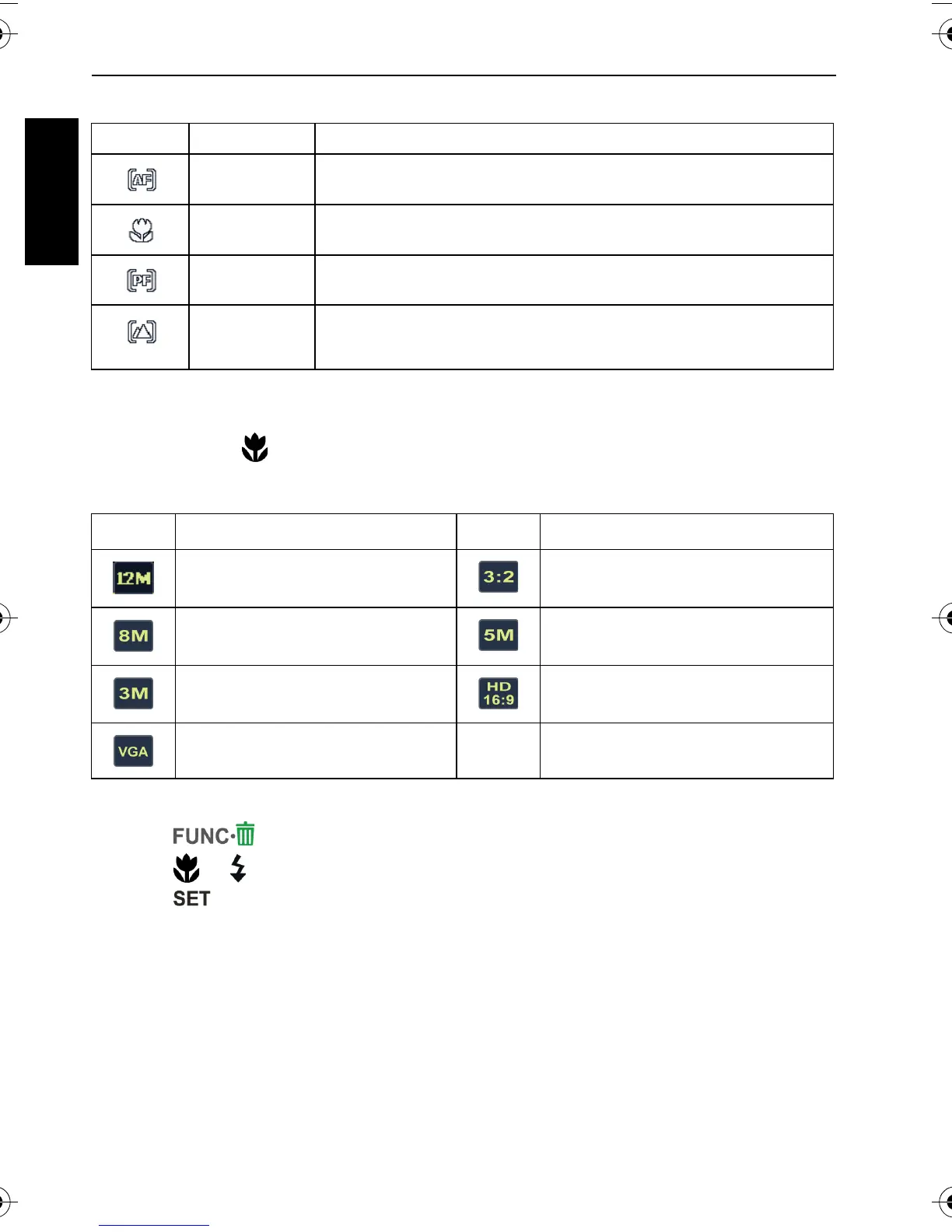
Icon Mode Description
Auto focus Adjusts focus automatically.
Macro Used when capturing images at a close distance.
Pan Focus Used when you want to capture the subjects in a certain focus
range.
Infinity Used when capturing images at long distance.
Icon Description Icon Description
12 megapixels
(4000 x 3000)
3:2
(4000 x 2672)
8 megapixels (3264 x 2448) 5 megapixels (2592 x 1944)
3 megapixels (2048 x 1536) HD 16:9
(1920 x 1080 in full HD format)
VGA (640 x 480) -- --
C1250_C1255_UM - EN.book Page 10 Friday, March 26, 2010 1:33 PM


 To Next Page