Operation
60
appers on th eprojector. You can change th elocation anytime you want, even
back to full screen or blank out.
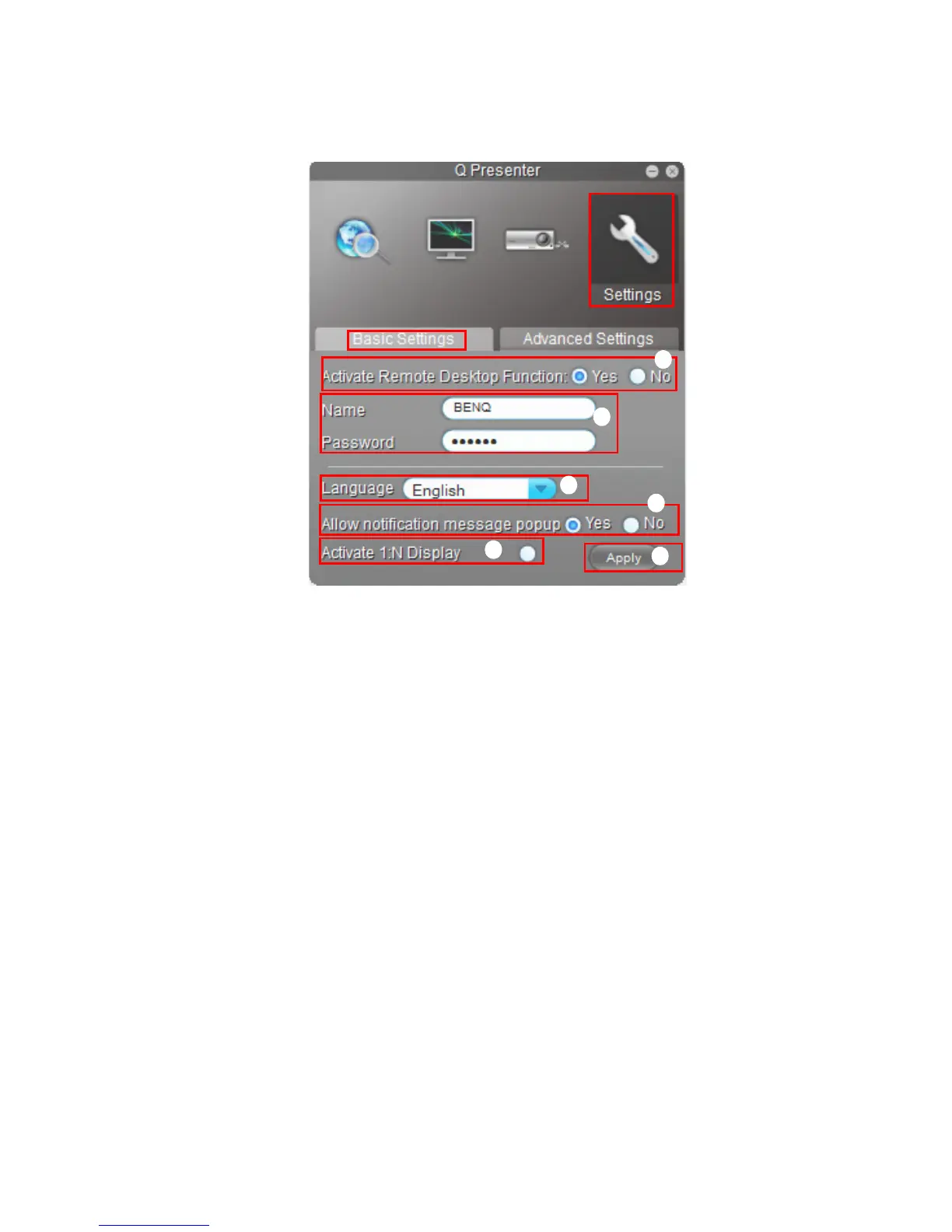
The Basic and Advanced Settings pages allow you to configure the Q Presenter.
i. You can select whether to activate Remote Desktop function. If the Remote
Desktop function is activated, you can change the Name and Password. If it isn’t
activated, the Name and Password will be gray out.
ii. You can set the name and password of the connected computer. The Name must
be eight capital letters from A-Z & 0-9. The Password must be 6 digits from 1 to
4.
iii. When you install the Q Presenter, the program will automatically identify the
language of your computer’s operating system and install the same language as
your operating system. If your language isn’t included, the system will keep
English as the default setting.
iv. You can select whether to allow notification message popup.
v. Once you set to activate 1:N display, 1PC/NB can display up to 8 projectors at
the same time.
vi. Once set, press Apply to save the changes.
i
v
ii
iii
iv
vi



 To Next Page