Connections 15
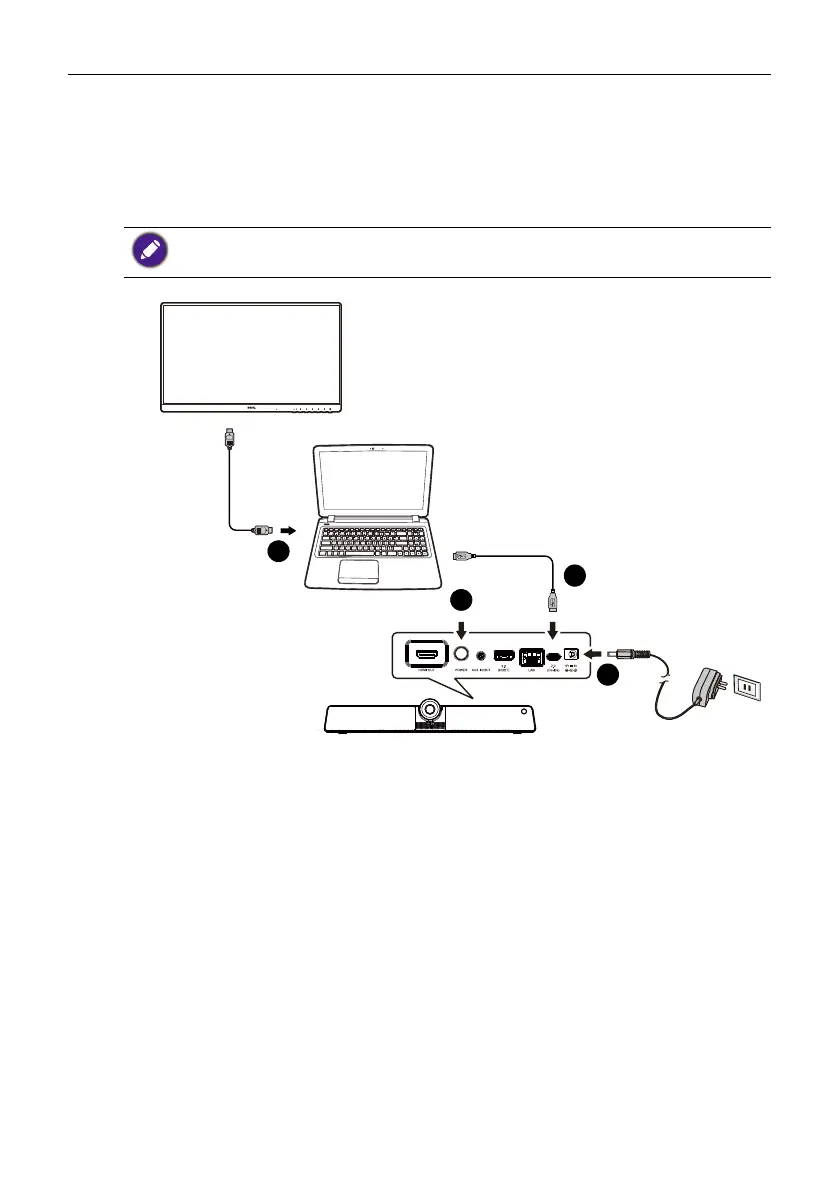
Connect your personal device to the product (BYOD
mode)
In Bring-your-own-device mode (BYOD mode), the product is connected to your
personal device through a USB Type-C cable. The built-in operating system of the
product will not function. In other words, you can keep working with your own OS
during meetings while choosing VC01A as the audio and video source for your device.
To e n a b l e BYOD mode:
1. Connect power to the product.
2. Connect the product to your personal device with a USB Type-C cable. Plug-in to
USB 2.0 (Device) port on the rear of the product and and the USB Type-C port
of your own device.
3. (Optional) Connect TV/monitor to your device through a HDMI cable to share your
screen to everyone in the room.
4. Power on the product.
Refer to the OS requirements for BYOD mode as below: Win 10/Win 8/Win 7/Win XP/
Linux OS/Mac OS/Chrome OS.
HDMI cable
USB Type-C cable
1
3
2
4



 To Next Page