Apps 39
Camera settings
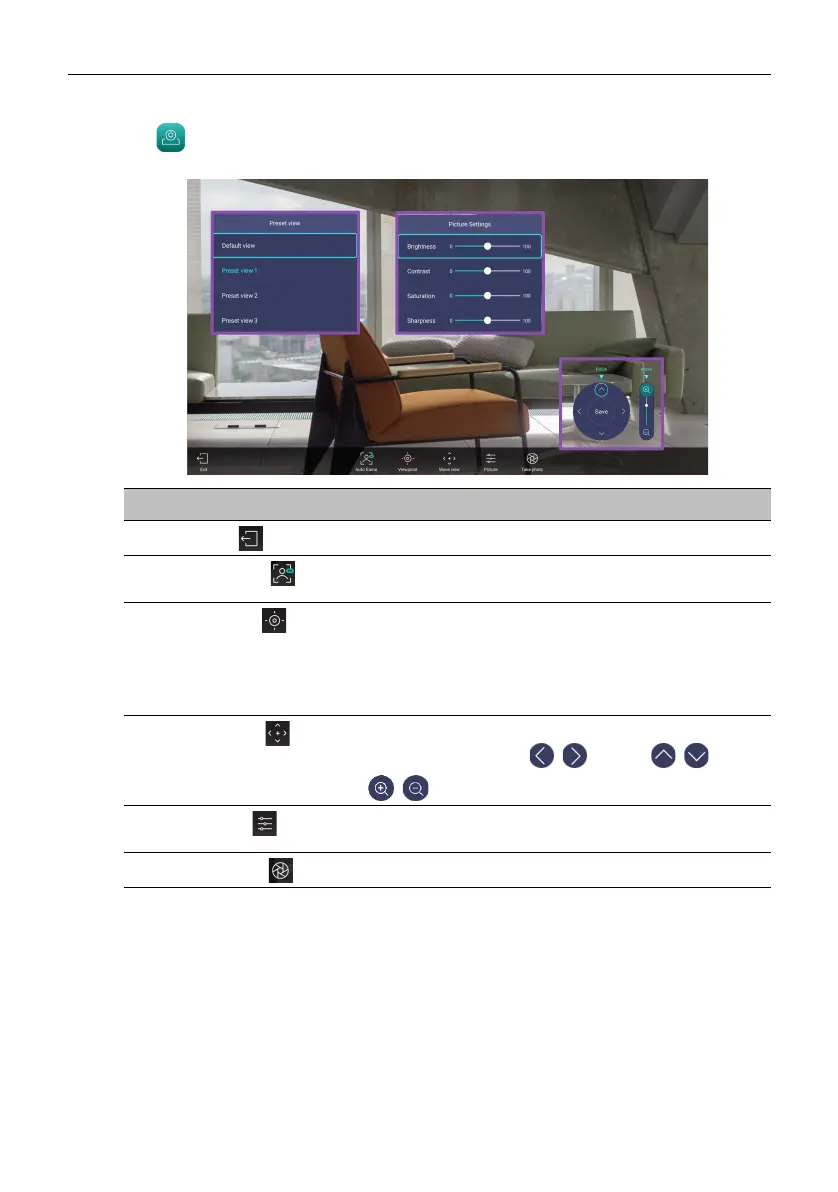
Tap to launch Camera Settings. With this application, you can adjust different
camera angles and picture parameters of the product.
Function Description
Exit ()
Tap to close the application.
Auto frame ()
Tap to enable/disable auto framing. Under Auto frame
mode, Viewpoint and Move view settings are locked.
Viewpoint()
Allows you to choose a default or preset view for the
camera. Besides the default view, you can preset three
more views in Move view to accommodate different
meeting environments. See Set and save a customized
camera view on page 40 for more information.
Move view ()
Allows you to adjust the camera view and save it in
Viewpoint. You can tap / to pan, / to tilt
or / to zoom in and out.
Picture ()
Select to adjust picture settings including Brightness,
Contrast, Saturation and Sharpness.
Take photo ()
Tap to screenshot the current camera settings.



 To Next Page