Introduction 13
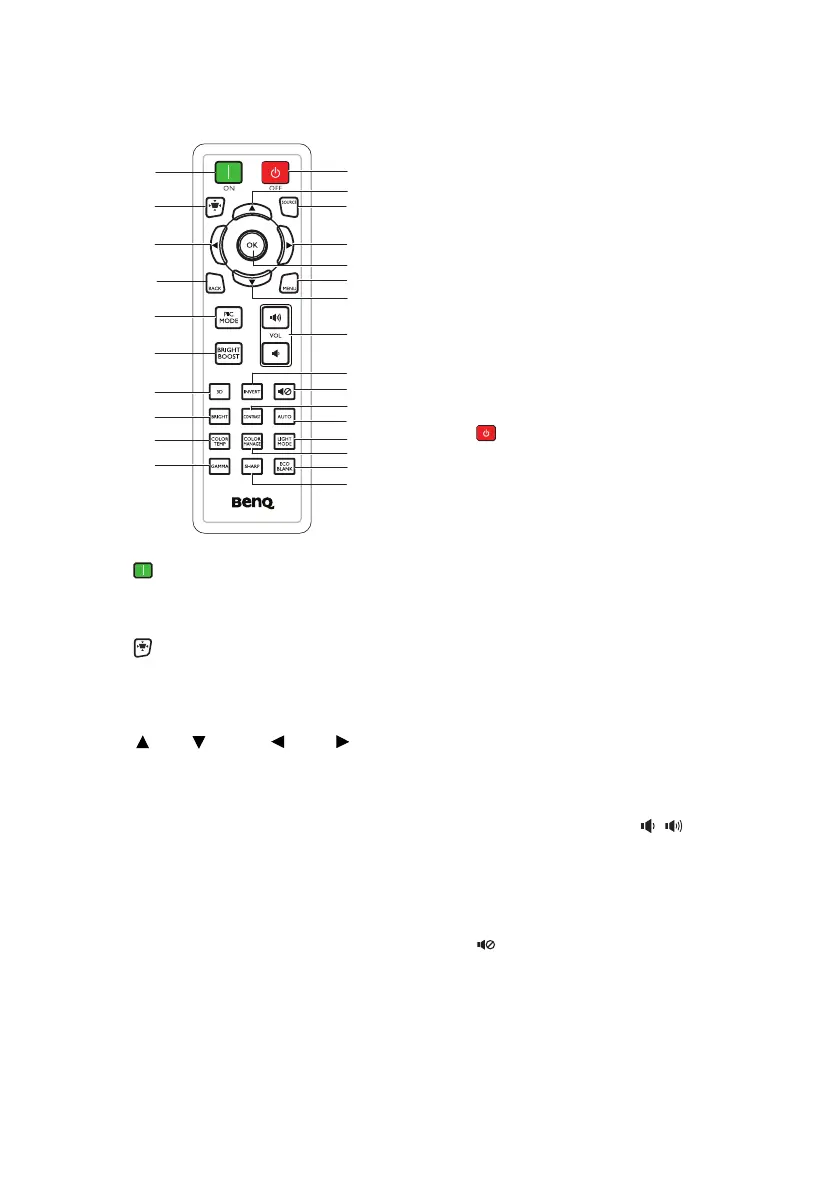
Remote control
1. ON
Turns on the projector. See "Starting up
the projector" on page 22 for details.
2. Keystone
Turns on or off Keystone menu. See
"Correcting keystone" on page 29 for
details.
3. Up/ Down/ Left/ Right
When the On-Screen Display (OSD)
menu is activated, the keys are used as
directional arrows to select the desired
menu items and to make adjustments.
See "Using the menus" on page 25 for
details.
4. BACK
Goes back to previous OSD menu or
exits and saves menu settings when it is
on the top level of OSD menu.
5. PIC MODE
Selects an available picture setup mode.
See "Selecting a picture mode" on page
33 for details.
6. BRIGHT BOOST
BRIGHT BOOST is not supported
by this model.
7. 3D
Activates the 3D On-Screen Display
(OSD) menu item.
8. BRIGHT
Displays Bright mode menu.
9. COLOR TEMP
Displays the color temperature setting
bar.
10. GAMMA
Selects a gamma value.
11. OFF
Turns off the projector. See "Shutting
down the projector" on page 42 for
details.
12. SOURCE
Displays the source selection bar. See
"Switching input signal" on page 30 for
details.
13. OK
Activates the selected On-Screen
Display (OSD) menu item. See "Using
the menus" on page 25 for details.
14. MENU
Turns on the On-Screen Display
(OSD) menu, exits and saves menu
settings.
See "Using the menus" on page
25 for details
.
15. Volume keys (VOL / )
Adjusts the sound level.
16. INVERT
Inverts right/left eye picture when 3D
mode is activated.
17. Mute
Toggles projector audio between on
and off.
1
2
3
4
5
6
7
9
10
11
3
12
3
3
13
15
17
16
18
20
21
22
23
14
8
19



 To Next Page